0:07
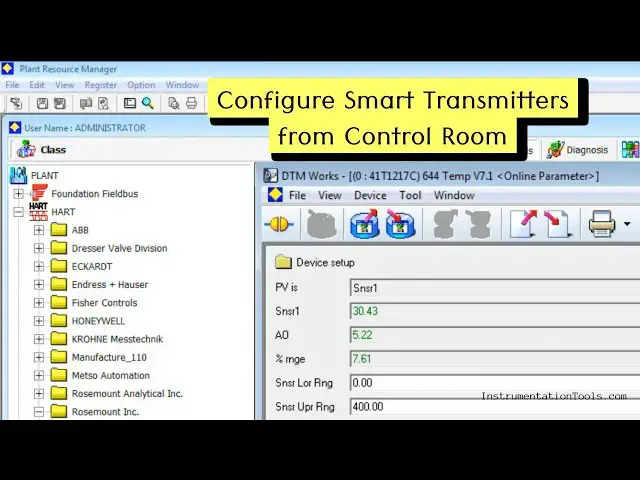
This is our plant resource manager PRM
0:12
software from Yoko Gova to access hot
0:18
And first I will search for the tag. For
0:21
that I will go to edit and then select
0:26
facility and inspection browser.
0:30
Open this. Here we have to enter the
0:33
required tag number. What is our tag
0:36
number? Uh simply I write 1217
0:43
and then click search.
0:47
Now we can see the tag device tag. It is
0:53
Double click here and select the tag. On
0:56
the right side you can see the details
0:58
like communication type heart device
1:01
comment TT that means temperature
1:03
transmitter and select DTM works. It
1:08
will open the hot window. It will
1:11
support hot protocol. It will fetch all
1:14
the data of the transmitter using hot
1:17
protocol. Remember that nothing but your
1:20
hot communicator. We're accessing the
1:23
data using a computer. from the control
1:27
room itself instead of going to the
1:29
field. See the data is updated here and
1:33
you can see different parameters. For
1:35
example, you can see sensor one that is
1:41
uh process temperature measured by the
1:46
In this case, we are using RTD for
1:50
measuring the temperature. It is
1:52
connected to the sensor one of the
1:58
and you can see the PV. This is the
2:00
process variable PV. And what is the
2:06
centigrades. And what is the equivalent
2:08
analog output? It is 5.22 milliampere.
2:12
And in percentage it is 7.61 percentage.
2:17
The sensor range is 0 to 400°
2:20
centigrade. You can see these parameters
2:23
details using hot communicator. Also,
2:27
this transmitter using 4 to 20 milliamp
2:31
signals for sending the measured process
2:34
temperature to the DCS system.
2:39
Now we have to do the configuration for
2:42
the heart protocol in order to receive
2:45
the heart variables in the DCS system
2:49
and we have to enable the heart burst
2:52
mode. Remember that depending on the
2:55
instrument model version some options
2:58
may vary. For example in this
3:01
transmitter right now there is no
3:03
separate burst mode available. So we can
3:06
directly configure the hot variables.
3:09
Otherwise first you have to enable the
3:13
hot burst mode. Remember that if you see
3:16
here there are two values here. One is
3:19
sensor one which is 30.42°
3:22
centigrade. And this is the real process
3:26
parameter measured temperature from the
3:32
And every instrument smart instrument
3:36
nowadays equipped with a internal
3:38
temperature sensor. So we can know the
3:41
temperature value inside the transmitter
3:46
and this is called terminal temperature.
3:50
Remember the difference between these
3:52
two temperatures. One is process
3:54
temperature and one is transmitter
3:56
temperature. Okay. Now what I will do? I
4:00
will fetch both these values in the DCS
4:03
system. Okay. For that we have to go to
4:06
variable mappings. Okay. And this is the
4:08
variable mappings. And in this variable
4:11
mappings we have four variables.
4:13
Primary, secondary, third and fourth
4:16
variables. That means we can use and we
4:19
can configure up to four variables.
4:21
Remember that if you see in the primary
4:24
variable PV here PV means primary
4:27
variable. It is sensor one selected and
4:30
secondary variable it is terminal
4:34
and we are not using third variable and
4:36
fourth variable in this transmitter.
4:39
If you want you can do the variable
4:41
remapping. You can select the variable
4:44
remapping and you can do the uh required
4:47
selection as per your requirement. Okay.
4:51
And here I'm just using sensor one
4:54
temperature which is process temperature
4:56
and second one terminal temperature. I
5:00
am using the PV and SV primary and
5:03
secondary variables of this transmitter.
5:06
Remember if you have a burst mode
5:09
available you have to enable it
5:11
otherwise it will not work in this
5:13
transmitter. I don't have any separate
5:15
burst mode that is why there is no
5:18
option to enable. Okay.
5:21
And if you remember the values, 30
5:24
something is the process temperature. 32
5:26
is the terminal temperature. Okay. And
5:30
that's it. The configuration in the
5:32
transmitter is completed. Remember, you
5:36
can do the same configuration
5:38
using your heart communicator. You can
5:41
connect your heart communicator to the
5:44
transmitter and uh search for the
5:48
Two options. First one enable burst
5:52
mode, heart burst mode. Second one map
5:56
the required parameter in the variables.
5:59
You can use any variable primary,
6:02
secondary, third, fourth, any variable
6:05
you can use. In the next video, I will
6:08
go to the DCS software and I will do the
6:11
remaining configuration there. Thank