0:00
So the first thing I do when I wake up is to open this spreadsheet and add all my tasks for the day
0:05
here. For example, I'll add them like that, then I'll select the date. So all of them are to be
0:13
done today. Then here on the status, I first start with pending. Then the most important part for me
0:21
is this priority part. So I will assign the priority to each of these tasks so they can either be high
0:27
medium or low. Further I can add comments here or I can leave it empty. And once I enter all my tasks
0:36
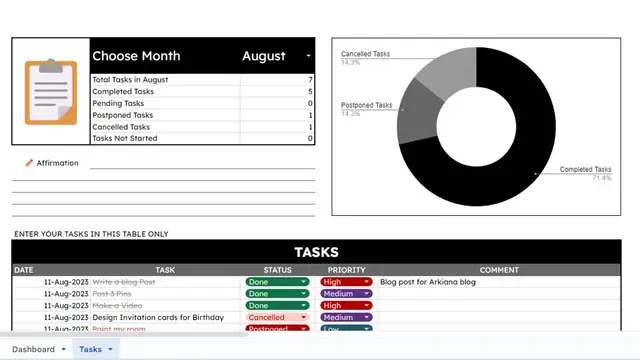
and assign the priorities and the status, you can see here I'm able to see the summary like that
0:41
and you have the graph here. Then when I go to the dashboard here, I'm able to see all the tasks
0:47
that I have. So all these are today's tasks, all these are the tasks that are pending, these are
0:52
are the high priority tasks and these are the tasks that I've completed
0:56
Here are just the numbers to show the same So when I complete something I can just go here to the status and change the status to done change this one to done change that one again to done and when I go back to my dashboard it shows the tasks that I
1:10
completed here and it shows how many high priority tasks I've completed. These are the tasks that are
1:15
still pending, I can go back and work on them. So let's say for today we decide to cancel this one
1:21
then we decide to postpone this one, this one is done and this one has been done. When you go back
1:27
your dashboard you are able to see that there are no more pending tasks. We had
1:30
four high priority tasks and all of them have been done. When you go back to your
1:35
tasks you're able to see from here the tasks that you have completed, those that
1:39
are pending, those that have been postponed and those that have been cancelled and this graph will show you the distribution. So this helps me to
1:46
organize my day and to see the things that I'm able to work on. Most of the
1:50
times I'm able to do this and I still have a lot of time that remains. That way
1:55
can use that time for other activities. So if you're interested in this spreadsheet, I'll leave a link
2:00
in the description on how you can get it. It's free, you can use it however you want. Thank you
2:05
so much for watching and I'll see you in the next one