Up next in 10

Vue.js 3 Tutorial to Show Toast & Notification Alert Messages Using vue-toast-notification in TS
Jan 9, 2025

Get the full source code of application here:
https://gist.github.com/gauti123456/adf1e7d56a4f5d608088945bce35832e
Show More Show Less View Video Transcript
0:01
uh hello guys welcome to this video so
0:03
in this video I will show you yet
0:04
another toast notification library for
0:06
view3 so this is the success call back
0:09
it appears for 2 seconds and then this
0:11
is the error call back you can display
0:13
it any location positioning it also
0:17
shows the icon as
0:18
well so the package name is view toast
0:23
notification if you go to npmjs.com
0:26
uh just search for this package which is
0:30
view toast
0:32
notification so this is actually the
0:36
package so it already got 18,000 weekly
0:41
downloads and this is actually the
0:43
command I've already installed it so it
0:47
is compatible with the latest version so
0:49
once you install this you just need to
0:52
register it first of all so just go to
0:54
your main.ts
0:58
file so so I will show you so just go to
1:03
this main. TS file and right
1:08
here you need to add this import
1:11
statement to import the module so import
1:15
toast plug-in and it will be coming from
1:18
view toast notification and also we need
1:21
to import the CSS file as well so view
1:25
toast notification slis SL theme default
1:32
CSS and also we need to import
1:37
the bootstrap theme as
1:44
well so that's all and after this we
1:47
need to pass
1:49
it this plugin toast plugin so that's
1:53
all that we need to do you need to
1:55
import the CSS file import the plug-in
1:58
and pass it now open the app. view file
2:01
close this file and right here inside
2:05
your
2:06
template we have a simple button a three
2:11
buttons first of all for showing the
2:14
success call back we will just find an
2:16
on click listener so we'll say show
2:20
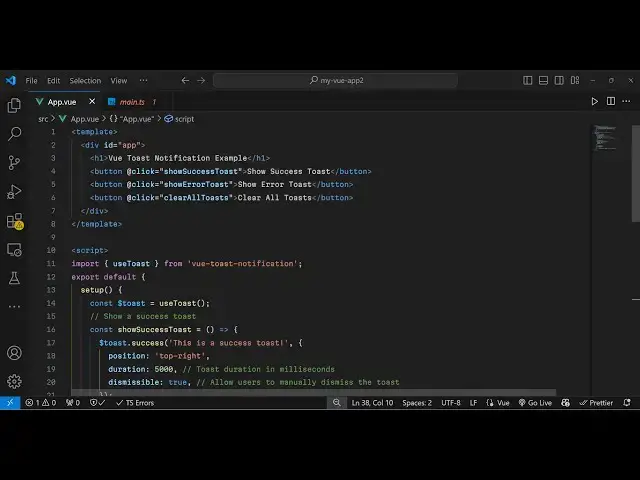
success so now we come to the typescript
2:23
code inside the script
2:27
tag so
2:33
we import this view toast
2:36
notification and then we say export
2:41
default and right here we Define the
2:45
setup function and inside this we
2:49
initialize this toast and use
2:53
this hook use toast and now we Define
2:57
this function Source success
3:00
it's a call back function and right here
3:04
toast. success so right
3:07
here it actually contains the success
3:09
call back so here you define the message
3:12
that you want to display and then it
3:15
takes an object right here which
3:17
contains the position so I will say top
3:19
right position then how many seconds you
3:22
want to display so let's suppose 5
3:25
Second so it is 5,000 millisecond and
3:28
then the property dismissible which is
3:32
true so now it will have a cross icon so
3:35
that when you click it it will go
3:38
away so if you refresh now uh you will
3:42
now
3:43
see if I refresh or sorry we do need
3:47
to return this so just add this method
3:52
so that we can use it inside our vuejs
4:18
just put a comma I think
4:25
return yeah so if you see now it will
4:29
will appear for 5 seconds and it will go
4:32
away or you can click it as well if you
4:35
click it then also it goes
4:38
away so same goes if you want to change
4:41
now for
4:44
error so it will now have this error
4:47
here so very simple plugin you can
4:51
easily use it so thank you very much for
4:54
watching this video if you like it
4:57
please hit that like button and also
4:59
check out my website as well free mediat
5:01
tools.com uh which contains thousands of
5:04
tools regarding audio video and image
5:07
and I will be seeing you guys in the
5:08
next video
#Programming
#Software
#Open Source