Up next in 10

React.js Tutorial to Display Password Strength Indicator Input Field & Validation Meter UI in JSX
Jan 9, 2025

Buy the full source code of application here:
Show More Show Less View Video Transcript
0:00
uh hello guys welcome to this video so
0:02
in this video I will show you this
0:04
password strength meter uh it's a very
0:08
simple input field where we allow the
0:10
user to in input the password and then
0:14
we give it a rating of how secure the
0:17
password is if they have entered enough
0:19
characters or special numbers as well so
0:23
it will give it a rating that now this
0:24
is a strong password this is a nice
0:27
little meter out there and you can
0:29
include this inside your react
0:31
application using a
0:33
package you can see it will give it a
0:36
strong rating Fair rating then we have
0:39
the Fe rating as well so the name of
0:43
this package is react password strength
0:46
bar indicator uh if you just go to
0:48
npmjs.com
0:52
so this is actually the module that I'm
0:55
talking
0:58
about so if you just SE search for it
1:01
this is
1:02
the command here react password strend
1:06
bar indicator it's a fairly new package
1:09
16 weekly downloads so I will just show
1:11
you the full example how to include this
1:15
inside your so just make a simple
1:18
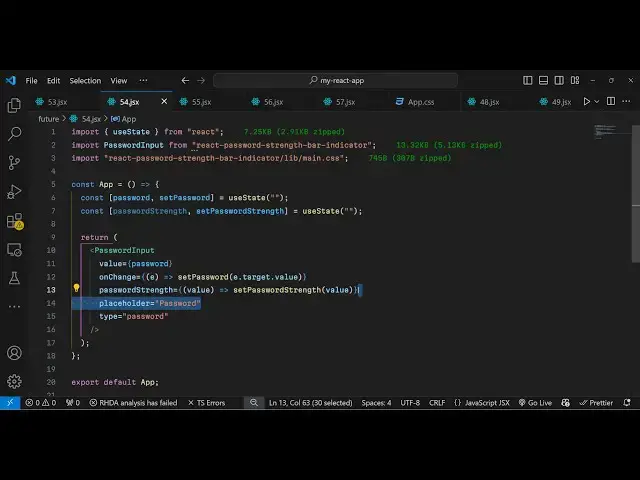
functional component and first of all
1:22
you need to include this module using
1:24
the import statement password input so
1:27
it will be coming from this package
1:29
about
1:31
14 kiloby is the size then we import
1:34
also the CSS file as well
1:37
react password strength indicator and
1:41
then lib main.
1:44
CSS so we import this CSS file as well
1:47
so then we inside this app level
1:50
component we declare two parameters or
1:53
two variables F first for the password
1:56
initial value will be empty and then the
2:01
second variable for the strength so what
2:06
is the strength of the password the user
2:08
entered for this also we will have a
2:11
variable initial value will be nothing
2:13
so we have these two variables now we
2:16
come to the jsx so wherever you need to
2:18
display this you wrap this using this
2:21
password
2:23
input this is your component it takes
2:25
some options first of all the actual
2:27
value which is residing in the
2:32
password and then we can even bind an
2:34
onchange event handler so whenever this
2:38
value
2:40
changes we will execute this set
2:43
password function so e. target. value
2:47
and thirdly it also takes the password
2:52
strength is a callback function so it
2:54
actually tells you the strength of the
2:57
password as you provide the password
2:59
password so set password strength I will
3:02
pass this value as well so this actually
3:05
takes these three parameters I've shown
3:07
you now we can even give it a
3:09
placeholder as well
3:13
so enter the password here and type here
3:18
will be
3:20
password so this password will not be
3:22
seen so now we have this nice little
3:25
input field uh we can adjust the
3:27
password
3:33
can see that so depending upon how the
3:36
we actually put this it gives you a
3:38
rating strong password weak password as
3:41
well so this is essentially this package
3:45
which does this thing here for
3:48
calculating the strength of the password
3:50
and updating the UI accordingly this is
3:53
the package so thank you very much for
3:56
watching this video and do check out my
3:59
website as well uh free mediat tools.com
4:02
uh which contains thousands of tools
4:05
regarding audio video and image and I
4:08
will be seeing you in the next video
#Other
#Computer Education