live_tv
Livestream Starting Soon
00
Hours
:
00
Minutes
:
00
Seconds
Up next in 10

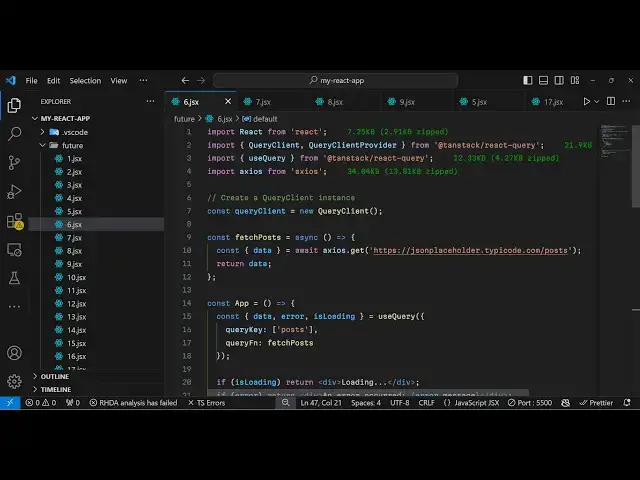
React.js react-query Example to Fetch Data Async & Cache it from JSONPlaceholder Using Axios
Jan 9, 2025

Buy the full source code of application here:
Show More Show Less View Video Transcript
0:00
uh hello guys welcome to this video so
0:02
in this video I will show you a powerful
0:05
asynchronous State Management library
0:08
for react CHS
0:09
application it is specifically useful
0:12
for C caching your data when you making
0:15
HTTP request to fetch some data fetching
0:18
from a URL so once you fetch the data it
0:21
will store the data in the catch and in
0:23
the subsequent request it will return
0:25
the data from the cache it will not make
0:27
redundant HTTP request so this is you
0:30
can see we are using the Json
0:31
placeholder API and fetching some data
0:33
right here and for the very first time
0:36
it will make the HTTP request using exos
0:39
and then in the subsequent request it
0:41
will store the data in the cache and it
0:43
will not make the substituent HTTP
0:46
requests you can see it only for the
0:48
very first time it is returning the Json
0:50
data and we are displaying it storing it
0:53
in cash so it automatically does that
0:56
the command is very simple npmi t St
1:00
react cury tag is a company name and
1:03
react cury is the library and almost it
1:06
has 5 million weekly downloads so it's a
1:08
pretty popular package so now I'll be
1:12
showing you how to configure this so
1:14
just make a simple functional app
1:16
component in react CHS and then we
1:20
will instantiate a new instance of cury
1:24
client in react cury so for configuring
1:28
it we need to
1:30
declare a new instance of this cery
1:34
client class this will be coming from
1:38
the react cury if you see automatically
1:42
imported so we just need to initialize
1:45
this and after initializing it inside
1:49
our app level component we need to
1:51
declare the hook which will be coming
1:54
from this react cury the hook name is
1:57
use cury this is a hook it will be
2:01
imported if you see from again react
2:03
query and this hook actually takes some
2:07
options first it takes two options first
2:09
is the cury key so in this case we are
2:12
fetching the post so this can be any
2:15
name because in this case we are
2:17
fetching the post we are just writing in
2:19
single codes post this is a key name and
2:22
the second property it takes is a cury
2:24
function so the function responsible for
2:27
fetching this data so I will just sign
2:30
this function fetch post which will be
2:33
responsible so it actually gives you
2:35
three things first is the actual data
2:38
which will be returned after the HTTP
2:40
request is successful and it will store
2:42
it in the cache automatically if any
2:45
sort of error take place or is
2:49
loading so the is loading is a Boolean
2:52
parameter whether the data is fetched or
2:54
not it will return and these three
2:57
variables are return automatically
3:00
and now we can Define this function of
3:02
fetch
3:03
post which will be responsible for
3:06
fetching the post so it will be a
3:09
simple uh fetch call X call to fetch the
3:14
data and be S your wait and for this
3:18
purpose we will be using the exos
3:19
package which is actually a simple HTTP
3:22
client for fetching the data from the
3:24
URL and inside this xos package we have
3:27
a get method which will make a simple
3:30
get call to this endpoint which is https
3:33
uh Json placeholder do typo code.com
3:40
slost so this will return our data so I
3:43
can just console log it and just return
3:45
the
3:47
data
3:48
[Music]
3:50
so so after you do this so if I refresh
3:53
the application and just refresh now you
3:56
will see in the console
4:03
so yeah so once you make the cury client
4:06
we need to wrap our app level component
4:09
to this cury client provider so one more
4:11
step to
4:12
do before we do the data fetching so
4:15
write this is
4:17
your root component right here if you
4:23
see we actually need to wrap
4:27
everything this whatever is your comp
4:29
component so in my case it's a app level
4:32
component so we just need to wrap
4:34
everything so I will just create a root
4:38
component and inside this I will
4:42
wrap everything in this cury client
4:48
provider so this will be coming from if
4:52
you see again it will be coming from
4:54
cury client provider react query so you
4:57
need you need to wrap everything
5:00
your app
5:01
component in this here we'll be
5:04
providing the client that we configured
5:06
which is cery
5:08
client and then we need to export
5:10
default this component which is
5:15
root so this is our actual component
5:19
where the data fetching is taking place
5:21
so we are just wrapping this inside your
5:23
query client
5:24
provider and if you now refresh
5:27
uh so now if you see uh the data will be
5:32
returned to us so console log message
5:36
and the post contains each property four
5:40
properties so we need to display this
5:42
now so the displaying process is very
5:45
simple uh right inside your div
5:48
section so once we get the data this
5:50
data will be present in this data
5:52
property so now to
5:55
actually display
5:58
this so you will have a div section
6:01
where you'll be displaying the data
6:03
which will be
6:05
post and we'll just be looping data. map
6:09
it's a array so for each
6:15
post so you have Alli tag which I will
6:18
just give it a key parameter which is
6:20
post. ID
6:30
post. title and then we will print out
6:33
the post.
6:47
body think just made a typo mistake so
6:50
if you refresh now the data will Now
6:52
display in
6:56
the cannot read properties of undefined
7:00
reading
7:23
map so we just using this data property
7:27
right here so if you now see the post
7:29
will show show
7:36
up and also we need to make sure that we
7:40
use these two variables error and is
7:42
loading so we just need to make sure
7:45
that uh if any sort of error take place
7:48
then we can show these error messages
7:51
and if is loading is also true
8:02
so these two variables are also returned
8:04
from this request so if any sort of
8:06
error take place then we are showing it
8:08
as an error
8:09
record and if the data is loading then
8:12
we can even show this loading screen as
8:14
well so this Library handles all these
8:17
processes in a very systematical way so
8:20
now if you refresh the page you will see
8:21
the data will be coming from the API and
8:24
you can see the data now if you want to
8:27
check for these error messages if I make
8:29
a mistake in the URL so if
8:32
I change this URL now if you see this
8:36
error message appearing the thing about
8:39
this library is that it will keep on
8:41
making the request if you see in the
8:42
console it is doing it is making the
8:46
request and after four request it will
8:48
show you this error message that an
8:51
error occurred network
8:54
error so if I again change it to the
8:57
correct URL it will show you this
8:59
loading screen and then it will show the
9:01
actual post so the data fetching will
9:04
only be done for the very first time and
9:06
after subsequent request will be
9:09
cached so this is actually a very great
9:12
way of data fetching you every time you
9:15
don't want to make the HTTP request so
9:17
once the data is returned we store this
9:20
data inside the cache so this caching is
9:23
automatically done by using react cury
9:26
so this is the advantage of using these
9:28
Library is
9:30
inside for data fetching
9:34
purposes so thank you very much for
9:36
watching this video
9:38
and do check out my website as well
9:41
freem mediat tools.com which contains
9:43
thousands of tools regarding audio video
9:46
n MH and I will be seeing you in the
9:48
next video
#Programming