Up next in 10

React.js Project to Pick Dates From Infinite Calendar Using react-infinite-calendar-with-range in JS
Dec 22, 2025

Buy the full source code of application here:
https://procodestore.com/index.php/product/react-js-project-to-pick-dates-from-infinite-calendar-using-react-infinite-calendar-with-range-in-js/
Show More Show Less View Video Transcript
0:07
Uh [snorts] hello friends. Today in this
0:08
tutorial I'll be showing you a new
0:11
ReactJS library which is able to embed
0:14
uh calendar inside your application to
0:17
pick date and time. So [snorts]
0:19
basically it's a infinite calendar and
0:21
uh various dates are mentioned here
0:23
alongside side with months, dates and
0:25
years.
0:27
So it's it has got a field of material
0:30
designed to into it. So you can see that
0:32
this is the example here and the
0:35
dependency name is uh react infinite
0:38
calendar. So basically if you go to
0:40
npmjs.com and if you search for this
0:42
dependency this dependency will come in
0:46
react infinite calendar. This is a
0:49
dependency. If you just search it, the
0:51
very first result which comes in, just
0:54
click it. And it offers a lot of
0:56
features. Infinite scroll is there.
1:00
So if you just scroll it, all the dates
1:02
will come. It is very much flexible,
1:05
extensible and localization is also
1:07
available in different kinds of
1:09
languages. If you prefer languages other
1:12
than English,
1:15
it can also select year from year. It
1:18
also supports keyword shortcut. So you
1:21
can see it's having weekly downloads of
1:23
11,000
1:25
and this is a dependency. I have written
1:28
a complete blog post on my website. So
1:30
all the example code that I will write
1:32
in this video will be there inside video
1:34
description. So just go to the video
1:36
description. Just go to the edit option
1:38
here and uh you will find all the source
1:41
code here. So this is the description
1:44
blog post. So just copy all the source
1:46
code. So
1:49
you can see this is uh the example that
1:52
I'm talking about. So this is a calendar
1:55
here. You will see that today's date is
1:57
selected.
1:59
If you see if you load this application
2:05
6th June here today is 6th June. So when
2:08
you load the application today's date
2:10
would be selected with a blue active
2:12
arrow. You can select another date like
2:14
this. Tuesday is June 7. Any date you
2:17
can select like this.
2:20
If you scroll it more dates will be
2:23
coming. You will see that.
2:29
So in this way you can just have
2:32
infinite scroll here. Infinite
2:35
scrolling up to 250 here.
2:42
And now let me show you guys how to
2:44
build this from scratch. So you just
2:48
need to go to this website
2:49
codesandbox.io.
2:51
So it's a very good alternative if you
2:53
don't want to create react application
2:55
from scratch. Just use this sandbox.
2:58
Just click react. It will create this
3:00
react project for you.
3:04
[snorts] So you can see that now you
3:05
need to install this. So dependency name
3:08
is react infinite calendar. So just
3:12
search for this react infinite
3:17
dash calendar. So just select this and
3:20
this will install it in the background.
3:22
So now it has installed this dependency.
3:25
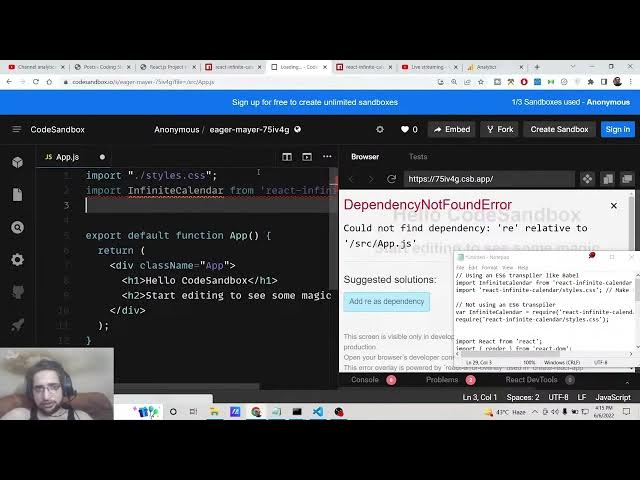
So now the very first thing you need to
3:27
do is guys you need to import this. So
3:30
at the very top we will import this. So
3:32
we will say import infinite
3:35
calendar
3:38
from react infinite calendar. So just
3:42
import this and the next thing we need
3:44
to do is to import the CSS file react
3:47
infinite calendars dot styles
3:52
dot CSS.
3:55
That's it. Uh now guys we need to
4:03
uh inside our uh this statement we need
4:06
to display the calendar. It's very easy
4:08
just display it like this infinite
4:10
calendar. So if you just display it your
4:13
calendar will display on the right hand
4:15
side. You will see that that uh you just
4:18
need to include this tag here and this
4:20
will display
4:25
and there are some options you can pass
4:27
here definitely in order to exclude some
4:30
of the dates out there because uh now
4:33
you can see it is starting from January
4:35
1st 1980 up till 250 year. So now to ex
4:40
exclude some dates it's very easy. So
4:43
let's suppose you need to start with the
4:44
current date. You can just say here uh I
4:48
need to start with the today date. So we
4:50
will just say new date. And here we can
4:54
pass some options to it.
4:57
So which date you need to select when
4:59
the application loads for the very first
5:01
time. So you can say selected
5:05
date.
5:06
So this will be equal to today.
5:10
So what it will do is that it will
5:12
select the today's date which is uh
5:18
uh let me see here uh
5:23
so I think this needs to be in the
5:33
so you can see today's date is selected
5:35
which is June 6th because we have
5:37
selected selected date you You can also
5:39
pass some other date as well. It is not
5:41
mandatory that you need to pass the
5:43
today's date. If you want to pass a
5:47
separate date, you can also pass it. It
5:50
is totally up to you like this.
6:02
So you can pass individual date here.
6:04
You will see that if I refresh it
6:22
selected date you can see that. So today
6:30
the next option you can pass guys you
6:32
can uh just provide a custom width width
6:36
of 400 and also a height of
6:41
400. So basically it will resize to
6:44
whatever that you pass here. You can see
6:45
that
6:48
[snorts] you can change the width to 800
6:50
as well. So this will resize to 800. So
6:53
it is so flexible. You can control the
6:55
width and height. You can also disable
6:58
some dates which are you don't want to
7:00
pick by disable dates disable days
7:04
property. And here you can pass the
7:07
number of days. So let's suppose I want
7:09
to disable 1 2 3 4 5 6. So in this way
7:16
you can pass it
7:22
is equal to.
7:25
So now guys you can see that
7:28
at the starting of each month this
7:30
third, fourth, fifth, 6th date is
7:32
disabled. You can see that
7:35
1st, 2nd,
7:38
fifth is there.
7:40
6 7 8 9th. You can see that
7:46
you can also provide minimum date as
7:48
well from which we need to start by the
7:51
minimum date property.
8:10
So we will need to start 7 days prior to
8:13
today's. So you can also control like
8:16
this. So this is all that you need to
8:18
understand about this library guys. All
8:20
the source code will be there inside
8:21
video description. If you like this
8:24
video then please hit the like button,
8:25
subscribe the channel and I will be
8:27
seeing you in the next video.