Up next in 10

Build a React.js Youtube API to Show Video & Live Streams in Player Using react-player in JSX
Jan 9, 2025

Buy the full source code of application here:
Show More Show Less View Video Transcript
0:00
uh hello guys welcome to this video so
0:02
in this video I will show you how to
0:04
embed the YouTube videos live streams
0:07
directly inside your react CH
0:09
application so there is a specific
0:11
package that you can use right here so I
0:13
will just show you the demo right here
0:15
first of all so we have this URL where
0:18
you can enter the URL of the YouTube
0:20
video or live stream directly right here
0:24
so let's suppose I go to a video copy
0:28
the URL and then simp paste it so after
0:31
pasting it you will see the video will
0:33
pop in and the thumbnail of the video
0:35
will show and we have this play button
0:37
so you can simply click the play button
0:39
and then now the video will start hello
0:41
guys playing so in this easy way to this
0:44
brand new you can embed any video and
0:47
directly play it inside your react CH
0:49
application and same goes with the live
0:51
stream as well so let now let's suppose
0:53
this is actually a live stream which is
0:55
going on you just copy the URL and once
0:59
again paste the
1:01
URL and now you see the live stream will
1:03
also play like this so in this way you
1:06
can do this very easily so the package
1:09
name is uh react player if you just go
1:13
to npmjs.com and just search for this
1:17
package react Das
1:20
player and it's not limited to YouTube
1:23
it can basically fetch from any social
1:26
media Network Facebook you can see on
1:29
their website it mentioning that it can
1:32
fetch from Facebook YouTube twitch
1:35
SoundCloud all these social media
1:37
networks it's a very popular package
1:39
almost 566,000 weekly downloads so this
1:42
is actually the command you simply
1:45
install this I've already installed it
1:47
so I will just show you a very basic
1:49
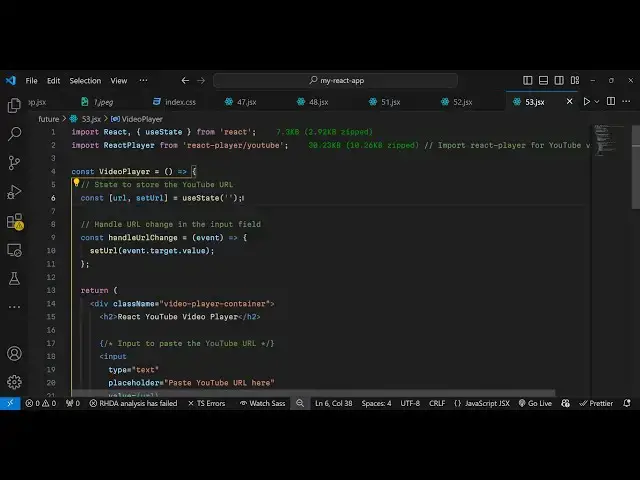
example so just import this by making a
1:53
functional component by using the import
1:55
statement so import react player and it
1:58
will be coming from this package react
2:01
player and for from this we just need to
2:04
SL slash YouTube because we are working
2:07
with YouTube vide so that's why we are
2:09
saying SL YouTube and then we are also
2:12
using bootstrap for Designing the
2:15
interface so we'll be importing the
2:17
container form which will be coming from
2:20
react bootstrap and also we'll be
2:22
importing the bootstrap CSS file as well
2:25
we will say import the CDN
2:31
like this so after we import this now we
2:34
come to the functional component we
2:35
declare some State
2:37
variables for keeping track of which URL
2:40
that the user has written the U State
2:42
hook we will use and then we come to the
2:45
jsx we design this form we wrap
2:49
everything inside the container
2:51
component of
2:53
bootstrap like this we give it a class
2:56
of margin top five and inside this will
3:00
have an H2 heading you will say that
3:02
react
3:06
YouTube video and live
3:11
stream player
3:14
so then we have a
3:17
simple bootstrap
3:20
form and we'll give it a label we simply
3:23
say enter the
3:25
YouTube
3:27
URL and here you'll have a simple input
3:33
field type will be
3:36
of uh
3:39
text and we give it a
3:42
placeholder
3:44
URL and we'll also be binding an on
3:46
change so whenever user write something
3:48
right here we will execute this function
3:51
handle change this function will
3:54
execute and E parameter will be
3:58
passed so whatever URL the user writes
4:01
it will
4:04
actually this function will execute so
4:06
whenever you write the URL so inside
4:09
this we just set the URL inside the
4:12
state so whatever coming e. Target do
4:15
value so very
4:18
simply so now to display the video it's
4:22
very simple we after this simple form we
4:25
simply compare that if the URL is
4:27
available in that case we need to show
4:30
the YouTube video in the video player so
4:34
we have this div element we give it a
4:36
class of player
4:42
rapper then we have this component react
4:45
player and it takes some options first
4:48
of all the actual URL that you want to
4:51
play and then the actual class name so
4:55
it has a built-in class which you can
4:57
directly attach which is react player
5:00
the third option is the theme so you can
5:02
use the Dark theme
5:04
or or light theme so I will say light
5:06
theme to true and then you can even
5:08
adjust the volume as well so you can
5:10
give it a predefined volume of 0.3 so
5:13
now the video will play at this volume
5:16
and if you want to mute the video sound
5:18
you can put true here so now the sound
5:20
of the video will not come and if you
5:23
want to Loop the video you can have this
5:25
option as well I will say false and you
5:28
can have the play l so if you want to
5:30
play play the video we set it to true so
5:34
by default the video will play you can
5:36
adjust the width as well by giving a
5:38
100% width percent and a height of 400
5:43
pixel so we have all these options you
5:46
will see we can directly attach this so
5:48
now we come to the application right
5:51
here and we paste Whatever video that we
5:54
want to paste the URL so we paste it and
5:58
now you will see the video will show up
6:00
we have the play button and we can
6:03
directly play the video so this is
6:05
actually the module it's very helpful
6:07
inside react CH to actually play any
6:10
YouTube video or live stream directly
6:12
play it so this is actually the
6:14
application and you can even try this
6:16
with any other social media networks as
6:19
well it's also supports Facebook daily
6:21
motion as
6:23
well
6:25
so I think if you do have a daily motion
6:28
video uh let's
6:35
suppose if any daily motion video you
6:38
want to play you copy the link address I
6:41
think it works you can directly attach
6:43
the
6:48
URL so directly by default it doesn't
6:50
work but you can check the docs
6:54
and can read this how to work for daily
6:58
motion as well so specific I told you in
7:01
how to play YouTube videos so thank you
7:04
very much for watching this video and do
7:06
check out my website as well free mediat
7:08
tools.com uh which contains thousands of
7:11
tools regarding audio video and image
7:14
and I will be seeing you in the next
7:16
video
#Flash-Based Entertainment
#Programming
#Video Sharing