live_tv
Livestream Starting Soon
00
Hours
:
00
Minutes
:
00
Seconds
Up next in 10

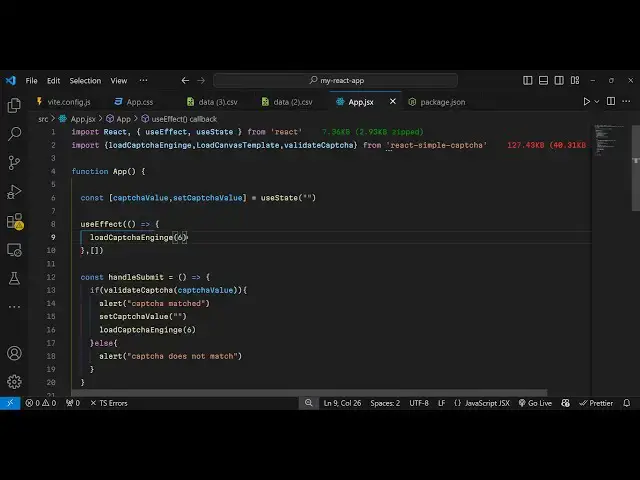
Build a React.js Simple Captcha Solver Challenge in Browser Using react-simple-captcha Library in JS
Jan 9, 2025

Buy the full source code of application here:
Show More Show Less View Video Transcript
0:00
uh hello guys welcome to this video so
0:02
in this video I will talk about how to
0:04
integrate a simple capture validation
0:08
system capture solving inside react CH
0:11
so there is a specific package which is
0:13
available so which will show this
0:15
capture to the user so if you want to
0:18
implement this so you have seen this in
0:20
many websites so you have this button to
0:23
reload the capture so new challenges
0:25
will come to the user to solve so they
0:29
need to enter the correct c s which is a
0:30
mentioned inside this so they can enter
0:32
the
0:34
correctors so if they enter the correct
0:36
correctors then in that case you will
0:40
validate it when they click on the
0:42
submit button and you will see that
0:43
capture matched so if they write invalid
0:47
characters you will see that capture
0:49
doesn't does not match so it's a fully
0:51
fleshed validation mechanism where you
0:53
can integrate the capture inside your
0:55
react application so the package name is
1:00
very simple just go to npmjs.com and
1:02
just search for this package react
1:05
simple capture this is actually the
1:07
package I've already installed it so it
1:10
has almost got 7,000 weekly downloads so
1:14
I will show you a very basic example so
1:16
just make a simple functional component
1:19
and we just need to import this
1:22
component so it contains three methods
1:25
first is your
1:26
load capture
1:32
this
1:33
one
1:36
engine and the second one is load
1:40
canvas
1:42
template and the third one is validate
1:45
capture so these are the three methods
1:47
which are available in this
1:49
module which is coming from react simple
1:53
capture so it's just a 127 kilobytes
1:57
package and it has three methods for
2:00
loading the canvas for validating the
2:02
capture and loading the capture so now I
2:05
will actually make a application and
2:07
declare a state variable just to keep
2:09
track of which capture
2:13
is whatever the capture submitted by the
2:16
user so we will have a variable for this
2:19
so the initial value will be nothing so
2:22
use state will be nothing and it will be
2:26
rendering the capture whenever user
2:28
renders the application so this use
2:31
effect hook will be executed this will
2:34
also be coming from react CH
2:38
so here we'll be calling this function
2:40
load capture and we'll be passing this
2:43
corre uh six it means that we have
2:47
wanted to create a capture of six
2:49
characters you can just see
2:53
so and now we need to render the capture
2:56
so now for rendering the capture you
2:58
come to the jsx and now to render this
3:02
challenge capture you first of all let
3:04
me just provide a padding of 20 pixel
3:07
and a maximum width of
3:11
400 pixel and a margin of
3:14
Auto and inside this we will actually
3:17
have a H3 which will say react simple
3:22
capture
3:24
example and we will now be rendering
3:26
this capture for rendering it we'll be
3:29
calling this function uh this component
3:32
load C canvas
3:35
template so now if you
3:38
see a capture will be created you will
3:41
see that the capture is created and we
3:44
have this button reload capture to
3:46
reload the capture so every time if
3:49
random correctors will be displayed A
3:51
new challenge will be displayed when you
3:54
click the button so now we just need a
3:56
simple input field where the user can
3:59
submit the capture so inside this we
4:02
will have an input field input type will
4:06
be of text and placeholder will be
4:09
simply be saying enter
4:12
capture and the value here will be
4:15
of capture
4:19
value so we just be giving a style
4:23
margin of 10 pixel
4:26
0 so we have this input field where the
4:29
user will enter the capture and then
4:32
when the user enters something on this
4:35
we'll be binding an onchange event
4:37
handler so inside this e parameter will
4:39
be executed and be calling this hook
4:41
function set capture value so whatever
4:44
the value entered by the user we can get
4:46
easily by using e. target. value so we
4:50
are just using this hook function and
4:52
just calling it so after you do this uh
4:55
we just need a
4:58
simple button to submit the form so for
5:01
submitting
5:03
it we will have this
5:11
button so this button will be submit so
5:16
when we click so button type will be
5:18
submit so when we click on the button so
5:21
we will simply bind an onclick event
5:27
handle so on click so when we click the
5:30
button we will execute this function
5:32
handle submit so now we come to
5:36
the
5:38
actual function here we will Define this
5:41
function handle
5:42
submit so e parameter will get executed
5:45
so
5:46
here we have this button so
5:50
now we will simply compare so whatever
5:53
is the validate capture entered by the
5:55
user if it matches the capture value in
5:58
that case
6:00
we will simply say that capture
6:04
matched and then we'll be resetting this
6:06
capture to nothing and load a new
6:10
capture so again call
6:12
the and in the else block we can say
6:16
that uh capture doesn't
6:20
match so for validation it we have this
6:23
function validate capture we are passing
6:25
it and we are passing the value which
6:27
the user has submitted so now if you
6:31
see if the user enters the correct
6:39
capture click on the submit button you
6:42
will see capture
6:44
matched but if there enter a wrong value
6:47
capture doesn't match so it's a fully
6:49
flash capture we have integrated in
6:51
react sh using this module react simple
6:54
capture so thank you very much for
6:57
watching this video and do check out my
6:59
website as well free mediat tools.com
7:02
which contains thousands of tools
7:05
regarding audio video and image and I
7:08
will be seeing you in the next video
#Programming
#Software