Up next in 10

Build a React.js Project to Scroll Animation to Any Section of Webpage Using react-scroll in JSX
Jan 9, 2025

Buy the full source code of application here:
Show More Show Less View Video Transcript
0:00
uh hello guys welcome to this video so
0:02
in this video I will show you a
0:05
scrolling uh library inside react CH so
0:09
if you want to scroll to a particular
0:10
section inside react CH with nice little
0:13
animation as well this is actually your
0:16
package so we have this demo right here
0:18
we have the buttons If you want to
0:20
scroll to the top of the page from any
0:22
location you can do that and as well if
0:25
you want to scroll to the bottom of the
0:27
page you can click this button and it
0:29
will autom automatically redirect you to
0:31
the bottom you don't need to manually do
0:34
it using your mouse you can click these
0:36
buttons and then it will automatically
0:38
it will be redirected to the bottom so
0:41
you have seen this on websites on many
0:43
popular websites they have these buttons
0:46
available if you want to scroll to the
0:48
right bottom or right at the top of the
0:50
page and also we have certain buttons
0:54
available so we have different sections
0:56
in the page if you want to go to that
0:58
particular section you can click click
1:00
these buttons and it will pinpoint to
1:02
that particular section of the page so
1:04
we have this package available in react
1:06
CH which which can do this process with
1:09
nice little animation as well the
1:11
package name is react scroll and if you
1:14
just go to npmjs.com and just search for
1:17
this package which is react scroll so
1:20
this is actually the name of the
1:23
package and it's a very popular package
1:27
almost
1:28
287,000 weekly downloads so this is
1:32
actually the command I've already
1:34
installed it so I will just show you a
1:36
very basic example so just make a simple
1:39
functional component and right here we
1:42
need to require this package and for
1:44
requiring it we will use the import
1:48
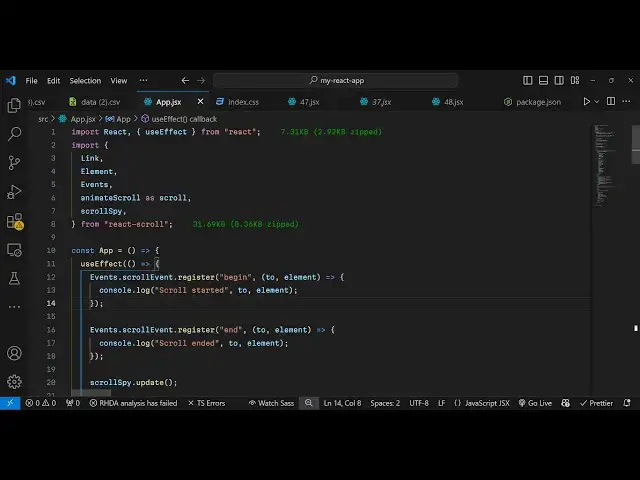
statement at the very top so we simply
1:51
write
1:52
import and then it has a series of
1:55
methods we will require it from this
1:58
package react scroll
2:01
and it actually contains the
2:03
method first of all I will import
2:07
link element and then
2:10
events comma animate scroll which has is
2:14
a method to actually scroll to a
2:16
particular section with animation and
2:18
then we have scroll spy so all this is
2:21
coming from this package react scroll it
2:23
is almost 32 kiloby of
2:27
size and now we will have a
2:30
series of buttons
2:32
available so right in the js6 we will
2:35
have this header tag and inside this
2:37
will have a button which will simply say
2:40
that scroll to
2:44
bottom
2:47
so you can have as much HTML that you
2:50
want so let's suppose I have a long
2:55
paragraph that is there in my website so
2:58
it can be anything it can be blog it can
3:00
be
3:00
images
3:03
so let me
3:05
just uh paste this
3:12
paragraph So we have this paragraph
3:14
right
3:16
here and we have this button right here
3:18
scroll to bottom so if you want to
3:20
scroll to the bottom section of this
3:22
page you will B this onclick listener to
3:24
this button so we will execute this
3:27
function which is built in which is
3:29
scroll to bottom so essentially we are
3:32
using this function scroll to
3:37
bottom so we will be binding this
3:43
function so I will write this Define
3:47
this function scroll to
3:51
bottom so inside this function we will
3:54
use this
3:55
scroll dot scroll to bottom so this is
3:59
actually the method we are using
4:02
this
4:05
scroll so for this we do need
4:08
to register this scroll
4:13
object I think the scroll is available
4:16
to us let me just search
4:20
it yeah you can see we are importing
4:24
this animate scroll as scroll so that
4:26
this is actually a variable name it does
4:29
contains this fun function scroll to
4:30
bottom and with nice little animations
4:33
so if I go to the
4:34
page so we do need to have some elements
4:37
so that I can clearly see if I click the
4:40
button I will be redirected so what I
4:42
will do after this paragraph I will have
4:46
a
4:48
navigation and inside this navigation we
4:50
will
4:52
have three buttons which will simply say
4:56
to the user
4:57
that navigate to that
5:01
section so it actually takes some
5:04
options right here this link tag I will
5:07
just attach we have these three link
5:09
tags so it will say that navigate to
5:12
this section so you can have as many
5:15
sections in your website and
5:18
uh so first of all we will Define these
5:22
sections after this inside of a main tag
5:26
so we will have this element
5:31
we will use this element that we
5:35
import this element is coming if you see
5:38
we have imported this
5:40
element so you can Define your element
5:43
in your website this can be anything it
5:45
can be image it can be paragraph So in
5:49
this case this element will be a simple
5:51
section so I need need to name it a
5:53
section right here and just give it a
5:56
class name and this inside this it can
5:59
be anything it can be a
6:02
heading and then I will simply say this
6:06
is welcome to section one so in this way
6:09
we'll be be defining three elements each
6:12
having an name parameter which is the
6:15
section one section two Section 3 so now
6:17
we can navigate to these sections using
6:20
this package so now in the link tag you
6:23
will Target
6:24
this so we will bind inside this link
6:28
tag we will give some battery attributes
6:30
which is the active
6:33
class which will be active and then we
6:36
need to give the two parameters so here
6:38
you need to uh give the name parameters
6:41
so this is we have given section one so
6:43
we need to redirect the user to this
6:45
section when they click and spy I will
6:49
give it to true and smooth animation if
6:51
you need you will still say true offset
6:56
and here will provide the coordinates so
6:58
when you click this section you will be
7:00
redirected to these section coordinates
7:03
and duration of the animation I will say
7:05
500 millisecond this is all the
7:08
coordinate it takes this uh component
7:12
and same thing I will do this for the
7:14
second one as well so second
7:17
section same parameters I will attach to
7:20
this as well I will see and the third
7:25
section as
7:27
well so here we have just replaced
7:30
changed the name parameter if you see so
7:34
whatever name parameter that you have
7:35
given to each section in the website so
7:37
you will be binding that to these
7:40
buttons so what happens is that if you
7:42
click the section any of these
7:46
buttons you will be redirected to these
7:52
sections I've given all the source code
7:55
in the description you do need to add
7:56
these Styles here for each section add
8:00
this some CSS code so you get the
8:03
concept so when you click it you will be
8:05
redirected to the second section when
8:06
you click the third section you will be
8:08
redirected to the third section so in
8:10
this way now if I click the scroll to
8:13
bottom section I will be redirected to
8:16
the bottom
8:17
s and same for the Stop section as well
8:21
we have this we have defined this scroll
8:23
to top function and it also has a
8:27
function to scroll to the top of the
8:29
page so this is a buil-in function which
8:31
is using this package react scroll so
8:34
when I click the scroll to top button I
8:37
will be redirected to the
8:39
top so this is a very simple and yet
8:43
effective package in react chairs if you
8:45
are building a Blog website you will
8:47
definitely use this package for allowing
8:49
the user to scroll to a particular
8:51
section inside your website so thank you
8:54
very much for watching this video and do
8:56
check out my website as well uh free
8:59
mediat tools.com uh which contains
9:02
thousands of
9:03
tools regarding audio video and image
9:06
and I will be seeing you in the next
9:08
video