Up next in 10

Build a React.js File Downloader App to Download TXT & CSV Files Using react-download-link Library
Jan 9, 2025

Buy the full source code of application here:
Show More Show Less View Video Transcript
0:00
uh hello guys welcome to this video so
0:02
in this video we will look at a library
0:05
inside react chairs which allows you to
0:07
download files as an attachment these
0:09
files can be anything text CSV so I'll
0:13
be looking at an example right here we
0:14
be showing you to download text file CSV
0:18
file in react CHS this is actually the
0:20
module here specifically for react CH
0:22
application react download link so it
0:25
has got
0:27
2,653 weekly downloads so this is a the
0:30
command so just install this I've
0:33
already installed this so first of all
0:36
to actually now build this I will show
0:40
simple functional component then I will
0:43
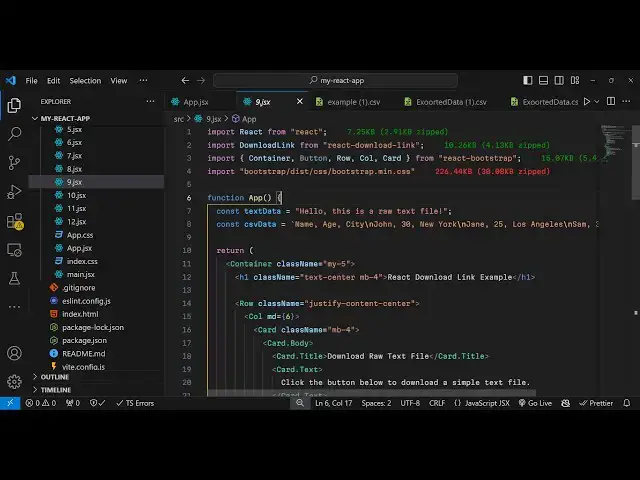
import this module at the top import and
0:46
it contains this download
0:48
link method from this module react
0:51
download link now we need to create two
0:54
variables so I will hard code the data
0:57
so this is actually the text Data we
1:00
will have a simple line hello this is a
1:02
raw text
1:04
file and the second one will be for CSV
1:08
data so this will
1:09
be actually the data which will be
1:13
residing in the CSV files
1:16
so we actually have three columns name H
1:19
C and then we have rows so this is a new
1:21
line character it will shift it in the
1:23
new line so now we have these two
1:26
variables so WR in the jsx
1:33
we will simply say that react
1:37
download link example so we'll be having
1:40
two
1:42
buttons so we will basically have
1:45
include this download link component and
1:48
it takes some options first is the label
1:51
of the button so it'll be simply saying
1:53
download text
1:55
file then the file name property it
1:57
takes so here you need to give the file
1:59
name
2:00
so I will say example.txt and then it
2:03
takes the third option which is export
2:06
file so here this is actually a call
2:09
back function and here you need to
2:10
provide whatever data that you want to
2:12
download so in this case we are need to
2:15
download this text file so data is
2:17
reciting right here so if you refresh
2:20
now there will be this button out there
2:23
download text file so if you click this
2:24
button you will see your txt file will
2:27
get downloaded so this is actually your
2:29
data
2:30
so in this way you can use this
2:32
module and same goes with the second
2:35
button which will be responsible
2:39
for again we'll be using this component
2:42
download link and here this time the
2:45
label will
2:48
be download CSV file and
2:52
then the file name so it will say
2:56
example. CSV and here you need to
2:59
provide
3:01
the export file so whatever is the data
3:03
so it is there in the CSV data
3:08
variable so this time you have the
3:10
second button
3:13
so so now if you see all the CSV data
3:16
has been converted to comma separated
3:18
value so in this way you can create more
3:20
extensions as well I'm just showing you
3:23
a basic one which is text and CSV it's a
3:26
handy module in react CHS if you want to
3:28
download some data as an attachment in
3:31
this file so this is a great module you
3:34
can use it so thank you very much for
3:37
watching this video and do check out my
3:38
website as well freem mediat tools.com
3:41
which contains thousands of free tools
3:43
regarding audio video and image and I
3:45
will be seeing you in the next video