live_tv
Livestream Starting Soon
00
Hours
:
00
Minutes
:
00
Seconds
Up next in 10

Build a React.js Draggable Tabs & Panel Windows to Add & Remove it in Browser Using JSX
Jan 9, 2025

Get the full source code of application here:
https://gist.github.com/gauti123456/c885317cb5759985334674ffe5df5588
Show More Show Less View Video Transcript
0:01
uh hello guys welcome to this video so
0:02
in this video I will show you how to
0:04
create uh
0:06
tabs we can tabs inside your react CH
0:10
application multiple tabs you can add
0:13
them remove them just manage them inside
0:16
your react CH application so we have
0:19
this button out there if you see once I
0:21
click the button I will need able to add
0:24
multiple tabs tabs are nothing but
0:27
windows in the browser itself if you see
0:29
in my browser we have multiple tabs in
0:31
each tab we have different content in
0:34
this tab the video is running and in
0:36
that tab the the different website is
0:39
loading
0:40
so similarly in our application as well
0:43
we can have multiple tabs which can hold
0:45
multiple types of data at the same time
0:49
so in less space you can have more data
0:51
so we have the option to add tab remove
0:55
tab I will show you a simple react CHS
0:58
package which allows
1:01
this so the package name is react tab
1:05
tab and you can even drag and drop the
1:08
order so you can even drag and drop
1:11
something like that we do inside the
1:13
browser itself there is an option to
1:15
drag and drop the order here you can
1:18
shift the position like this you can
1:21
remove them you can add them as
1:24
well so if you go to npmjs.com and just
1:28
search for this package which is is
1:32
react tab tab this is actually the
1:39
package so it's a mobile it also
1:43
supports Mobile support draggable
1:45
editable API based tab for reacts and
1:48
this is actually the command I already
1:51
installed it and it is almost having 181
1:54
weekly downloads a fairly new package
1:58
and you can see all these options are
2:00
supported you can load the data in
2:04
different panels and tabs you can add
2:06
and delete draggable so drag and droper
2:10
supported and it's available for mobile
2:13
devices as well so I will show you a
2:15
very simple example so just make a
2:17
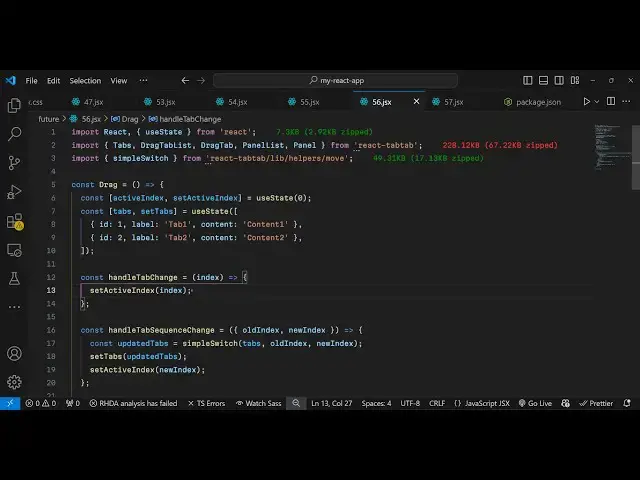
simple functional component and then we
2:20
need to
2:22
import the actual package using the
2:24
import statement so we import this so
2:28
it's almost 280 229 kilobytes package
2:32
and then we also have this method to
2:34
switch between multiple tabs which is
2:36
coming from this
2:38
package so now we will actually inside
2:41
our component we need to declare some
2:43
State variables for this application so
2:47
first of all we will have a variable in
2:50
the state for keeping track of the
2:53
active tag active tab or
2:56
window so it initial value will be zero
2:59
we'll use the UST State hook and
3:02
similarly for managing different tabs we
3:05
will have this U State array and
3:11
for array of object so each tab will
3:14
have three options first is the ID of
3:16
the tab it's a numeric value then we
3:19
need to have a label so I will say tab
3:22
one and then whatever content that you
3:24
want to show it can be any HTML element
3:27
text images anything similarly you'll be
3:30
having the second tab the label here
3:33
will
3:35
be tab two and then we have the actual
3:41
content so in this way you have an array
3:44
where you declare multiple tabs creating
3:47
having single
3:49
object and then we come to the
3:53
jsx where you need to
3:56
display so we have this component of tab
4:00
we surround it and we provide this
4:03
active index property so whatever is the
4:06
active tab we will provide this option
4:09
the
4:10
variable and then we have this variable
4:14
or component which is drag and drop tab
4:16
list so here we need to surround all the
4:19
tabs using this parent tag and inside
4:22
this we will have this map function for
4:25
each
4:26
tab we will Loop through using the map
4:29
function and for each tab we will
4:31
surround this using this component drag
4:37
tab so it takes an option of key and we
4:41
provide a unique ID for the tab which
4:44
will be coming from this ID
4:47
variable and inside this we first of all
4:50
just show the label of the tab which is
4:52
the title so you say tab dot label and
4:57
then we have a simple button it remove
5:00
button so once you click this button
5:02
this tab will be removed so we have a
5:04
cross
5:08
button like this so once you click this
5:11
button we execute this function remove
5:13
tab and we provide the actual index
5:16
which is an ID
5:18
here so you just need to Define this
5:23
function so it essentially it removes
5:27
this tab from this app array here that
5:30
we Define in the array in the state we
5:33
have this function remove tab
5:34
essentially it takes the index it
5:36
filters
5:37
out and then it sets it in the
5:41
state so that's all so if you refresh
5:44
now you will see different tabs
5:46
initially two Tabs are there tab one tab
5:48
two if you click the cross icon that tab
5:51
will be
5:52
removed so we have now different tabs if
5:56
you also want to show the content so
5:58
what you will say
6:00
after this
6:05
button we can even
6:12
show the actual content so panel list we
6:16
surround everything using this and for
6:19
each tab again we'll be in mapping
6:23
through tabs. map for each tab
6:29
so here you'll be showing the actual
6:32
content we will surround it using this
6:34
panel component so all these components
6:37
that I am surrounding here panel list
6:39
panel and this is trag tab this supports
6:43
drag and drop as well so we are simply
6:45
importing it from this package it's all
6:48
coming from this package so here we show
6:51
the actual content of the tab so we
6:53
simply tab. ID we give it a key
6:56
parameter and then we show the content
6:59
tab do content so now you also see the
7:02
content as
7:11
well let me see what
7:15
is the tabless
7:18
component cannot read properties
7:28
of so so we have this again we have a
7:31
button where we add the tab so we
7:34
basically binded this function add tab
7:36
so essentially inside this function we
7:38
create a new tab we give it these three
7:40
properties ID label content and then we
7:43
set this inside this set State function
7:45
set
7:48
tabs and then we will also have this
7:52
button so as I click the button a new
7:54
tab will be
7:55
added so now we can manage in different
7:58
tabs we can have different content
8:02
available so we can remove as well we
8:05
can add it and then drag and drop is
8:08
also supported so this is this essential
8:11
package I've given all the source code
8:12
of this example in the description of
8:14
this
8:15
video so you can copy this and use it so
8:21
thank you very much for watching this
8:23
video and do check out my website as
8:25
well free mediat tools.com uh which
8:28
contains thousands of tools regarding
8:31
audio video and image and I will be
8:33
seeing you in the next video
#Programming
#Software
#Web Services