Up next in 10

Build a React.js downshift Library to Build Autocomplete Combobox Form Field in JSX
Jan 9, 2025

Buy the full source code of application here:
Show More Show Less View Video Transcript
0:00
uh hello guys welcome to this video so
0:02
in this video I will show you a react
0:04
CHS package for autocomplete and combo
0:07
box widget so if you want a library
0:10
specifically designed for react CHS we
0:13
have this downshift package so we have
0:16
this input field as the user types you
0:18
will see these autocomplete suggestions
0:20
coming and from the series of
0:22
suggestions you can pick any of that so
0:24
when I click Apple you will see you
0:26
selected Apple so in this easy way the
0:31
user can select from a autocomplete
0:33
options
0:36
appearing so the package name is
0:41
downshift if you search this they have
0:44
their own official website as
0:47
well downshift gs.com and it's a
0:51
powerful react aut to complete combo box
0:54
or select drop-down
0:57
component so if you go to pjs.com and
1:01
just search for this package
1:08
downshift so the command is very
1:12
simple this is the command here you need
1:15
to install it and it's almost got
1:17
378,000 weekly downloads
1:21
so so first of all just make a simple
1:24
functional component and then we import
1:27
this package import everything
1:30
import
1:32
downshift from this package downshift
1:35
it's almost 52
1:38
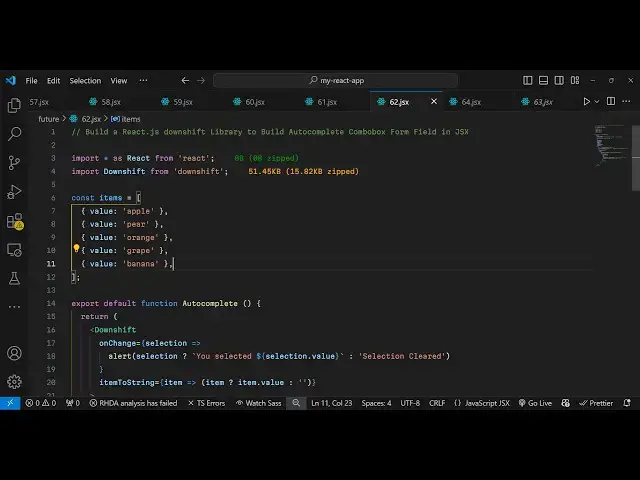
kiloby so now we Define the items that
1:41
needs to go in the drop-down or in the
1:44
autoc complete it can be coming from a
1:46
database as well for this example we are
1:50
just declaring a static array of
1:53
items each object is having one property
1:57
value
2:00
so you can have your own data
2:02
coming and then here in the jsx wherever
2:05
you need to display this we use this
2:08
component of downshift and it actually
2:11
takes some options first is the
2:13
non-change so whenever the you the user
2:16
select some selection we simply alert
2:19
the
2:21
user based upon the
2:25
selection we will say you selected this
2:28
selection so we can bind simply this on
2:41
change and then here we can also
2:45
put a second option which is item to
2:49
string this is the second parameter it
2:52
takes
3:00
so like
3:04
this and here you need to
3:12
put so here we are getting all these
3:15
parameters options which are coming from
3:17
this downshift Library one by one we are
3:22
displaying it right here in this label
3:24
we are putting asking the user to enter
3:27
a fruit so
3:30
then we are having
3:32
this displaying this filtering this
3:35
based upon Whatever item the user writes
3:38
as soon as they write we show the
3:40
autocomplete suggestions the key
3:43
parameter all this
3:44
stuff you can even style this as well we
3:47
put this background color font weight
3:51
and then here we are sugges uh
3:54
displaying the items item. value so now
3:56
what happens if you see if I refresh
4:08
you will see the suggestions
4:13
appearing and as soon as you click any
4:15
of the suggestions
4:18
you so this is actually the package you
4:21
can integrate for autocomplete and combo
4:24
box
4:26
widget so also check out my website as
4:29
well free fre mediat tools.com uh which
4:31
contains thousands of tools regarding
4:34
audio video and image and I will be
4:36
seeing you in the next video
#Programming
#Education