live_tv
Livestream Starting Soon
00
Hours
:
00
Minutes
:
00
Seconds
Up next in 10

Build a React.js Data Table Grid Component to Render Tables With Sorting & Filter in JSX
Jan 9, 2025

Buy the full source code of application here:
Show More Show Less View Video Transcript
0:00
uh hello guys welcome to this video so
0:02
in this video I will show you a react CH
0:05
data table kind of a library where you
0:09
can display tabular data so if you have
0:12
data that you want to display in a table
0:15
with all the capabilities let's suppose
0:17
you can sort your data in the ascending
0:20
and descending order and this is also
0:22
expandable rows as well so you can even
0:25
show some expandable data as the user
0:27
clicks on a particular row of data they
0:29
can expand it as well so you can see we
0:32
are showing showing these two columns
0:34
which is title and ear which we have
0:37
this data table Library so the actual
0:40
package name is react data table
0:43
component and if you just go to
0:44
npmjs.com and just you need to search
0:48
for this package react data table
0:53
component and this will be coming here
0:55
you will see specifically designed for
0:57
reates
1:02
and it's almost got 110,000 weekly
1:05
downloads a pretty popular package uh
1:08
this is actually the command I've
1:10
already installed it so I will just show
1:12
you a very basic example so just make a
1:15
simple functional component and we will
1:18
simply import this component using the
1:20
import
1:21
statement I'll be importing it like this
1:25
using this import line and this package
1:27
is almost 45 kilobytes
1:30
so here you'll be declaring the data
1:32
that you want to
1:34
show so I will just have this hardcoded
1:37
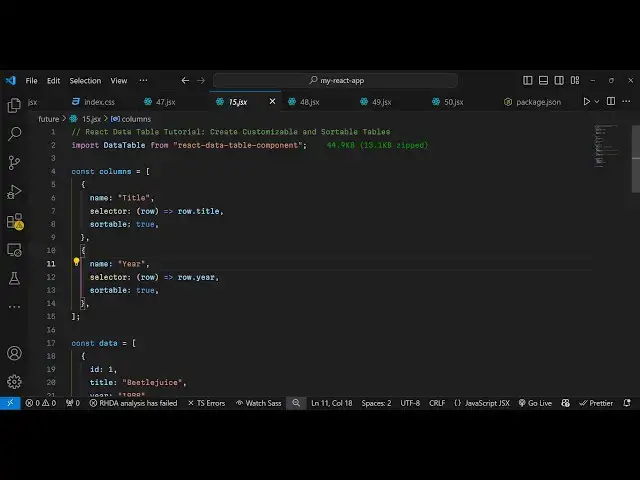
data here you'll just declare the column
1:41
names so the name of the column which is
1:45
title you can have any data that you
1:48
want to display and then the
1:52
selector row. title and it will be
1:55
sortable so you can sort your data in
1:57
ascending or descending order so we have
2:00
these three properties the name of the
2:01
column then selector and then
2:04
sortable and then I can have another
2:07
field for
2:09
ear like this so you can have as many
2:12
columns as you want but for this example
2:14
I'm just showing you then we have the
2:17
data that you want to
2:19
have this will be an array of objects
2:22
each object will contain three
2:23
properties ID then the title
2:30
and then the ear
2:36
here so in the similar way you can have
2:39
more objects so you just put a
2:45
comma so we can just change the values
3:04
so now we have these four rows of data
3:06
that we want to display and then we can
3:09
even have custom Styles as well you can
3:13
style this providing an object for the
3:16
rows I just want to style it so I will
3:20
just provide this
3:21
object a minimum height of 72 pixel so
3:25
in this way you can customize the look
3:27
and feel
3:28
of the table and the head cells you can
3:34
Target The Columns here you can provide
3:37
the padding from the left position which
3:40
will be 8
3:42
pixel and similarly from the right
3:45
position padding
3:47
right 8 pixels so in this way you can
3:50
write custom
3:52
Styles and then we can even Target the
3:55
actual cells as well
4:00
so we have the style object which you
4:02
can control
4:06
everything again padding
4:10
left 8 pixel and padding right again 8
4:15
pixel so now we have declared everything
4:19
so these three are Global variables
4:20
first is columns then the data here then
4:23
the Styles so now this wherever you want
4:27
to render it come to the jsx and we have
4:30
this component data
4:34
table and this takes some options so the
4:37
first option it takes is the columns so
4:39
we have declared that variable and the
4:42
actual data as well so we put this
4:45
variable and then you can choose the
4:47
theme here uh in the docs you can check
4:50
multiple themes but I will be attaching
4:52
the solarized themes and then you can
4:55
even attach custom Styles as well just
4:58
provide this variable that be declared
5:01
and then
5:03
expandable make this as
5:09
expandable so this table will be
5:11
expandable so we can simply attach this
5:24
option so if you just refresh now so
5:27
what happens is that if you see
5:30
we are displaying these four rows of
5:31
data and we can sort this from ascending
5:35
to descending order in column names such
5:38
as title and ear as
5:44
well so this is actually the package if
5:48
you want to show any table data you can
5:50
use this package data
5:52
table it's very popular as well so thank
5:55
you very much for watching this video
5:57
and do check out my website as well
6:00
uh free mediat tools.com which contains
6:03
thousands of tools regarding audio video
6:05
and image and I will be seeing you in
6:08
the next video
#Programming
#Software