Up next in 10

Build a React $100/Month SaaS: Canva Clone Text to Image Editor Using jsPDF & Html2Canvas in Browser
Mar 3, 2026

Buy the full source code of application here:
https://procodestore.com/index.php/product/build-a-react-100-month-saas-canva-clone-text-to-image-editor-using-jspdf-html2canvas-in-browser/
Show More Show Less View Video Transcript
0:00
Uh hello guys, welcome to this video. So
0:02
in this video, I'll show you I built out
0:04
a Canva clone uh React application which
0:08
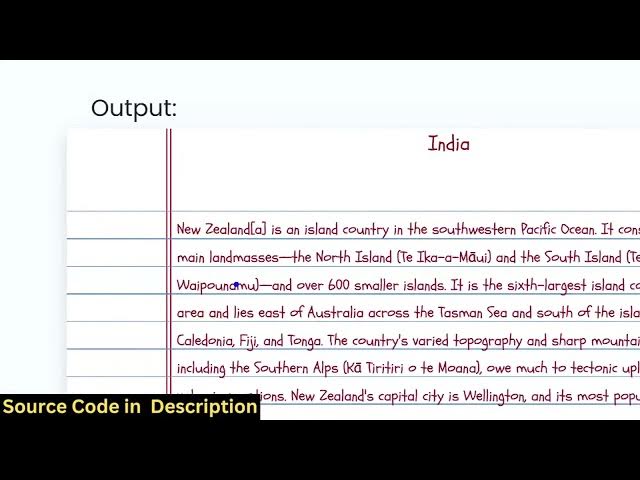
actually convert your text into image
0:10
and PDF. Uh it's actually a software as
0:13
a service SAS kind of a web application
0:15
where you can actually deploy this
0:17
application and potentially you can earn
0:20
about $100 per month. So this is
0:23
actually the demo of the application. So
0:26
let me just load this. So this is
0:29
actually coded entirely inside ReactJS.
0:33
So you will see we are using the latest
0:36
version of React. We are using JSPDF and
0:39
HTML to canvas library for building this
0:42
project. Each component is customizable.
0:45
Every component as you can see is coded
0:47
inside appropriate file. So you can
0:50
easily deploy this, customize this and
0:52
add additional features as well. So what
0:55
the application is all about? You
0:57
basically
1:00
paste a bunch of text and this text will
1:03
be converted to a image and PDF. So it's
1:06
actually handwriting text. You basically
1:09
paste raw text and this converts into
1:12
handwriting text which is very much in
1:15
demand and you can export this to a
1:19
image and PDF file. So all the
1:22
processing directly happens in the
1:24
browser. You will see that that
1:26
handwriting text is automatically
1:28
converted. You can also choose your own
1:31
font as well. We can change the color of
1:33
the text here.
1:35
We can also change it to a white paper
1:38
if you don't want the this one. You can
1:41
change the font here. Select any font
1:45
here.
1:47
So from a single click you will see
1:49
that. So
1:52
you can export this to any.
1:56
So this will save you a lot of time. And
1:59
basically if you purchase a domain name
2:01
and you can deploy this application and
2:03
you can actually enroll a subscription
2:05
based model you can basically charge
2:08
user
2:10
if they use your application. You will
2:12
charge users with the subscription fees.
2:15
So it's actually you can purchase it.
2:18
The link is given in the description.
2:20
This is actually the full project. After
2:22
purchasing it, you will get the source
2:24
code from Google Drive automatically.
2:26
The link I have given in the
2:28
description.
2:31
So you can basically rank this tool on
2:33
Google. So you can simply say text to
2:36
image handwriting.
2:39
So various websites are built using this
2:41
search term. So you can actually rank on
2:43
this search term and actually earn a lot
2:46
of subscription based or ad revenue if
2:49
you deploy this application.
2:55
Same thing you can export this
2:56
handwriting text into image. So you will
2:59
see that
3:02
it does the same thing right here. It
3:04
exports the handwriting text into image
3:07
as well.
3:15
So this potentially as you make changes
3:17
you will see the live preview happening
3:20
directly. It's
3:23
all the processing happening directly in
3:25
the browser. So potentially you can earn
3:27
up to $100 per month. So it's a simply a
3:30
SAS software as a service.
3:33
You it's the application is running
3:35
entirely in the browser. You can
3:39
potentially change to any
3:42
font here and it will automatically
3:44
reflect back. So if you're interested in
3:46
this, you can purchase it. The link is
3:48
given in the description.