Up next in 10

Build a Jodit WYSIWYG Rich Text & HTML Editor With Live Preview in Browser Using Javascript
Jan 9, 2025

Get the full source code of application here:
https://gist.github.com/gauti123456/9bd28c53709ed0be5c650d8e7a453651
Show More Show Less View Video Transcript
0:00
uh hello guys welcome to this video so
0:02
in this video I will show you yet
0:04
another viic Rich Text Editor which is
0:06
called as a jit jit is one other Rich
0:10
Text Editor viic Rich text editor
0:12
library and I will show you how to
0:14
integrate this directly in the browser
0:16
using simple HTML CSS and JavaScript so
0:19
where you will be able to write text
0:21
HTML as well so with live to view so you
0:24
will be able to provide all these
0:26
controls which is bold italic underlined
0:29
strike through you can select your text
0:31
and let's suppose change the font
0:36
here and you can change the phone size
0:39
as well if you see that
0:42
so if you need to see the live preview
0:45
as well click the live preview option
0:47
you will be able to see the live preview
0:49
in a separate window you can open it in
0:51
a full size as well if you want to
0:54
directly print it you can sing click the
0:56
print button it will print out you can
0:59
directly print it
1:01
so in this way you can use this option
1:04
as
1:07
well so you can even change it to a
1:11
heading so we have all these options you
1:13
can change it to
1:15
heading you can see that
1:19
so you can copy text paste from
1:23
clipboard you can directly embed tables
1:26
as well you can see that so in this way
1:30
you can insert Tabo data as well so it's
1:33
a visic g text editor which have all
1:35
these controls available to you copy to
1:38
clipboard also you can say you can also
1:40
change the color of the text as well by
1:44
selecting the
1:46
color we have this Color Picker and you
1:49
can change the color add a background as
1:51
well so all these things you can do
1:56
uh you can even directly embed images as
2:00
well by
2:02
this this image picker you can also
2:06
insert videos as well so embed code as
2:10
well so the name of the visic editor is
2:13
it
2:16
jit so if you search it for uh
2:20
basically the very first link which
2:22
comes it's an open source visib editor
2:25
return it pure typescript so uh you can
2:29
integrate with any front end framework
2:31
react angular I will show you a very
2:34
basic example how to include it in
2:36
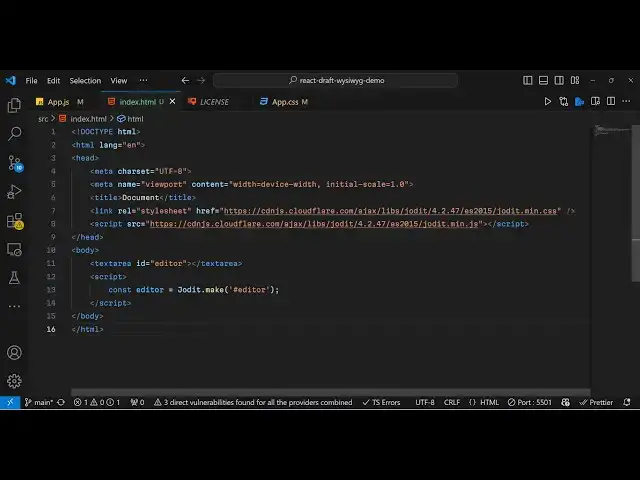
directly in the browser so just make a
2:38
simple index.html file and uh first of
2:42
all we need to import the CSS and the
2:45
JavaScript using uh CDN links so Ive
2:49
just included you will see we have
2:50
included the bootstrap sorry Jed m. CSS
2:55
which is
2:56
required and then the script tag which
2:59
is again the main.js
3:01
file so this is the direct way of
3:04
including the library using the CDN link
3:07
so after including these two tags now
3:11
we'll have a simple text area where
3:15
we provide an ID here to this text area
3:19
I will say it as editor and then inside
3:23
this we will be loading this uh Vis text
3:27
editor and for this we will be writing
3:29
the custom JavaScript tag right here and
3:32
we will make a
3:34
simple editor which I will say jit
3:39
Dot and it contains a method of make and
3:43
here you need to
3:44
specify the ID that you provided so
3:47
directly specifying editor right here
3:50
hash symbol ID whatever ID that you have
3:53
given and now we are simply loading this
3:55
visib G text editor in the text area so
3:58
if you try to refresh
4:01
your browser after writing this code you
4:04
will see this uh preview this uh
4:07
application loaded and now you can
4:10
perform all these modifications you can
4:12
write any
4:14
text and it also tells you how many
4:16
words that you written how many
4:18
characters powered by jit so you can
4:20
simply select italic underline strike
4:24
through all these customizations you can
4:26
perform so this is actually the
4:28
open-source VIs this text
4:30
editor
4:32
so I have given all the source code that
4:35
I used so if you need the full source
4:37
code you can go to the description of
4:38
this video so thank you very much for
4:41
watching this video and do check out my
4:43
website as well free media tools.com uh
4:47
which contains thousands of tools
4:48
regarding audio video and image and I
4:52
will be seeing you guys in the next
4:54
video
#Programming
#Software
#Open Source