Up next in 10

AppDeploy AI – Build & Deploy Full Stack Apps Instantly 🚀 (No Code) From ChatGPT & Claude for FREE
Apr 1, 2026

Get the full source code of application here:
Show More Show Less View Video Transcript
0:01
Uh, hello guys.
0:03
Welcome to this live stream. So, in this
0:06
live stream I will actually show you
0:09
a
0:10
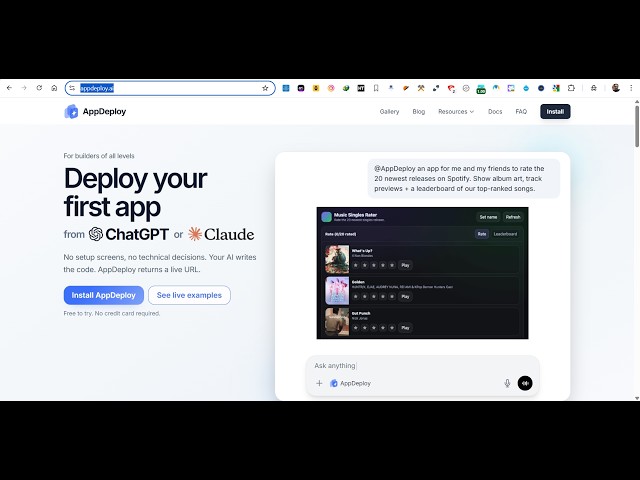
AI extension. It's called as app
0:14
deploy.ai.
0:16
So,
0:18
with the help of this extension you can
0:19
actually make
0:23
uh, full stack applications from a
0:26
single prompt. It's similar to Claude
0:28
and Cursor. This is the actual address
0:30
here, app.deploy.ai.
0:33
So, if you go to the browser, simply
0:34
type this address.
0:36
Uh, this actually
0:39
you need to install it as a Chrome
0:40
extension. You click the install button.
0:43
It's completely free to try.
0:46
And you can actually install it
0:49
inside ChatGPT
0:52
or Claude
0:53
or Codex app
0:55
or Cursor anti-gravity CLI coding agent
0:59
as well. So,
1:01
this is the full instructions which are
1:03
given. You go to ChatGPT, uh, then go to
1:06
apps in advanced settings. You go to
1:08
developer mode.
1:15
So, first of all, what you need to do,
1:18
you need to go to ChatGPT.
1:21
Uh, simply sign up. You can do this
1:25
directly inside Claude as well. So, it's
1:28
actually a application which runs
1:30
directly inside your ChatGPT.
1:33
So, once you create the account,
1:46
so, step-by-step instructions are given.
1:48
You need to go to
1:50
the app section.
1:52
So,
1:55
once it finishes, you will actually see
1:57
this settings shop options.
2:07
So, right here you will see the settings
2:09
option. You need to go to settings.
2:13
Uh, from here you go to app section.
2:15
And
2:23
So, step-by-step it's given to you. You
2:25
need to go to apps.
2:39
So, from here you can add different
2:41
types of apps here. So, one such app is
2:43
app.deploy.
2:54
So, whatever app you want to add, you
2:56
search. For example, you want to add
2:59
this app. So, you simply click the
3:00
connect button. So, you can connect this
3:02
app
3:03
directly. So, once the app is connected
3:05
with this, you will be able to use it.
3:07
So, similarly, we have this app.deploy
3:09
section as well. So, it's an actual
3:13
extensions. So, from here you can
3:15
actually see some applications which are
3:17
made directly from this extension. So,
3:19
you can check out the prompt.
3:23
This is the actual full prompt here. And
3:25
this is actually the live app which is
3:27
deployed full stack application. And
3:29
it's actually deployed to this address.
3:33
So, it's fully functional app here,
3:35
completely responsive as you will see.
3:38
Various examples are given. Similar to
3:40
this, you can build out a complete game
3:43
as well.
3:52
So, you can just see here.
4:01
So, it's complete game here which is
4:13
So, it's directly built using this
4:16
app.deploy.ai
4:18
technology. It's a really good
4:19
technology, very similar to Claude GPT,
4:23
Cursor.
4:24
So, you can connect with any of these.
4:27
So, various examples are given.
4:29
Similarly, you can connect to Claude as
4:31
well.
4:33
So, Claude [snorts] code CLI, this is
4:36
step-by-step instructions are given. You
4:38
can directly connect this.
4:40
Uh,
4:41
we also have CLI coding agents as well.
4:46
So, definitely check out this
4:47
app.deploy.ai.
4:49
It's a really useful technology from
4:52
which you can create full stack
4:54
applications.