Up next in 10

Angular Tutorial to Export HTML Table as Excel File Using xlsx and Download it Using Filesaver in TS
Jan 24, 2025

Get the full source code of application here:
https://codingshiksha.com/angular/angular-tutorial-to-export-html-table-as-excel-file-using-xlsx-and-download-it-using-filesaver-in-ts/
Hi Join the official discord server to resolve doubts here:
https://discord.gg/cRnjhk6nzW
Visit my Online Free Media Tool Website
https://freemediatools.com/
Buy Premium Scripts and Apps Here:
https://procodestore.com/
Show More Show Less View Video Transcript
0:00
uh hello guys welcome to this video so
0:02
in this video I will show you how to
0:04
export a data inside the table to an
0:07
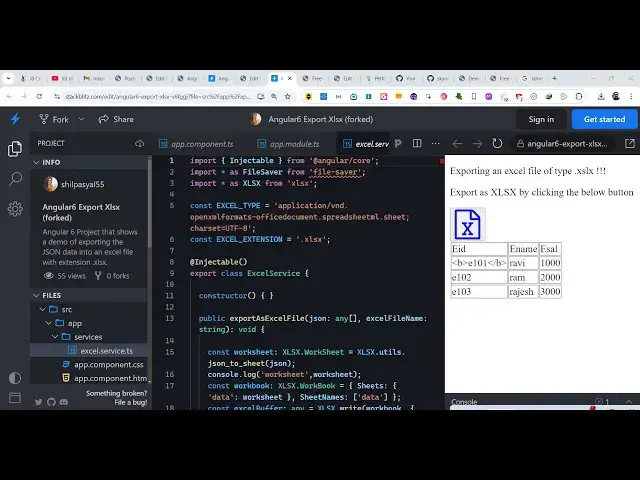
Excel file in angular project so this is
0:09
a complete angular project you will see
0:11
the live demo on the right hand side so
0:13
we have a set of data right here in a
0:16
tableau structure we have three columns
0:18
and three rows and which is displaying
0:21
inside this table so and we have a
0:22
button right here as soon as we click
0:24
this button all this data will be
0:26
converted to an Excel file if you see
0:28
that and if I open this Excel file you
0:31
will see this Excel file will display
0:33
something like this so there is a pro
0:36
actual module here which you can use it
0:39
if you go to npmjs.com
0:41
specifically for this project we are
0:43
using this package which is XEL X which
0:47
is a sheetjs
0:49
implementation package for nodejs so
0:52
simply install this package and also for
0:55
downloading the file as an attachment we
0:57
are using file saver which is a package
1:02
which allows you to download files as an
1:05
attachment so these are the two packages
1:06
which we are using and for this tutorial
1:09
I have written a complete step-by-step
1:11
blog post on my website so you can check
1:13
out the blog post alongside with
1:15
watching the video as well so I will now
1:17
show you step by step how I did this so
1:20
I will delete everything from
1:22
here from the template and the HTML so
1:26
now we open the template file app.
1:28
component. HTML file so right
1:30
here you will have a table tag and here
1:33
you'll Define our table so this will be
1:37
a TBL structure table row and here you
1:40
can Define your actual column
1:43
names table data and I will say
1:49
name
1:53
age and Country so on the right hand
1:56
side you can see that it is r
2:00
Auto reloading
2:06
and and then we will simply run a simple
2:09
NG form directive so which is provided
2:12
by
2:14
angular we will Loop through the
2:18
data so this data variable we need to
2:21
declare it inside the typescript code so
2:23
now we open the app. component.ts file
2:26
so right here we Define this data which
2:29
is actually an
2:32
array so we simply Define this array of
2:37
items array of objects so each object
2:40
will contain three properties or you can
2:42
May Define this
2:55
name so in this way you can Define
2:58
multiple items right here
3:13
so we have four items right here uh
3:15
inside our data object so now we come to
3:18
this template file we Loop
3:25
through and after looping through right
3:28
here
3:31
we
3:32
put and we show the table data inside
3:36
double curly
3:37
bracket so we display the item do name
3:41
so this will be the we'll see that then
3:44
we display the age
4:00
so in this way we dis display this data
4:04
we have four rows of data right here now
4:06
we need a simple button to
4:08
submit or to allow this to export this
4:12
as a Excel file so we will just add a
4:14
button right here just at the bottom
4:17
side so this is actually a button so as
4:20
soon as you click this button we will
4:22
bind this on click listener export as
4:25
excels custom function so now we need to
4:28
Define this function in the typescript
4:30
code
4:34
so we will Define this function which is
4:38
export as
4:45
XLS so for this we have return a service
4:48
which is Excel
4:54
service and it contains this function
4:57
export as Excel
5:00
file and here you need to
5:04
pass the data here this module contains
5:06
this function this state data and the
5:09
file name which is sample so this Excel
5:11
service is contained inside this module
5:14
so this is e is capital right
5:21
here and we do need to import this
5:23
inside the Constructor so
5:30
we declare a Constructor right here and
5:32
simply pass this service so you can
5:35
declare a variable which is private
5:38
Excel
5:52
service so if I click this button you
5:54
will see now this data will now convert
5:57
to an Excel file X LS file so we have
6:00
three columns four rows of data so in
6:03
this way you can actually use these two
6:07
modules and
6:09
then just create your data whatever data
6:12
it can be coming from a database or an
6:14
API and then you can export this in
6:16
Excel file so I've written a complete
6:18
step-by-step blog post where I have
6:20
given the full example source code that
6:23
I used in this video so thank you very
6:25
much guys for watching this video and
6:28
also check out my website as well free
6:31
mediat tools.com uh which contains
6:33
thousands of tools regarding audio video
6:35
n MH and I will be seeing you guys in
6:38
the next video