Up next in 10

Angular 14 Movie Search App Using RXJS 6 Debouncetime Effect on Input Field to Call REST API in TS
Dec 22, 2025

Buy the full source code of application here:
https://procodestore.com/index.php/product/angular-14-movie-search-app-using-rxjs-6-debouncetime-effect-on-input-field-to-call-rest-api-in-ts/
Show More Show Less View Video Transcript
0:07
Uh hello friends, today in this tutorial
0:09
I will be showing you a very effective
0:12
way of calling rest API inside your
0:14
angular 14 application and for this we
0:17
will be using the concept of uh debounce
0:21
effect on an input field such that you
0:24
will be limiting your uh API calls. So
0:27
let's suppose you call an at rest API
0:30
you have limited credits available
0:33
inside your API balance because each and
0:37
every API call is a paid one. So if
0:40
you're calling a paid API then it's very
0:42
much effective than you if you build an
0:44
application which is very much effective
0:46
in calling it so that minimum API calls
0:49
will be consumed. So for this purpose we
0:52
have this effect called as debounce
0:55
effect which you can put on the input
0:57
field such that if you just search for
1:00
if you just type in the keyboard and uh
1:04
if the key key up event occurs after uh
1:08
let's suppose 1 second delay then only
1:10
the API call will be made you will see
1:12
that. So now basically when I just hit
1:16
the keyboard key after a certain period
1:19
of time uh after 1 second the API key
1:22
will be made. So if I type here uh
1:25
anything on the keyboard L if you can
1:28
now see after 1 second now you will see
1:32
searching [snorts] will start and it
1:33
will make API key to clear out this
1:36
process. If I right click inspect
1:38
element and go to console. So basically
1:40
this is the let me show you the live
1:42
proof here. Let me reload the page. So
1:45
basically uh if I type a correct movie
1:48
name let's suppose life in a metro and
1:51
uh basically if I now have 1 second
1:55
delay here now basically you will now
1:57
see it will have it will make this API
1:59
call and it will get the response back.
2:02
You will see this is the title of the
2:04
movie year uh type is a movie poster. So
2:09
this is a poster we have uh scraping it
2:12
from the API by using API call and this
2:15
is a title this is the year. So
2:17
basically what happens is that you
2:19
minimize the API calls which is made to
2:22
the API thereby you just decrease the
2:25
cost and this is very much effective by
2:28
using debounce effect inside the input
2:30
field. If you have studied Angular, this
2:33
is a advanced tutorial. Basically, this
2:36
is part of RxJS. RxJS are the part of
2:40
utility tools which is available inside
2:42
Angular. If you just type here RxJS6,
2:45
this is the latest version and basically
2:48
it's a library for reactive programming
2:50
inside uh Angular
2:53
and basically you can bind this input
2:55
effect on a input field uh such that it
2:59
will have certain amount of delay while
3:02
making the API calls. You can control
3:04
this delay. You can even have two 2 3
3:08
second but in a uh practical situation
3:11
you need to be putting this delay to 1
3:12
second. So let's suppose you any uh the
3:16
user put uh one delay after it have you
3:20
can see now it will start the searching
3:22
process. So it will list out all the
3:25
movies which is uh uh having this text
3:27
which is Jaho. You will see that. So
3:30
this is the kind of application guys we
3:32
need to implement in this tutorial live
3:34
stream. So if you're watching it for the
3:35
very first time then please hit the like
3:37
button subscribe the channel. So you
3:39
will be uh learning a new concept in
3:41
Angular 14 which is RxJS6 debounce time
3:45
input effect on an input field such that
3:48
if you put this effect on an input field
3:50
you will be minimizing your API calls.
3:52
So that this is the overall concept. So
3:55
for this purpose I have given all the
3:56
source code for this application in the
3:59
video description of this live stream.
4:00
So this is my blog post which is uh
4:03
there on coding section. So you can get
4:06
all this source code. So now let's start
4:08
implementing this inside our angular 14
4:11
application. So what we need to do is
4:13
that we need to simply first of all
4:15
create a brand new angular project.
4:19
So let me just delete all this code from
4:21
here and start from scratch.
4:26
So let me also delete this. So,
4:35
so now guys uh if you just see here
4:39
inside our uh app dot component
4:45
uh you need to [snorts] simply first of
4:48
all required some things for having this
4:53
uh to build this application. So this is
4:56
my ReactJS or sorry Angular application.
4:59
So just go to app.module.ts
5:01
file and basically what we need to do is
5:03
that we need to simply required some
5:06
things here. So you need to first of all
5:10
import the routing module. So this I
5:12
have uh included the rout routing as
5:15
well. So we need to include the routing
5:17
module from automatically from this
5:19
file.
5:21
And after that we also need to include
5:24
uh the browsing animation module.
5:32
Browser
5:34
animations
5:37
module. So this will be coming from
5:40
angular/
5:45
platform browser/an
5:48
animations.
5:50
So just do this and also guys at last we
5:52
also need to put uh the HTTP client
5:55
module which is required for making HTTP
5:57
request to the rest API. So HTTP client
6:00
module. So this will be coming from add
6:03
the rate angular/common/http.
6:07
So just do it. And now we need to add
6:09
this uh to our uh imports array. So just
6:14
add this browser animations module and
6:17
http client module. Just add this. So
6:20
now basically it is saying that uh
6:22
duplicate identifier. So sorry we have
6:25
already imported this. So there is this
6:28
error here which is app component. We
6:30
haven't created this. So go to
6:32
app.component.ts
6:34
file. So here we will start
6:37
uh first of all we need to import uh
6:42
component library
6:46
from the regular angular library
6:49
angular/ comp uh sorry angular/core
6:54
library
6:57
and now guys what we need to do is that
6:59
we need to create our component which is
7:02
very much necessary
7:04
So component.
7:06
So we will have the selector which is
7:08
called as app root. This is standard
7:11
stuff. So if you have made the uh
7:14
angular application you have done this
7:17
process. So we will put the component
7:19
template which is app.component.html
7:22
and style URLs. So basically this will
7:25
be as we are using CSS not SAS. So we
7:29
will put here app do.component. CSS.
7:35
So after this guys what we need to do is
7:37
that
7:40
we need to have export class app
7:42
component and we will implement this uh
7:45
on init.
7:47
So this will be automatically you can
7:49
see imported here at the very top. So
7:53
after this
7:56
lastly
7:59
you can see that we need to quick fix we
8:01
need to implement this interface on
8:04
init. So you can see
8:07
so now the error will gone here you will
8:09
see that no error is coming. So right
8:11
here inside our template guys we need to
8:13
have a input field such that we will
8:15
allow the user to input the movie name.
8:18
So after inputting the movie name the
8:20
rest API call will be made and the
8:23
response will be shown to the user. So
8:25
now we need to first of all bind this
8:27
inside router outlet as this is a
8:30
routing application. So now we will have
8:33
a div. We will give a style to it of
8:36
margin 50 pixel. So just give it and
8:40
inside this div we will have
8:43
a container class
8:48
and we will give it a style of text
8:50
align to center.
8:57
So inside this div guys we will have a
9:01
row class
9:04
and basically inside this we will again
9:07
have a call. Call stands for column.
9:10
This will be 12 column and it will be
9:13
there inside center position. So
9:15
basically guys you can just copy paste
9:17
this as I'm writing in this video. So it
9:19
it's regular HTML and with some
9:21
bootstrap classes. So this is the
9:24
heading here Angular search using
9:27
debounce effect
9:30
RxJS6.
9:32
So basically now to uh if you refresh
9:35
your application ngs
9:38
go to localhost 4200 you will see
9:40
[snorts] a heading appearing here
9:42
Angular search debounce. So after this
9:45
guys what we need to do is that we need
9:47
to have a simple input field where the
9:50
user will type the movie name. This will
9:52
be input type text and we will be giving
9:54
a reference to it movie search input
9:57
such that we can reference it inside
10:00
app.component
10:02
ts file. So we will be giving a form
10:05
control class to it
10:08
and after that we will simply say in the
10:12
placeholder tab type any movie name.
10:18
So close this input field. So now if you
10:21
refresh it you will see a simple input
10:22
field out there where you will input
10:24
your movie name. So right here after
10:27
that guys [snorts]
10:29
uh
10:31
we will simply go to app dot
10:33
component.ts file.
10:36
So here first of all what we need to do
10:39
is that
10:41
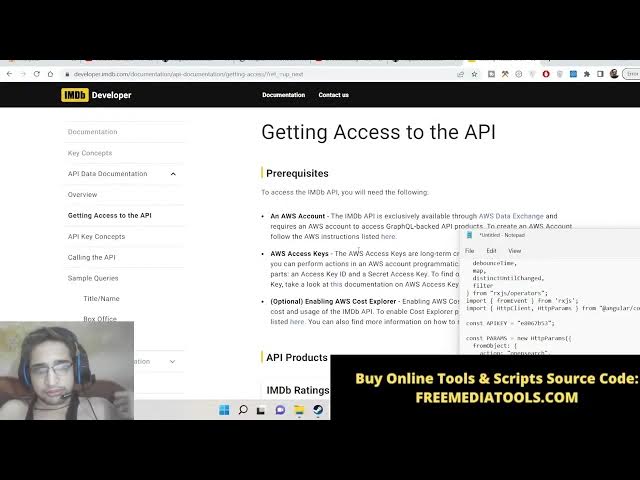
let me show you the API where we are
10:43
calling this. So uh the API is internet
10:46
movie database. So internet movie data
10:49
IMDb this is a great API if you want to
10:53
get the movie information they also
10:55
provide their own API key. So you
10:57
[snorts] can sign in with Google Ank
10:59
account
11:01
and then get your own API key.
11:08
So after getting your API key it's very
11:10
easy. First of all you need to create a
11:12
account here.
11:15
And if you see here uh
11:19
just type here IM DP API and you will be
11:23
landing on this page. IMDb you can call
11:26
any API this not uh you should be
11:29
calling this API that's totally up to
11:31
you which which you want to do it. I'm
11:33
just showing you this is the API that we
11:36
are having this.
11:41
So basically this is the documentation
11:44
you can run uh do it. Basically we are
11:48
just uh
11:50
uh getting the title year and the poster
11:53
of the
11:57
so here you can subscribe to it locating
12:00
your API key.
12:04
So you will get a email when you create
12:06
your account. So I think I have got this
12:10
email.
12:12
You can see that.
12:19
So now you can get your API key. So
12:23
after that guys, what we need to do is
12:24
that we need to uh
12:30
uh create a variable here right here at
12:32
the very top.
12:34
We need to def uh import some
12:36
dependencies. So import of off from RxJS
12:41
and also here we need to import view
12:44
child element ref and uh that's it.
12:48
These are the four dependencies and also
12:50
we need to import debounce time.
12:54
Debbounce time
12:56
map distinct
13:00
until
13:03
changed
13:05
and uh filter
13:10
this needs to be imported from rxjs
13:14
uh slash operators. So these are
13:16
different kinds of operators which are
13:18
available. Deb debounce time is also an
13:21
RxJS operator which is available.
13:25
And then we also need to have uh from
13:28
event from RxJS.
13:32
And lastly we also need to import uh
13:35
HTTP event HTTP client and uh HTTP
13:41
params. So HTTP params stands for
13:46
parameters.
13:48
So this needs to be capital. So now we
13:51
have successfully imported all these
13:53
dependencies guys. So right right here
13:55
we need to declare an API key variable.
13:59
So we will I will paste my API key which
14:02
is E80.
14:04
So you need to get your own API key
14:06
guys. Don't copy mine. 53.
14:11
And then we will be putting the
14:12
parameters params. So we will create a
14:15
new HTTP params.
14:19
And uh here we will use from object. And
14:22
here we will be having the action.
14:24
Action will be equal to open search.
14:28
And the format of the response will be
14:31
in JSON. It can be either in XML or
14:34
JSON. But in modern times all the
14:37
developers prefer JSON not XML. So
14:40
origin will be star.
14:45
So [snorts] this will be sounding like
14:46
complicated guys but in angular 14 this
14:49
is a format by which you can make a a
14:51
call to the rest API. So this is just a
14:53
concept.
14:59
So what is there decorators are not
15:02
valid here. Let me see.
15:05
So I think we need to move this upward.
15:11
right here just above it. So right here.
15:16
So [snorts] right here guys now what we
15:18
need to do is that inside this we need
15:20
to declare variables. So at the rate
15:22
view child we need to have uh the movie
15:26
search input. So this is the reference
15:29
that we have given to the input field.
15:31
If you see inside app.component html
15:34
this is the reference hatch movie search
15:36
input. So that's why we are using it.
15:39
And then we will put comma static
15:45
to true. This is necessary
15:48
[snorts] in angular 14. And movie search
15:50
input
15:54
uh this one to element refi
16:00
response. We will call a new variable
16:02
API response any. This will hold the
16:04
JSON response coming from the API. And
16:07
is searching. This is a boolean
16:09
variable. Basically, it will track
16:11
whether the user has made a request or
16:14
not. Whether it is ma made a request.
16:18
Let me quick [snorts]
16:19
like this.
16:21
So, it's a boolean variable. So, now we
16:23
need to make a simple constructor guys
16:25
just initializing all these parameters.
16:27
So, when the application loads for the
16:28
very first time. So, now this is HTTP
16:31
client here. This is of the type HTTP
16:34
client and set of query brackets. So
16:37
here we will initialize this dot is
16:39
searching to false. So when the
16:42
application loads for the very first
16:43
time the user is not searching the
16:46
movie. So it is assuming and the API
16:49
response will be empty array like this.
16:53
And also we can console log this dot
16:57
movie search input. So whichever
16:59
characters are pressed by the keyboard
17:01
this will be console log in the browser.
17:05
So now guys we will initialize this
17:07
method which is uh this in interface. So
17:10
right here we will say from event we
17:14
will call this this dot movie search
17:16
input dot native element. And basically
17:20
from event guys basically is the way to
17:23
initialize various events in the
17:25
browser. So let me show you the various
17:27
events of browser.
17:30
So if you go to w3schools.com you will
17:33
be have list of events which are
17:35
available in browser just type this key
17:38
up onload on mouse over on mouse out
17:42
various events are there. So if you are
17:44
studying uh basic JavaScript you will
17:47
get all these events. This is also in
17:50
angular. So we in this case we need to
17:53
initialize the key up event. So when the
17:56
key is pressed and it is up by the
17:58
keyboard key up from the name itself
18:02
whenever you press a key a key in the
18:04
keyboard whenever you uh
18:07
whenever your hand goes up then that
18:10
event triggers automatically. So now to
18:13
trigger this event, we will use the pipe
18:14
operator. pipe
18:18
and inside this
18:20
uh
18:22
we will have the map operator. So right
18:26
here just put a enter key and here we
18:29
will be using the map operator of RxJS.
18:32
So all the operators are having working
18:36
in tandem for this application. So we
18:40
will map the data which is event.target
18:43
dot value like this.
18:46
So after this guys now we will use the
18:49
filter operator we will filter out the
18:52
results response
18:56
response.length
18:58
if it is greater than two.
19:02
So basically it is telling that whenever
19:04
you put a uh movie name it needs to be
19:08
greater than two characters. If the
19:10
movie name is one character then it it
19:12
is not valid. Then the API call will not
19:14
be made. That's the time. And now guys
19:16
we will put a comma and then we will use
19:18
the debounce time. So here you can
19:21
control how many milliseconds you need
19:24
to have a delay in between the API call
19:26
request. thousandth milliseconds uh is
19:30
equal to 1 second. You can also change
19:32
to 2,000 millisecond. This will be 2
19:35
second but for practical application
19:37
this needs to be 1,000 millisecond which
19:39
is 1 second. [snorts] So this is a delay
19:42
that you're putting in. And then the
19:45
next one is distinct
19:48
until changed. Just call this.
19:52
So basically it is called because uh if
19:54
previously [snorts] something was there
19:55
inside the input field then uh this uh
19:59
query will be run
20:01
and now we need to subscribe to this
20:03
event guys. So we will put dots
20:06
subscribe and here we will put text.
20:09
This will be of the type string.
20:12
And here
20:14
inside this we will put this dot is
20:17
searching to true
20:20
because at the starting of the
20:22
application you will see this is false.
20:23
So now the user has finished typing. So
20:27
this will become true.
20:30
And uh
20:33
after this we need to make the call to
20:36
the rest API.
20:38
So this dot
20:41
search
20:44
get call this is a method guys we will
20:48
uh write we will pass the text we will
20:50
subscribe to it and the response which
20:53
is coming here we will console log the
20:56
response
20:59
like this. So now we need to make this
21:01
method guys which is uh search get call.
21:04
So now to make this method it is very
21:06
simple right here make this method
21:09
search
21:12
get call
21:17
it will be receiving a string as a
21:20
argument.
21:23
>> [snorts]
21:23
>> So basically first of all we will check
21:26
if the term is empty. If the movie name
21:29
is empty triple equal to then basically
21:32
we will return of we will use the off
21:35
operator and we will return empty here
21:38
empty string like this.
21:42
And now if the movie name is not empty
21:45
then in that case we will say we will
21:47
perform the httpclient.get get we would
21:50
perform a get request to to this
21:53
endpoint which is HTTP
21:56
OMDB sorry the uh API is OMDb API
22:03
ompi.com
22:11
and then question mark S is equal to and
22:14
then we will put the term and then we
22:17
also need to have the API I key
22:23
we'll concatenate the API key
22:27
API key
22:31
and after that here we need to pass it
22:34
as a params. [snorts]
22:36
So for setting the params guys we need
22:39
to set uh
22:45
uh sorry
22:47
there is some plus API put a comma here.
22:51
Yeah after this params is equal to
22:57
params dot set
23:00
you will set this param search to the
23:03
term which is passed here like this.
23:06
That's it. So now this will make a get
23:08
request guys using HTTP client. And now
23:10
the response will be returned. So this
23:13
response will be coming here right here
23:15
when we have subscribed to it. So
23:18
[snorts]
23:19
we will get this response. So now we can
23:22
check actually guys the if the response
23:24
is coming or not with the debounce
23:27
effect which we have put. Let me go to
23:29
console. So basically if I'll check here
23:33
method not implemented. Let me check if
23:36
I type here J.
23:40
So now let me see uh undefined is coming
23:49
why it is saying that? Let me see.
23:59
I think some typing mistake was happened
24:02
guys that's why. Oh, sorry. We haven't
24:06
put that uh
24:09
row here which is
24:12
if searching.
24:18
Let me write this also which is
24:20
available inside app.component.html.
24:23
So basically after this uh div here
24:30
we will have another div which will be
24:33
for uh
24:36
for
24:39
searching here. So basically this will
24:41
only show if the is searching is true.
24:44
So basically we will say h4 is
24:46
searching.
24:48
This is a animation little bit of
24:50
animation that we will show whenever a
24:52
user is finished typing the movie name.
24:54
So now basically you will see that uh it
24:57
is saying that method not implemented ng
25:00
on init.
25:16
Why it is saying that uh this event is
25:18
not ng init?
25:23
Let me see. ng init is the interface
25:27
method. ng in it ng oh sorry this need
25:32
don't need to be void here
25:37
console log we need to
25:41
oh sorry that was a mistake here we need
25:44
to console log the this dot uh movie
25:49
search input
25:52
and just uh yeah yeah that was a problem
25:56
which is just remove it from here. Now
25:59
basically if you do it
26:02
you will see here if I type a movie name
26:04
which is JO. Now if I have 1 second
26:08
delay you will see it will have this
26:09
animation going on searching and this is
26:12
our response coming here and there are
26:15
10 movies related to this term here.
26:17
Jaho you will see that 2014 2015
26:22
all all are movies. So we can simply now
26:25
display this list here guys using uh
26:30
simple template. So go to app.component
26:33
html guys. So right here what we need to
26:35
do is that we need to simply display
26:37
these movies to
26:41
now to display these movies it is very
26:43
easy. We will have a div class will be
26:46
attached to row.
26:50
So inside this we will have ng
26:53
container. So ng container we will have
26:56
guys. So basically whenever you need to
26:58
have conditional rendering inside your
27:01
angular application you will use ng
27:02
container and here you will put ng if
27:06
for a condition.
27:08
So ng if so this if this condition is
27:12
satisfied then only display this. API
27:14
response we will check this property
27:17
which is uh
27:20
called as response. So if response is
27:24
false
27:32
if this is false
27:38
put a semicolon.
27:42
else we will be putting the else
27:45
template like this.
27:48
So basically we are checking for this
27:50
property which is API response. If it is
27:53
equal to false then we will display this
27:54
template. If this is true then we will
27:56
display this template which is else
27:58
template. Now we need to uh put this
28:06
uh a error message. So basically we will
28:08
have this error message which will be
28:10
coming from the API response which is
28:12
error we will display in alert danger.
28:16
And now we need to uh show the movies
28:19
inside this else template. So again ng
28:24
template.
28:26
So here [snorts] we will be giving the
28:28
reference which we have defined which is
28:30
else template.
28:34
So right here guys. So this is the
28:37
actual
28:40
the source code is given. So I will not
28:42
write this. So basically it is just
28:44
putting the uh cover of the movie inside
28:47
a image tag. It is displaying the poster
28:50
of the movie and then it is uh printing
28:53
the title of the movie and the year of
28:55
the movie which is released. So it is
28:57
just wrapping this all this stuff. So
29:00
now basically if you do it
29:05
so some error will be there because we
29:07
haven't put this template. So right
29:09
here.
29:18
So
29:20
yeah we need to set this. So right here
29:23
whenever the after console logging the
29:26
response we need to set this dot is
29:28
searching to false and also this API
29:32
response to response and basically if
29:35
any sort of error take place right here
29:38
if any sort of error take place then we
29:40
can simply this dot is searching to
29:43
again false
29:46
and we need to console log error to
29:50
error that's it. So now basically if you
29:54
see here hopefully it should unexpected
29:58
closing tag ng container. It may happen
30:00
when the tag is already been closed. Let
30:02
me see uh ng container.
30:20
Why it is saying that? Let me see.
30:23
ng container.
30:28
Let me paste it.
30:31
Just wait.
30:38
So now you can see that guys it is
30:40
compiled successfully. So now basically
30:42
if you write a movie name let's suppose
30:44
cho and have a delay of 1 second. So now
30:47
basically it will search it. Your
30:49
response is come here. You will see that
30:51
10 movies are there. So if I see here 1
30:54
2 3 4 5 6 7 8 9 10.
31:00
So here you can just see any movie here
31:02
which is let's suppose you just need to
31:04
have a delay of 1 second when you just
31:07
finish typing. So then only it will make
31:10
the API request.
31:12
So thereby you will reduce the number of
31:14
API requests which are made. So there
31:16
will be saving money as well. So this is
31:17
the debounce time effect guys which is
31:19
implemented inside angular 14
31:21
application which is RxJS6 operator.
31:25
So I think that you have learned
31:26
something in this live stream. So please
31:28
hit the like button, subscribe the
31:29
channel for all the source code. You can
31:30
go to the description of this live
31:32
stream to get all the source code and uh
31:35
I will be seeing you in the next live
31:37
stream. Until then thank you very much.