Up next in 10

This Hunter Alpha Xiaomi mimo-v2 AI Model to Build Full Stack Apps in Terminal Destroys Claude Code
Apr 7, 2026

https://www.hunteralphahub.com/
Watch My Visual Studio Code IDE Setup Video For Fonts,Themes & Extensions
https://youtu.be/Bon8Pm1gbX8
Hi Join the official discord server to resolve doubts here:
https://discord.gg/cRnjhk6nzW
Visit my Online Free Media Tool Website
https://freemediatools.com/
Buy Premium Scripts and Apps Here:
https://procodestore.com/
Show More Show Less View Video Transcript
0:01
Uh, hello guys, in this video I will
0:03
show you another AI model specifically
0:06
for programming and coding. Uh, it's if
0:09
you go to Google simply type Hunter
0:12
Alpha.
0:15
So, this is the name of the model.
0:17
If you just type here Hunter
0:21
Alpha
0:23
AI.
0:24
So, if you just type this Hunter Alpha
0:26
AI, the very first result which comes
0:29
this is their official website Hunter
0:31
Alpha hub.com. It's also called as
0:35
Xiaomi Memo version two. It's a Chinese
0:38
based model.
0:39
Uh, it's
0:42
is previously called as Hunter Alpha.
0:44
Now it's confirmed to be Xiaomi's Memo
0:46
version two model.
0:48
So, it's a very powerful Chinese based
0:50
model similar to Claude, Gemini, Deep
0:53
Seek, all those Qwen.
0:56
So, you can actually see it's available
0:59
free on Open Router. You can try this
1:02
for completely free. Or you can actually
1:06
also go.
1:09
So, these are some of the tests which
1:11
have been going on right here.
1:25
So, it's also available for completely
1:27
free on Open Router. You can go to
1:29
openrouter.ai simply search for Hunter
1:32
Alpha.
1:34
So, it was released in March 11, 2026.
1:36
So, it's 1 trillion parameter 1 billion
1:39
context window kind of a
1:43
So,
1:51
if you simply search for Xiaomi you can
1:53
see that this is the actual you can even
1:55
search it like this as well. This is
1:57
their official version. Flagship model.
2:00
You can try this for completely free.
2:02
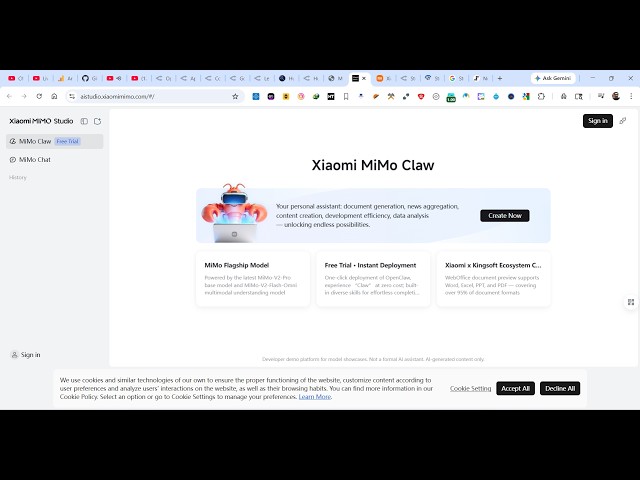
This is the website
2:03
aistudio.xiaomimemo.com.
2:06
So, here you will see uh, first of all
2:09
you can sign in up with your Google
2:10
account. It's completely free.
2:13
So, it's a Chinese based model. So, once
2:15
you register on this so, you will be
2:17
able to create full stack coding
2:19
applications by writing simple prompts.
2:22
So, once you create the account simply
2:24
select your country.
2:30
You need to set the password right here.
2:49
So, after you set the password now you
2:51
can click on create now. So,
2:59
So, it's similar to chat GPT, Claude,
3:01
Deep Seek where you actually can use it
3:04
for completely free. So, there is no
3:06
subscription cost.
3:08
So, it's just creating your account. So,
3:10
just need to wait for 2 minutes. So,
3:12
once it's created you will be able to
3:14
use this.
3:18
So, now you see this chat prompt. So,
3:20
right here you will exactly tell the AI
3:22
what sort of thing you want to generate.
3:24
So, let me say
3:26
I want to
3:28
build a
3:30
image to PDF
3:32
web app
3:33
in browser.
3:35
So, exactly you tell the AI and now it
3:39
will exactly tell you the application
3:41
right here. So, you just need to wait
3:43
here.
3:49
So, I personally try out this model. It
3:52
actually creates very impressive
3:56
coding applications in a matter of
3:57
second.
3:59
So, just write the prompt and just wait
4:01
for some time.
4:03
So, after you sign up you actually get a
4:05
free trial as you can see we have using
4:07
the free trial for 1 hour.
4:10
So, after that you need to subscribe to
4:12
the subscription fees.
4:14
But, uh
4:18
in the subscription you will be able to
4:20
use this model for completely free at
4:22
this address aistudio. sh
4:26
So, you can see that it's actually
4:28
building out this application for you.
4:30
It automatically executes this app
4:34
file as well at your local directory.
4:37
So, here it automatically deploys this
4:39
application as well as you can see at
4:41
localhost.
4:43
So, for this I think this is a file
4:46
here.
4:51
These are some of the files that it has
4:53
created. It has its own editor as well.
4:56
So, as you see the left hand side these
4:59
are the files automatically created. So,
5:02
this is the actual code.
5:03
This is a live preview.
5:06
So, this is your index.html file which
5:08
has been created. And you see this live
5:10
preview. This is your image to PDF
5:12
application.
5:13
So, from here you select a bunch of
5:15
images.
5:25
After that it will be downloaded as a
5:28
PDF. So, you can even click this
5:30
download button to download the source
5:31
code. You can even make it full screen
5:34
as well.
5:35
So, it makes it easy for you to actually
5:37
execute this.
5:42
>> [sighs and gasps]
5:53
>> So, it has its own editor. So, similarly
5:56
in the inside inside the chat prompt you
5:59
will write whatever application you want
6:00
to generate.
6:02
And instantly it will generate that
6:04
application for you.
6:05
You can click on new.
6:07
So, you can ask any sort of question.
6:09
This Memo version 2.0 will actually
6:15
So, it's by default it's a Chinese based
6:17
model. So, as you can see it returns
6:19
Chinese.
6:20
So, it's really powerful. You can ask in
6:23
any language. These are some of the
6:25
models which have it is high speed
6:27
reasoning model version 2.0.
6:30
So, these are all the models which are
6:31
there.
6:32
It's very impressive. Definitely start
6:35
using it.