Up next in 10

This Google Gemini 3 Coding AI Agent is INSANE Builds & Deploys Full Stack Apps From Prompt For FREE
Apr 7, 2026

Watch My Visual Studio Code IDE Setup Video For Fonts,Themes & Extensions
https://youtu.be/Bon8Pm1gbX8
Hi Join the official discord server to resolve doubts here:
https://discord.gg/cRnjhk6nzW
Visit my Online Free Media Tool Website
https://freemediatools.com/
Buy Premium Scripts and Apps Here:
https://procodestore.com/
Show More Show Less View Video Transcript
0:01
Hello guys, welcome to this live stream.
0:04
So in this live stream I will show you
0:06
Google has released this Gemini coding
0:09
agent.
0:10
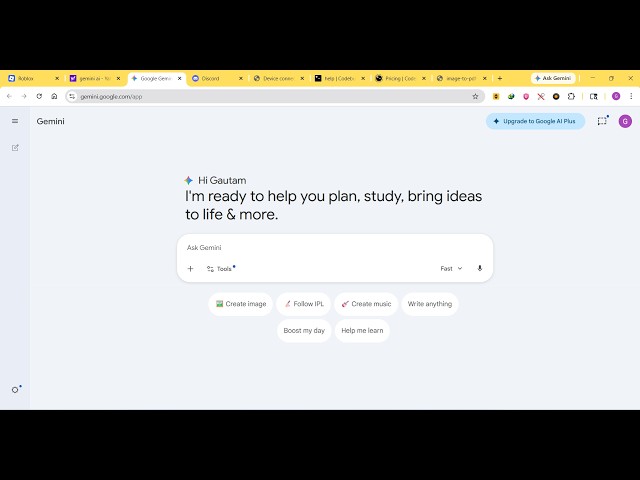
So if you simply type Gemini AI
0:13
the very first link which comes right
0:15
here. So this is an ultimate coding
0:17
agent for programmers and developers to
0:19
build out full stack coding applications
0:21
by simply writing a prompt. So you can
0:25
access it at gemini.google.com.
0:27
So it's an ultimate AI model.
0:30
So right here inside the chat prompt you
0:32
will write whatever application you want
0:34
to develop. So let's suppose I say build
0:37
a image to
0:40
PDF editor in browser.
0:43
So as soon as I write this prompt right
0:45
here, it will use the Gemini model.
0:48
As I sent out this request
0:51
automatically it will build out the
0:52
application from scratch with a lot of
0:55
description as well. It has its own
0:58
editor as well. So you can see it
1:00
started generating the application for
1:02
us.
1:05
So you can see it start it generated
1:07
this application for us.
1:09
You can actually
1:12
it has tools as well. These are
1:14
different tools that are there.
1:17
You can even attach files as well. So we
1:20
have you can even create images
1:23
music as well. So
1:28
I will simply say build a
1:31
advanced image to PDF editor
1:35
and also run the
1:37
here.
1:42
So now you can see it's automatically
1:44
running this application as well. So you
1:45
can see that
1:47
it's writing the code for us
1:49
with all syntax highlighting. So it's an
1:51
all-in-one editor similar to VS code.
1:54
So it actually generated this code right
1:56
here. You can see that in real time.
1:58
It's from a single prompt.
2:00
The speed you can just see right here.
2:02
It's very impressive as a opposed to
2:04
different AI providers. It automatically
2:07
compiles and runs the application as
2:09
well.
2:10
So you can see that you can run the
2:11
application. Just select a bunch of
2:13
images.
2:19
And then you can actually convert those
2:21
images into PDF. So you can just see it
2:23
actually constructed this full UI.
2:27
This is actual code right here. You will
2:29
see automatically.
2:31
You can actually
2:33
share this application as well if you
2:35
want to.
2:36
Click on share and you can share this
2:38
application with other people as well on
2:40
social media.
2:41
So you can see that it's an ultimate AI
2:44
provider. It generates the code.
2:46
It's called as Gemini. You can access it
2:49
at gemini.google.com
2:51
and
2:54
you can just say
2:57
build a advanced
3:00
PDF editor in browser and run it.
3:04
You can ask multiple questions. You can
3:06
make multiple apps.
3:08
Once again it will start now writing
3:11
this PDF editor for you.
3:14
So you can actually provide frameworks
3:16
as well. So you can just provide which
3:19
framework you want to
3:20
build your application. Specifically you
3:22
can mention React, Angular, View.
3:25
So you can just see here the speed is
3:27
very much impressive.
3:29
It instantly generates all the code for
3:31
you
3:32
of the application. So it actually makes
3:35
these complex applications in a matter
3:37
of seconds.
3:38
So it's backed by Google. So that's why
3:40
it's very much
3:42
impressive and automatically compiles
3:46
the application. So you can see this is
3:48
your PDF editor
3:52
which is ready. So
3:57
in this easy way guys you can build out
3:59
you can also see it has its own console
4:02
as well where it executes all these
4:04
commands.
4:05
So
4:06
you can just see here. So
4:10
these are all the code. You can even
4:12
generate let's suppose build a React
4:16
PDF editor
4:19
and run it here.
4:21
So this time we are specifically asking
4:24
to make the application in React. So now
4:26
it will actually generate a full stack
4:28
React application for us. So you will
4:30
see that.
4:45
So it's actually generating this full
4:46
stack React application.
4:57
So once it compiles it you will see that
5:02
it automatically run the application.
5:07
So it automatically fixes all these
5:09
errors if any errors take place. So it
5:11
also compiles the error automatically.
5:32
So you can see that it now
5:35
this is your React application. It
5:37
automatically fix all the errors for us.
5:46
So [snorts] definitely build this. Go to
5:48
gemini.google.com. Simply sign up using
5:50
your Google account and start building
5:52
your dream application. Simply type the
5:55
prompt and automatically all the code
5:57
will be generated for you
5:59
in a matter of time.