Up next in 10


Get the full source code of application here:
Show More Show Less View Video Transcript
0:00
Uh hello guys welcome to this video. So
0:02
Uh hello guys welcome to this video. So
0:02
Uh hello guys welcome to this video. So in this video I'll show you a AI coding
0:04
in this video I'll show you a AI coding
0:04
in this video I'll show you a AI coding editor uh which can generate full stack
0:08
editor uh which can generate full stack
0:08
editor uh which can generate full stack applications inside minutes. So if you
0:10
applications inside minutes. So if you
0:10
applications inside minutes. So if you go to Google simply type here code AI-S
0:13
go to Google simply type here code AI-S
0:13
go to Google simply type here code AI-S studio and the very first link which
0:15
studio and the very first link which
0:15
studio and the very first link which appears this is the actual IDE similar
0:18
appears this is the actual IDE similar
0:18
appears this is the actual IDE similar to cloud gemini and cursor and right
0:22
to cloud gemini and cursor and right
0:22
to cloud gemini and cursor and right here you simply write whatever
0:24
here you simply write whatever
0:24
here you simply write whatever application you want to develop and it
0:26
application you want to develop and it
0:26
application you want to develop and it will instantly build out that
0:28
will instantly build out that
0:28
will instantly build out that application and also deploy this as
0:30
application and also deploy this as
0:30
application and also deploy this as well. So first of all you just need to
0:32
well. So first of all you just need to
0:32
well. So first of all you just need to sign in and you can sign up with your
0:35
sign in and you can sign up with your
0:35
sign in and you can sign up with your Google account. Uh simply loging in and
0:38
Google account. Uh simply loging in and
0:38
Google account. Uh simply loging in and then it will provide you with free
0:40
then it will provide you with free
0:40
then it will provide you with free credits so that you can try out this
0:43
credits so that you can try out this
0:43
credits so that you can try out this platform.
1:03
So once you are there you will be logged
1:05
So once you are there you will be logged
1:05
So once you are there you will be logged in and after that just go to the editor
1:09
in and after that just go to the editor
1:09
in and after that just go to the editor and right here you simply write what
1:11
and right here you simply write what
1:11
and right here you simply write what sort of application you want to develop.
1:13
sort of application you want to develop.
1:13
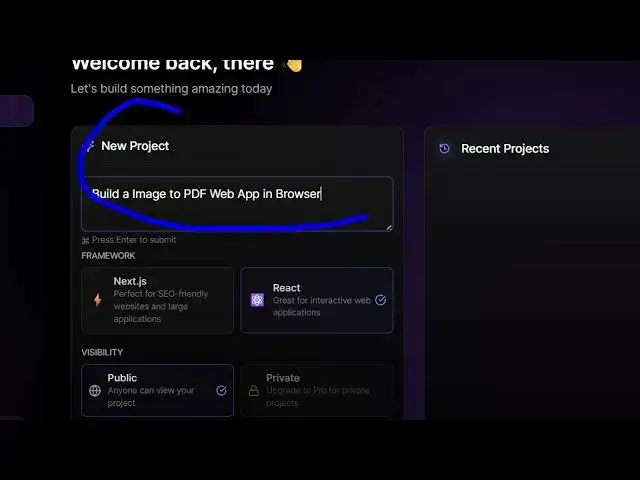
sort of application you want to develop. So I simply say build a image to PDF web
1:18
So I simply say build a image to PDF web
1:18
So I simply say build a image to PDF web app.
1:21
So we simply write this and here you can
1:24
So we simply write this and here you can
1:24
So we simply write this and here you can see the framework generate this react
1:26
see the framework generate this react
1:26
see the framework generate this react application
1:28
application
1:28
application and uh
1:44
so now you can see you basically write
1:46
so now you can see you basically write
1:46
so now you can see you basically write whatever thing you want to generate.
1:57
So right in the chat prompt right here
1:59
So right in the chat prompt right here
1:59
So right in the chat prompt right here either you can select nextjs or react
2:02
either you can select nextjs or react
2:02
either you can select nextjs or react then select the visibility and click on
2:05
then select the visibility and click on
2:05
then select the visibility and click on create project. So after you do this it
2:08
create project. So after you do this it
2:08
create project. So after you do this it will instantly build out this
2:10
will instantly build out this
2:10
will instantly build out this application and deploy this. You can see
2:12
application and deploy this. You can see
2:12
application and deploy this. You can see it is generating all the source code
2:17
and then
2:19
and then
2:19
and then automatically this will
2:22
automatically this will
2:22
automatically this will generate the live preview as well. So
2:25
generate the live preview as well. So
2:25
generate the live preview as well. So you can see it is deploying that project
2:28
you can see it is deploying that project
2:28
you can see it is deploying that project and it gives you this unique URL where
2:31
and it gives you this unique URL where
2:31
and it gives you this unique URL where the project will be deployed. These are
2:33
the project will be deployed. These are
2:33
the project will be deployed. These are all the source code files which are
2:36
all the source code files which are
2:36
all the source code files which are basically generated by this uh AI code
2:39
basically generated by this uh AI code
2:39
basically generated by this uh AI code editor and similar to claude Gemini
2:42
editor and similar to claude Gemini
2:42
editor and similar to claude Gemini cursor
2:43
cursor
2:43
cursor and instantly it will
2:47
and instantly it will
2:47
and instantly it will so we have the option right here if you
2:49
so we have the option right here if you
2:49
so we have the option right here if you see we have the option of deploy
3:03
So now it is initiating the development
3:05
So now it is initiating the development
3:05
So now it is initiating the development here. So it is showing the live preview
3:08
here. So it is showing the live preview
3:08
here. So it is showing the live preview of the application.
3:19
So you can see it has all the models
3:21
So you can see it has all the models
3:21
So you can see it has all the models right here. Clot 3.7
3:25
right here. Clot 3.7
3:25
right here. Clot 3.7 clot 3 opus you will see.
3:36
So this is your react project. So it is
3:39
So this is your react project. So it is
3:39
So this is your react project. So it is simply deploying it.
3:47
So once you click deploy here it will
3:49
So once you click deploy here it will
3:49
So once you click deploy here it will start to deploy your application.
4:06
So in this easy way you can see it
4:08
So in this easy way you can see it
4:08
So in this easy way you can see it generates your application source code
4:10
generates your application source code
4:10
generates your application source code file. said definitely try this code
4:12
file. said definitely try this code
4:12
file. said definitely try this code AI-Studio
4:14
AI-Studio
4:14
AI-Studio and it's similar to cloud gemini it
4:17
and it's similar to cloud gemini it
4:17
and it's similar to cloud gemini it basically generates all the code here
4:19
basically generates all the code here
4:19
basically generates all the code here which is
4:29
so similar way you can basically say
4:31
so similar way you can basically say
4:31
so similar way you can basically say build
4:38
a scientific calculator click Click on
4:40
a scientific calculator click Click on
4:40
a scientific calculator click Click on create project. So once again it will
4:43
create project. So once again it will
4:43
create project. So once again it will create a new project here with all the
4:46
create a new project here with all the
4:46
create a new project here with all the source code files.
5:03
It's a fairly new platform but
5:05
It's a fairly new platform but
5:05
It's a fairly new platform but definitely try this. You can try this
5:07
definitely try this. You can try this
5:07
definitely try this. You can try this for completely free.
5:19
So this is a platform called AI-Studio
5:23
So this is a platform called AI-Studio
5:23
So this is a platform called AI-Studio and definitely try this and also check
5:25
and definitely try this and also check
5:26
and definitely try this and also check out my website freemediatubes.com
5:28
out my website freemediatubes.com
5:28
out my website freemediatubes.com uh which contains thousands of tools.
#Programming
#Software