Up next in 10

How to Setup & Run CakePHP 5 Project in Browser Using Composer in VSCode Full Tutorial
Apr 1, 2025

Get the full source code of application here:
Watch My Visual Studio Code IDE Setup Video For Fonts,Themes & Extensions
https://youtu.be/Bon8Pm1gbX8
Hi Join the official discord server to resolve doubts here:
https://discord.gg/cRnjhk6nzW
Visit my Online Free Media Tool Website
https://freemediatools.com/
Buy Premium Scripts and Apps Here:
https://procodestore.com/
Show More Show Less View Video Transcript
0:00
uh hello guys welcome to this video so
0:02
in this video I will show you how to uh
0:04
set up and run a Cake PHP 5 uh framework
0:09
project how to create a brand new
0:11
project of this framework uh Cake PHP
0:14
and run it inside your browser so you
0:16
can see I'm running it locally right
0:18
here and it's a PHP framework for
0:21
building used for building web
0:23
application similar to laral Symphony
0:25
Cod nighter it's a very popular
0:27
framework so you should have exam panel
0:30
directly installed guys for this so this
0:33
comes with the Apache PHP server mySQL
0:37
database as well so I'm already running
0:39
this server you can see on port number
0:41
80 so if you haven't installed this just
0:45
install this I'm assuming that if you're
0:48
watching this video you should have
0:49
installed if you haven't then simply
0:52
download for your respective operating
0:54
system it comes with
0:56
PHP 8 you will see the latest version
0:59
just down download after installation it
1:02
actually go to the C directory it
1:04
creates a directory called as
1:08
exam this directory it will create it
1:11
and it will now contain this directory
1:13
HD dos and simply enter into this
1:16
directory and now we need to
1:18
Simply uh actually paste a command here
1:23
which will be composer command so for
1:27
this you also need the composer which is
1:29
actually a dependency manager if you
1:32
don't have composer installed so just
1:34
write composer download and just
1:36
download the latest version this is
1:38
actually the exe file for Windows I've
1:40
already installed it so there is a
1:42
command here
1:44
composer create
1:47
project and Then followed by D- prefer
1:50
disc and then Cake PHP SL app and Then
1:55
followed by the app
1:58
name let's suppose I give sample
2:04
app so you will see it this is actually
2:07
the compile composer create project--
2:09
prefer dis K PHP / app and then the
2:13
project name so now it will actually
2:15
install all the dependencies of Cake PHP
2:18
and it will hardly take 15 to 20 seconds
2:22
and after that you can just open it
2:24
inside VSS code to actually run this
2:27
project so running the project is very
2:30
simple you simply open the URL Local
2:33
Host followed by the project name
2:37
so just wait for it to
2:40
finish so once it finishes I will show
2:43
you you can
2:45
see set it is now created that project
2:51
now we need to Simply navigate to the
2:53
directory here so we simply say CD
2:56
sample
3:01
whatever is sample app 1997 this is my
3:05
app name so navigate to the folder and
3:07
just open it inside vs code this will be
3:11
the directory structure if you see of a
3:13
Cake PHP app here if I show you composer
3:16
Json file you will see we are using the
3:18
latest version which is Cake PHP 5.1 and
3:22
the PHP version which is 8.1 so now to
3:24
run this
3:25
application you simply as you are
3:28
running this exam control panel This
3:31
Server should be running in the
3:33
background and just type Here Local Host
3:37
SL sample app 1997 so this will
3:43
actually Local Host slash followed by
3:46
the project name or directory name so
3:50
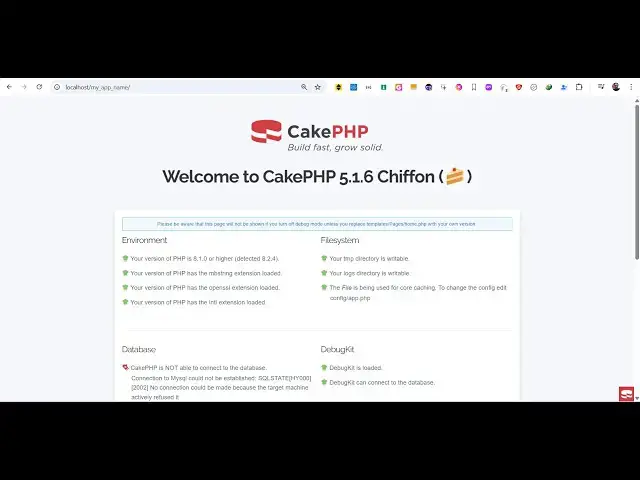
this will open the homepage of the Cake
3:52
PHP framework right here you will see
3:54
welcome to Cake PHP 5.1 so this is
3:57
actually the
3:58
homepage uh the
4:00
templates the pages are located in the
4:02
templates folder this is actually we go
4:06
to the Pages directory right here and we
4:08
only have the single page this is the
4:10
home.php page here if you want to change
4:13
anything from
4:15
here so if you make any sort of change
4:18
here let's
4:23
suppose let me delete everything from
4:26
here
4:32
so if I make make this change here
4:35
refresh you will see Hello World so in
4:39
this easy way you can edit this file
4:40
here in Cake PHP this is go to the
4:43
templates folder then pages home.php so
4:46
in this way you can edit and the changes
4:48
will be reflected back so in this way
4:50
you can set up and run a very simple
4:52
Cake PHP app in VSS code in the
4:55
browser so just follow the steps that I
4:58
showed you in this video and thank you
4:59
thank you very much for watching this
5:00
video and also check out my website free
5:03
mediat tools.com which contains
5:06
thousands of tools regarding audio video
5:08
and image and I will be seeing you in
5:11
the next video