Up next in 10


Get the full source code of application here:
Show More Show Less View Video Transcript
0:00
Uh hello guys, welcome to this video. So
0:02
in this video, I'll show you how to find
0:03
out the MAC address of your laptop or
0:06
PC. So as you can see, every computer or
0:09
laptop has assigned a unique MAC address
0:12
which is unique to every device. So now
0:14
to find out that address simply open
0:16
your command prompt
0:19
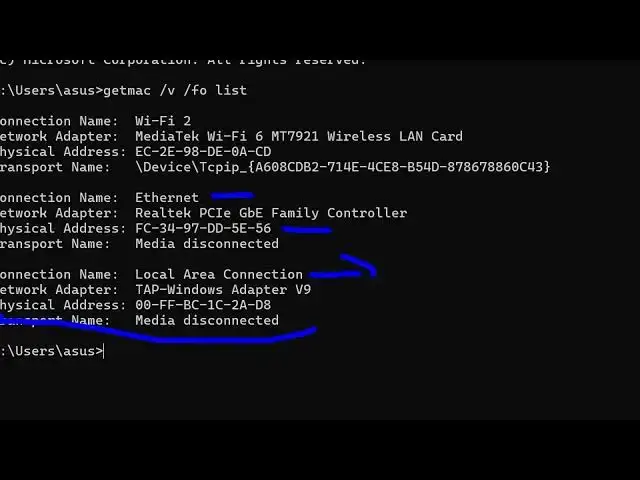
and you just need to execute this
0:20
command here which is get MAC
0:25
/ V / FO list. This is the command here
0:31
get MAC /V/ FO space list. If you just
0:37
uh enter this command, it will give you
0:40
all the MAC address of all the Wi-Fi
0:42
adapters inside your machine. So this is
0:45
your your this is my main Wi-Fi adapter
0:48
here. This is the physical address. This
0:50
is the MAC address as you can see. Then
0:52
we also have the Ethernet MAC address as
0:56
well. This is your local area
0:57
connection.
0:59
So this will list out all the network
1:02
network adapters inside your machine and
1:05
alongside with your MAC address. So as
1:07
you can see this is my MAC address of
1:09
the main Wi-Fi connection that I'm
1:12
using. So this is your MAC address of
1:15
your machine. So in this easy way you
1:17
can inside your command line you can do
1:19
this. There is one other command. If
1:21
this command is not working for some
1:23
reason you can use this ip config
1:26
command as well /all. Simply write IP
1:30
config space/all.
1:33
Simply enter it. And this also will
1:35
return the MAC address of each. You can
1:37
see this is your physical address.
1:41
This is physical address land. This is
1:43
wireless LAN. It will list out all these
1:47
adapters alongside with their physical
1:51
address as well. You can see that.
1:55
So in this easy way you can do this
1:57
inside Windows to get the MAC address of
1:59
any PC and laptop. Please hit that like
2:02
button, subscribe the channel and also
2:04
check out my website freemediattools.com
2:07
uh which contains thousands of tools.
#Networking