Up next in 10

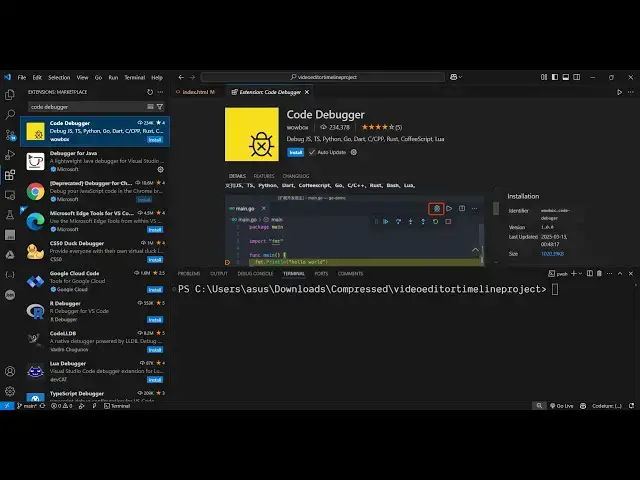
Debug Like a Pro — Find & Fix Bugs Instantly Using Code Debugger Extension in VS Code!
Mar 17, 2025

Get the full source code of application here:
Watch My Visual Studio Code IDE Setup Video For Fonts,Themes & Extensions
https://youtu.be/Bon8Pm1gbX8
Hi Join the official discord server to resolve doubts here:
https://discord.gg/cRnjhk6nzW
Visit my Online Free Media Tool Website
https://freemediatools.com/
Buy Premium Scripts and Apps Here:
https://procodestore.com/
Show More Show Less View Video Transcript
0:00
uh hello guys welcome to this video so
0:02
in this video I'll will show you a vs
0:04
code extension which allows you to
0:06
directly debug your programs directly in
0:09
vs code so this is actually the
0:11
extension if you go to extensions just
0:13
type here code debugger and the very
0:16
first extension which comes this is
0:18
actually the extension it's got almost
0:21
234,000 installs and it can debug any
0:24
language JavaScript python go do C++
0:29
rust
0:30
so just click the install button and
0:32
just activate this extension so after it
0:35
activates uh now you go to the file and
0:39
they will add this button right here if
0:41
you see this button will get added
0:45
automatically so whenever you are inside
0:47
a file this is the debug file button so
0:51
this extension adds this option right
0:53
here and now we have a simple JavaScript
0:56
program right here and we have a
0:58
function of ADD which adds two numbers a
1:01
we we basically pass the
1:04
values so we can add a break
1:07
point by clicking on the particular
1:09
section so let's suppose I add a break
1:12
point here so this break point you can
1:14
see is added right here in this line so
1:17
now as I click this button of debug file
1:20
you will see automatically the code will
1:23
be stopped right here at this line right
1:27
here and at this moment of time
1:30
the values of A and B is a is equal to 4
1:36
here and B is equal to 5 you can see
1:39
these are two local variables inside
1:41
this function add
1:43
function and now we have these set of
1:46
options available to
1:49
us we can click the stop button here
1:52
this will stop the debugging and we can
1:54
restart we can step out step into if I
1:58
step into you will see it will execute
2:00
this code and now you will see the
2:02
return value 4 + 5 is equal to 9 so this
2:07
is the return value it is showing right
2:09
here so this is how we can debug
2:13
programs in vs code and then you go to
2:16
the next line so this console log
2:19
statement will execute the add function
2:22
that you can see you can see the length
2:25
the name of the
2:27
function everything so
2:32
this is the thing guys you can actually
2:34
do this process by installing this
2:36
extension and you can stop this the
2:39
debugging by clicking the stop button so
2:41
now this will stop the debuging and once
2:44
again if you want to start from this
2:46
break point you just add the break
2:48
points right here and then see you will
2:51
see first of all it
2:53
will stop at this
2:56
location and then if I say step into
3:00
and then it will go to this
3:03
function return
3:06
value and then it will go to this file
3:09
right here so in this way guys you can
3:11
debug your programs and it is not
3:13
limited to only
3:15
JavaScript you
3:18
can also have a python file here so this
3:22
is a python file here if you see app.py
3:26
again you add the
3:28
breakpoint and then again and you click
3:30
this and then the python code will be
3:34
debugged you'll see that so it will
3:37
actually
3:40
show the local variable a is equal to 1
3:43
B is equal to 2 and again you step
3:47
into the return return value is ADD is
3:50
equal to three you can see that so in
3:54
this easy way guys you can see you can
3:55
debug your programs by just installing
3:58
this extension and you will see the
4:00
output right here so definitely install
4:04
this extension I personally use this
4:06
extension a lot to debug programs
4:08
directly in vs code and thank you very
4:11
much guys for watching this video and
4:13
also check out my website free mediat
4:16
tools.com which contains thousands of
4:19
tools regarding audio video and MH and I
4:22
will be seeing you in the next video
#Programming
#Software
#Development Tools
#Scripting Languages