Up next in 10


Get the full source code of application here:
Show More Show Less View Video Transcript
0:00
Uh hey guys, welcome to this video. So
0:02
in this video I show you a SEO related
0:04
Chrome extension for Google Chrome. So
0:06
it will find out all the broken links
0:08
inside your website. So this is the
0:10
extension name check my links and if you
0:14
simply copy this name and go to the
0:16
extensions tab. Simply type this name
0:18
and this extension will come right here.
0:21
So it will crawl your website for all
0:24
the links. simply add to chrome and then
0:27
it will find out all the broken links
0:29
for you and it will display it. So once
0:31
it is activated you can actually pin
0:33
this extension. So now this button will
0:36
show right here and now if you visit any
0:38
website simply tap on this button and
0:42
the crawling will start here. It will
0:44
crawl all the pages which are there on
0:45
this website and also it will show you
0:48
the broken links as well. So now it has
0:51
crawled all the 431 links. Valid is 299
0:55
and valid redirect is 123. Invalid links
0:58
is uh 9. So you can basically export all
1:02
this information into a CSV file. And we
1:05
can open it the CSV file right here in
1:08
the browser in the VS code.
1:12
So
1:13
these are all the valid links which are
1:15
there. You can see it crawled all the
1:17
links on my website freemediatools.com
1:21
which is a tool related website and then
1:24
also this is the 300 redirect links
1:29
and if you just want to see now the
1:32
links which are not valid you simply
1:34
click on that invalid links and you
1:38
download this.
1:41
So first of all you can access this
1:44
feature.
1:49
So you just need to purchase their
1:52
extension if you want to get access full
1:55
access. But uh this is the free access
1:58
that you get. You get uh this view all
2:02
button as well. For this you need to uh
2:05
purchase the access of this. But I found
2:08
this for free extension to be very
2:09
useful. detect detect all the links
2:13
which are there and it basically shows
2:18
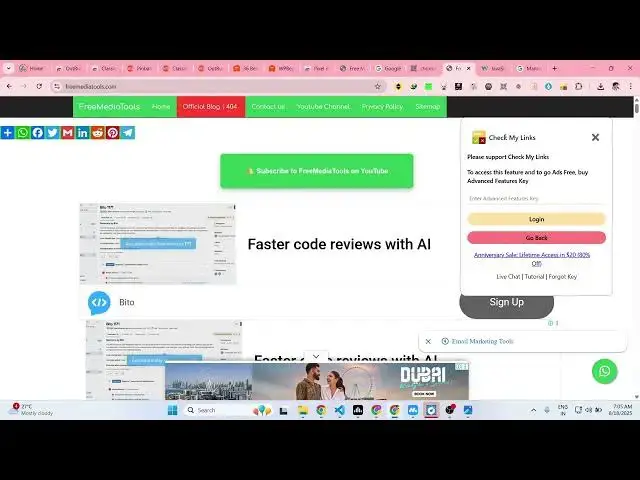
right here. This is 404. This link is
2:21
not working. So as you can see it
2:24
highlights it right here by the red tag.
2:27
So if you visit basically this link is
2:30
not working. So as soon you can see it
2:32
is showing me 404. So this link is not
2:35
working. So it basically helps you in
2:38
visualizing which links are not working.
2:40
So it is highlighting the 404 links with
2:43
a red button right here. So now this
2:46
link is a broken link. So in this easy
2:49
way this is a great extension for
2:52
accessing your SEO information for
2:54
finding out broken links inside your
2:56
website. Definitely try this extension
2:58
and in a visual way it basically shows
3:00
you all the links which are not working
3:02
with a using a uh red color. So
3:06
definitely you can remove those links
3:08
and
3:09
and these are green links which are
3:11
working and basically it scans all the
3:14
website links and shows you the broken
3:16
links and the links which are working.
3:17
So definitely try this extension guys
3:19
which is uh uh check my links and uh
3:24
thank you very much for watching this
3:27
video.