Up next in 10

Build a Next.js Full Stack Video Editor & Screen Recorder App in Browser Using Fluent-FFMPEG in TS
Mar 5, 2026

Buy the full source code of application here:
https://procodestore.com/index.php/product/build-a-next-js-full-stack-video-editor-screen-recorder-app-in-browser-using-fluent-ffmpeg-in-ts/
Show More Show Less View Video Transcript
0:00
Uh hello guys uh welcome to this video.
0:02
So in this video I'll show you I built
0:04
out a full stack nextjs video recorder
0:07
and video editor application directly in
0:09
browser. So we are running this project
0:11
locally on localhost 3000 and it's built
0:15
inside using fluent FMPG library
0:19
directly in browser. So this is actually
0:21
the full interface of the application.
0:23
So once you click the create button uh
0:26
you will have two options.
0:28
you will be redirected. So once you
0:31
click the create video button.
0:37
So I think you can see we are running it
0:42
on local host npm render. So you will
0:45
basically have two choices either you
0:46
can upload a local video for editing or
0:49
you can record the video directly in
0:51
browser. So let me choose this one to
0:54
actually edit the video. So once you
0:57
select a video file the video will load
1:00
and uh you click on save and edit. So
1:05
once you click the button the timeline
1:07
will be shown to you and right here you
1:11
can use the trimming functionality to
1:13
actually trim out the specific parts of
1:15
the video. So this is the interface here
1:18
you can trim out the link is given you
1:21
can directly purchase the source code of
1:24
the application.
1:28
So after purchase basically it actually
1:31
constructs this link automatically.
1:38
So using these sliders that are there.
1:46
So if you see these are actually
1:51
the full directory structure. Everything
1:53
is customizable. It's all coded inside
1:55
Typescript. So once you get the source
1:58
code, purchase it automatically. It will
2:00
download from Google Drive. And it's
2:03
easy for you to customize this, add
2:05
additional features as well. So if I
2:07
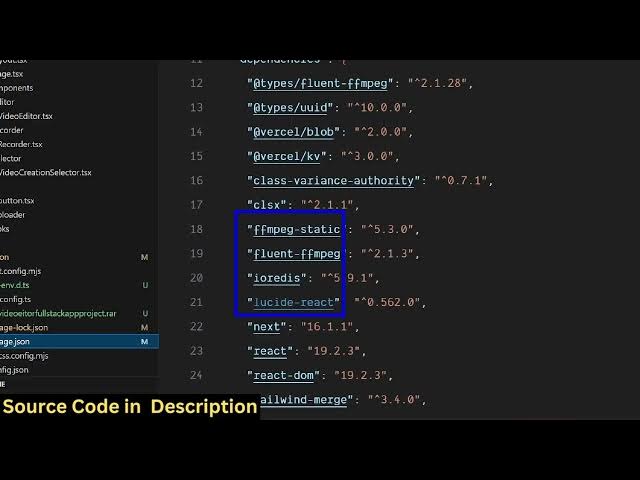
show you package.json JSON file we are
2:08
using fluent ffmpg
2:11
and uh we are using ffmppg library and
2:17
this is the latest version of next and
2:19
react as well so it's easy for you to
2:24
deploy the application as well so
2:35
uh just wait let me open it in a new tab
2:37
because I think it's
2:46
so yeah so once you click this [sighs]
2:49
you will have two options
2:52
uh this is the upload video option so
2:54
right here so all the processing
2:56
directly happens in the browser so there
2:58
is no need to upload it to a server So,
3:11
so from here you can trim out the
3:13
specific portion by using these sliders.
3:19
Then we have the second option to
3:21
actually
3:30
select.
3:38
So now the screen is recording. You can
3:41
do anything. Click on stop recording.
3:43
The video will be captured as you can
3:45
see.
3:49
The voice has also been recorded. Let me
3:51
turn on the desktop audio.
3:57
So now the screen is recording. You can
3:59
do anything.
4:02
So you click on save and edit and uh
4:06
from here
4:09
you can trim out the specific portion.
4:12
Trim and save. And
4:15
once you click the save button the
4:17
processing will directly happen directly
4:19
in the browser using ffmpg fluent fmpg
4:22
library.
4:24
So
4:26
once it completes
4:33
so it's a full stack application. The
4:35
server is also there inside this next
4:37
year application.
4:39
So after that processing is done you
4:41
basically the video will get downloaded.
4:45
So now the video is ready. It's
4:48
successfully trimmed and you can click
4:50
the download button to actually save
4:53
this video.
4:55
So the video is successfully saved and
4:59
this is the full link which is the
5:02
video. You can even view the video as
5:05
well directly in browser which is
5:07
recorded.
5:11
So it's a fullstack application guys. If
5:13
you are interested in purchasing it
5:15
definitely
5:16
the link is given in the description.
5:19
You can purchase it. So you can edit
5:23
your videos and record your videos as
5:25
well. It will give you a unique link
5:27
every time because it's the link is
5:29
generated at the server side in the next
5:31
year's application.
5:33
And same goes for editing your video
5:36
files directly.
5:42
So using these sliders you can do the
5:45
local video editing stuff as well. So
5:49
so as you can see
5:54
it's running it in the command line and
5:58
uh
6:00
you can easily deploy this application
6:01
as well. very simple.
6:11
So this is the full stack next year's
6:13
video editor and recorder project.
6:16
So if you still face any issues, I will
6:18
definitely help you in running the
6:20
application.
6:23
So fluent ffmppg if you don't know it's
6:25
a very popular package for
6:31
using ffmpg
6:33
inside
6:35
your application. So we are using this
6:37
package specifically for our next year's
6:40
fullstack video editor project.