Up next in 10

Build a 3D Flipbook Video Editor to Export Images to Video Using FFMPEG & Three.js in Browser
Mar 3, 2026

Buy the full source code of application here:
https://procodestore.com/index.php/product/build-a-flipbook-video-editor-to-export-images-to-video-using-ffmpeg-three-js-library-in-browser/
Show More Show Less View Video Transcript
0:01
Uh hello guys uh welcome to this uh live
0:04
stream. So in this live stream I'll show
0:05
you I built out a 3D flick book uh video
0:10
editor uh which actually you can
0:12
actually export your images into a
0:14
readymate MP4 video. So it's directly
0:18
built inside HTML CSS and JavaScript. Uh
0:22
so this is actually the project we are
0:24
running it on local host. Uh this is
0:26
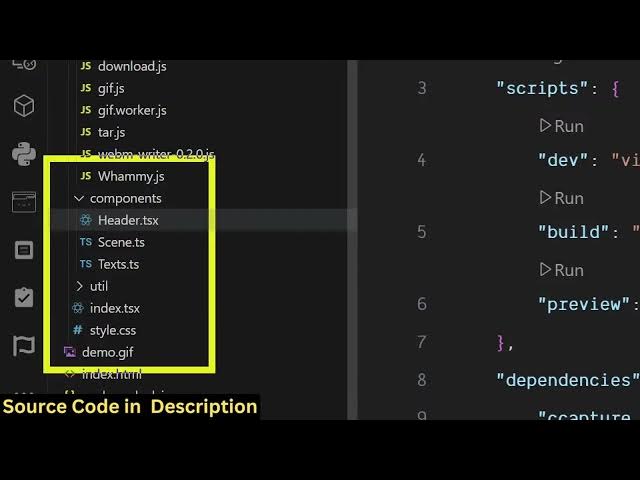
actually the full directory structure of
0:28
the overall project here. All the files
0:32
are coded directly inside Typescript. So
0:34
as you can see JavaScript we are also
0:36
using ffmpg as well. So it's a 3D flip
0:40
book video editor. Uh so as you can see
0:43
we have used ffmppg 3.js as well
0:48
for building this.
0:52
So these are the development scripts. So
0:54
we are running it on local host npm
0:56
runtime. So we have started this on
0:59
local development server.
1:01
So let me show you the actual demo of
1:03
the application. So if you're interested
1:05
in purchasing the source code, the link
1:07
is given in the description. You can
1:09
directly purchase it. So now if you want
1:12
to create a new 3D flip book, you simply
1:15
select the bunch of images.
1:21
After the images are selected, you will
1:23
basically see this is actually the flip
1:25
book. So you can actually see
1:30
this is actually a kind of a book where
1:34
all the images will be shown. So as you
1:36
can see you can flip all these images
1:40
and then we also have this button of
1:42
start recording. So as soon as you click
1:44
the button of start recording, the
1:46
recording will start and now you can
1:49
flip the pages
1:59
by just clicking it and automatically
2:02
the video will be created by
2:07
flipping the pages inside a 3D flip
2:10
book. So it's kind of a flip book. So
2:12
once it adds you can click end recording
2:15
and your video will be saved
2:16
automatically and it will be downloaded
2:19
and if you see now the video will be
2:22
created for you automatically as you can
2:25
see.
2:32
So this is
2:35
the full video which is created.
2:39
So it will be created downloaded as MP4
2:43
file here.
2:57
So if you're interested in this project,
3:00
the link is given in the description.
3:01
You can directly purchase the source
3:03
code. After purchasing the source code,
3:05
you will be redirected to Google Drive
3:07
where you will get the source code for
3:09
you. So as you can see, we have used
3:11
FMPPG
3:13
uh 3.js as well. So these are all the
3:17
libraries that we have used. So it's
3:19
actually coded inside TypeScript.
3:28
So once you select the bunch of images
3:31
you can actually it is kind of a flip
3:34
book where all the images will be there
3:37
as you can see that
3:50
once you want to export it to a video
3:52
you click the start recording button.
3:56
And now the recording will start because
3:59
I'm doing it as a live stream. So that's
4:01
why it is consuming more resources as
4:03
well. So once you run this application
4:05
inside your own local machine then there
4:07
is there will not be a delay because I'm
4:10
doing live stream as well. That's why it
4:13
is showing you some delay. But once you
4:16
run this application inside your local
4:18
machine, it will not be having any kind
4:20
of delay. So automatically the video
4:23
will be created and downloaded as a MP4
4:25
file. So you will see that the actual
4:30
video will look something like this
4:33
because I'm also doing live stream as
4:35
well. That's why you are seeing some
4:37
kind of delay as well because as you can
4:40
see we are also doing OBS studio
4:43
directly.
4:45
It is consuming resources as well. So
4:50
this is the end result you will get. You
4:53
will it's a fantastic application.
4:56
If you are interested in this uh the
5:00
link is given in the description.
5:03
It's directly coded inside Typescript.
5:19
So this is actual full directory
5:21
structure of the project.
5:23
If you still face any issues, you can
5:25
contact me
5:27
after the payment. If you still face any
5:29
issues, I will definitely help you to
5:31
run this project.
5:49
So for building this we have used uh
5:55
this fmpg web assembly library. As you
5:58
can see, we have also used uh
6:03
3.js which is actually a JavaScript 3D
6:06
library for actually building out 3D
6:10
applications directly in browser. So we
6:12
have used these two libraries for
6:14
actually building this 3D flip book
6:16
editor which looks like this.