live_tv
Livestream Starting Soon
00
Hours
:
00
Minutes
:
00
Seconds
Up next in 10



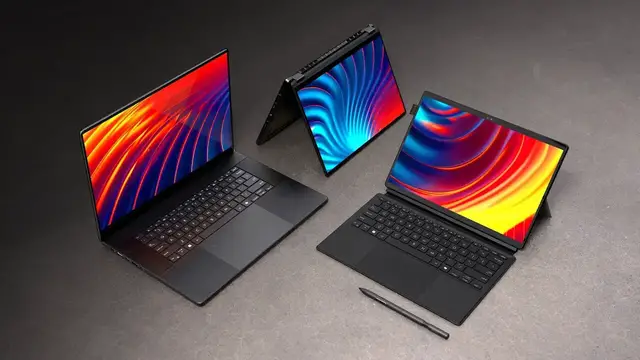
The latest ProArt Series laptops from Asus. ProArt P16, ProArt PX13, and ProArt PZ13 - https://asus.click/proart_ut
Thanks to ASUS for partnering on this episode.
FOLLOW ME IN THESE PLACES FOR UPDATES
Twitter - http://twitter.com/unboxtherapy
Instagram - http://instagram.com/unboxtherapy
TikTok - http://tiktok.com/@unboxtherapyofficial
Show More Show Less View Video Transcript
0:00
Got the brand new ProArt laptops
0:02
and the one in front of me here is unique because it's running Snapdragon. I've got two more over here
0:07
so I'm excited to check out all the new stuff. This one also seems to include a Pen 2.0
0:13
so obviously we're going to have Pen input. And my understanding about this model in front of me
0:18
is that this one is gonna be a kind of convertible situation
0:22
tablet and laptop experience. Well, to start with, this portion is extremely light
0:29
So this must be the tablet piece. 16 by 9 aspect ratio, front facing cameras, volume up and down in the top right corner
0:39
Dolby Atmos speakers and they are stereo, one on each side. We have these pins for docking
0:46
Type C is over here and then we have a couple of other ports which are covered in order to be protected from the elements I suppose
0:54
There's a full size SD card slot and another type C port
0:58
Also in the package there must be some sort of keyboard component and there it is
1:02
We have our keyboard section with this green color and then we've also got the top portion
1:09
which looks like it also behaves like a stand and it has an area for storage of your pen 2.0
1:17
And this is a fairly rigid stand so it should be able to hold in a number of different angles
1:23
Now this piece here should, yes, snap together magnetically and then the secondary portion
1:31
so it's like a two-piece case, will just slap on like that. So it's a two-stage kind of setup
1:38
You'll lift up the tablet and then you'll prop it up at whichever angle you like using this kickstand
1:46
which actually moves all the way down to there, which could be useful for drawing and pen input
1:52
When it's closed, that's what the whole package looks like. Fairly large trackpad, clicky
1:58
And because the keyboard sits flush with the table, there's no flex whatsoever
2:04
And surprisingly, some decent key travel. You think because it so thin but the keys pop up quite a bit And then the entire keyboard section is recessed our pen and the pen does include some extra nibs of a different size and as far as charging you
2:21
unveil the type c charge port by lifting up the back portion a couple of buttons on the pen also
2:28
and the entire thing will slide into the side here magnets are cool but you get an extra sense
2:35
of security by just having it inside of this compartment. It's not gonna pop out or fly out most likely
2:42
Now this external case has a nice texture to it. I like that they put these bumps
2:46
so you just have a little more confidence when you grip it. And the whole thing creates a fairly portable package
2:52
It's featuring a 13 inch 3K 16 by 10 Lumina OLED touchscreen
2:58
And IP52 will actually give you some water resistance on this device
3:01
It's measuring in at an ultra slim at nine millimeters, and the weight is under two pounds at 1.87 pounds
3:09
So if you're looking for something flexible, versatile, this is gonna be your offering
3:14
Of course, it's part of the ProArt line, so the idea here is professionals
3:18
creative types that are making things using their devices. If you want that kind of new form factor
3:24
plus you're going to get those battery advantages of having a Qualcomm chip inside of a device like this
3:29
Let's check out the next unit here. We're going up in terms of scale
3:33
Oh, this is gonna be very thin and light. Ooh, look at that matte black finish
3:41
I really like this subtle branding that they've gone with just in the corner, nothing in the central portion
3:47
This feels quite sleek and stealth like. Power switch, micro SD, USB-A, type C, power
3:56
full size HDMI is there, another type C and og audio. Single finger display lift
4:04
Ooh, super solid. And the keyboard, surprisingly similar. Maybe slightly more travel
4:10
but a very similar style to the convertible device. This display, oh
4:16
We have our tent mode. Obviously, we have our full-on tablet mode
4:20
We have our touchscreen. We have our pen input. So now we have two options for versatility I mean I suppose the advantage there is that you able to remove the tablet independently so you have the most portable scenario
4:34
But the advantage here is you're getting an integrated solution, more laptop-like, but then with convertible features
4:42
This has another large glass trackpad, and this actually integrates their wheel as well
4:49
So this is going to be able to control various aspects in certain creative applications, well really any applications
4:55
In this case, the Pen 2.0 included as well as a USB-A to Ethernet adapter
5:03
You can configure this system with up to 32 gigs of RAM. The PX13 is coming in at 1.3 kilos and 15.8 millimeters
5:12
13.3 inch display, 16 by 10 aspect ratio at 3K pixels. So the peak performance is 115 watt TDP
5:20
So you're going to be able to do all of your intensive tasks and then even do a little bit of gaming using that RTX 4070
5:26
Okay, last up, the big boy. Oh, definitely larger and it comes with a backpack
5:37
Wow, I kind of want to start with this backpack. Like this is a high quality backpack
5:42
Look at this thing. metal clasps and like thick straps. You can carry it like this
5:48
Now you're used to having this happen like in the gaming space where you would get
5:52
like a gaming backpack or something with ROG. To have it on a ProArt side with something
5:58
that sort of like matches the aesthetic is a cool idea. So the ProArt customer now gets something
6:05
like the gamer treatment by getting the backpack included, which is cool
6:09
All right, so here is the big boy ProArt ProD. device so this is going to come down to portability versus screen size and resolution
6:21
since we have the bigger display to start with in the 16 inch we now have speakers that are right
6:28
on the deck six surround speakers to enhance the audio experience not just for entertainment but
6:34
also for communication this just looks very smooth and sleek the display traditional laptop display So it not doing any kind of funky twisting around but that wouldn really make sense for a 16 inch laptop anyways over here we have
6:49
power full-size hdmi thunderbolt usb-a og audio and then over on the other side full-size
6:56
sd card slot useful another usb-a and then type c connector there as well and once again included
7:02
inside my retail pack, the Pen 2.0. So we're talking about a touchscreen still
7:08
even though this one doesn't flip all the way around, we can reach up, touch the display
7:12
and obviously draw on it as well. So you go ahead and let me know down in the comments
7:17
which of these devices is the most compelling to you? Do you like the traditional laptop format in the P16
7:25
with just a big, bright 4K display? Would you gravitate towards the scale
7:31
kind of as a desktop replacement. Of course, you could feed this out to an external monitor
7:35
but obviously you give up a little bit of portability. Or what about the in-between
7:40
This convertible right here, kind of like a laptop, but also giving you some of that tablet functionality
7:46
by flipping all the way around or even going into tent mode for media consumption
7:51
or possibly for collaborating during a meeting. In this case, you're still having that 115 watt TDP
7:58
You're still having RTX 4070. So even though this is scaled down and lighter, you're able to still do those intensive tasks and do some gaming if you choose to
8:08
Or would you go for the most convertible of the bunch? And in this case, be one of the first to purchase these new Snapdragon chips running Windows
8:18
So over here, obviously, we have the versatility of this stand, which can stop at basically any point
8:24
We've got our pen input, but that's the case across the board. And then we have our removable stand
8:28
so we can just take that off and have something even lighter
8:32
And what's cool about their case design is the second piece can stay on and give you a little bit more versatility with just the tablet
8:39
So now I have a kickstand, but I also have a little bit of protection on the back
8:43
and a place to put my pen, even if I don't want to carry the keyboard
8:47
So anyway, let me know in the comments which of these three you would select and why
#Computers & Electronics
#Computer Hardware
#Laptops & Notebooks
#Gadgets & Portable Electronics
#Virtual Reality Devices