live_tv
Livestream Starting Soon
00
Hours
:
00
Minutes
:
00
Seconds
Up next in 10



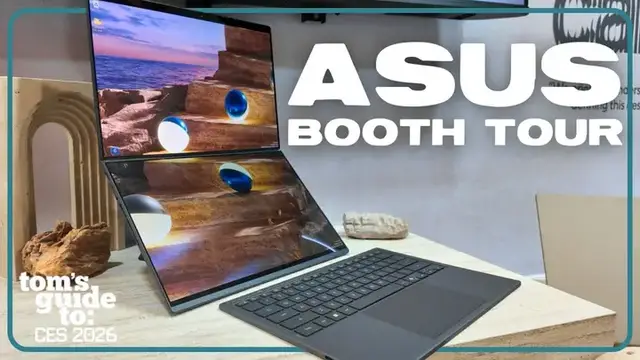
Phil takes you through the latest laptop tech at Asus' CES 2026 booth! In this episode of Tom's Guide to CES, we take you hands on with the brand new, Ceraluminium A16 laptop that weighs in at just barely over 1 kilogram, the latest dual screen Zen Book Duo with magnetic keyboard and integrated kickstand, and the ultra slim S Series laptops with stylish new details. We also check out the updated ProArt laptops with super color accurate Asus Lumina OLED displays and the nifty programmable Asus Dial for creators, plus the eye-catching GoPro branded Pro Art laptop for adventurous creators.
Show More Show Less View Video Transcript
0:00
Hey everyone, I'm here at the ASUS booth here at CES 2026 and I'm here with my friend Sasha
0:04
He's going to be running us through what's going on here with ASUS this year. And what would you say is some of the philosophy when it comes to ASUS's thinking of when they're making products
0:12
What are they trying to accomplish? So we're like the opposite of other brands that are maybe one size fits all, right
0:19
So there's some companies who try to make the laptop for everyone and it's great and everything
0:25
But it isn't specifically tailored for one particular thing or use case
0:28
And we're the opposite. We try to do all sorts of different series tailored specifically to the needs of those kind of users
0:35
So we have devices with dual-screen laptops, dual-display laptops. We have some super-slim laptops, some super-light-weight laptops, some super-long battery life
0:44
So that's kind of our philosophy. So whatever your use case is, we have the perfect product series just for you
0:50
Cool. Well, I'm excited to check out the booth. Let's go have a look. Thank you, Sasha. Thank you
0:58
I'm here with Napoleon from ASUS. Napoleon, thanks for doing this. Thank you, Philip
1:02
And we're checking out the ASUS ZenBook Duo. So run me through it
1:06
What's going on here? All right, so this is our newest iteration of the ZenBook Duo
1:10
And this is basically, it has been created with maximum productivity in mind
1:15
It looks like a normal laptop. You can carry it and use it as normal. But then the secret is, here we have an integrated kickstand
1:22
You just prop it up. You take off the keyboard. And it automatically detects
1:29
And you can start using it as a second screen, up and down layout. Super simple, super intuitive
1:35
And this allows you to have that dual screen productivity, no matter where you go
1:39
We call this the dual screen mode. We also have desktop mode
1:43
Some people prefer a left and right layout. So what you do is that you just tilt it to the side
1:48
and it automatically becomes your side-by-side layout just to use. Because you have these two displays, are there any cool features
1:56
when someone might want to work with a coworker, for example. You're exactly on point
2:00
So when you push this back, the system automatically detects that. So you can do, for example, you can duplicate the screen
2:08
So if we were coworkers, we're discussing something, we can have the same screen, and we can collaborate together
2:15
Once we have this, we have this stuff that comes out. So I can highlight this, we can talk about it
2:21
and it just facilitates discussion. And there's practically no latency. It's like an immediate as soon as I'm doing it. Exactly
2:28
Okay, so you've got the keyboard, you've got your layout, and it's time to travel
2:32
How easy is it to just get back into being on the go You good to go just like that So this is one of the very small things that people might not think about
2:44
which I think Asus does absolutely crush it, which is how the second screen is implemented
2:51
The kickstand and the keyboard, they are all integrated. So when you're transporting it, literally
2:56
you just close it straight into my back, and you're good to go. All right, so now we're here with the A-Series
3:03
There's an A-16, so you guys have a 16-inch version of the A-Series now. And looking at it here, it looks like you guys were able to make something really lightweight
3:12
but you kept in fans. Yeah, no, not just fans. We kept in everything
3:17
Okay. You know, a lot of brands, they can make, you know, really thin laptops
3:21
but you can see across the board that they start to sack themselves. As you said, right, they start to remove fans
3:26
They start to remove speakers, ports, and whatnot. But I think what makes it special and really makes Asus design and engine really shine is that we have kept everything that is essential inside, right
3:39
So that we are not sacrificing on anything performance or any user experience at all
3:45
But we are still able to make one of the thinnest and one of the lightest devices that there is out there
3:52
The ZenBook A14 is just under one kilogram, while the ZenBook A16 is just a little bit over one kilogram
3:59
So you can touch it, you can grab it and feel it. Yes. It's almost like air. It really is almost like air. Wow
4:05
Yeah, so even the bigger screen model is really lightweight. Wow. And the reason we're able to do that is because of seroluminum
4:13
Okay. So seroluminum is the newest and greatest when it comes to material innovation from Asus
4:18
You can touch it and you can feel it. The ZenBook A16 and A14 are fully made with Ceraluminum
4:24
Wow, okay. And what Ceraluminum is, a process of ceramization to aluminum that gives it the best benefits of both ceramic and aluminum
4:35
Okay. Yeah, so what do I mean by that? So it is tougher while being lighter than aluminum
4:42
It is anti-wear, so it has a really nice touch. It is matte, so it is anti-smudge, and it's also scratch-resistant
4:51
And all of this goes into what makes this device so special, which is ultimate portability
4:57
So when you put it into your backpack, you don't need to worry about it getting scratched or damaging it
5:03
It is impact so when you out and about you don need to worry about putting your backpack really lightly so it doesn rumble it or anything And on top of that it carries the Snapdragon X2 Elite Extreme processor with 18 cores which is ultra efficient
5:24
All right, so moving on, we have the S14 and the S16. These look pretty slim. Is that where the S comes from
5:31
Yes, it does. In fact, a lot of the great features that we talked about in the Sembo 8 series carries over to the Sembo S series
5:38
So for instance, the Cerro Aluminum we're talking about, we can see it in the cover, so it has a really nice touch to it
5:45
But it goes another notch. You can see a lot of subtle detailing
5:51
So for example, you can see on the Asus Zenbook logo, there's a laser which gives it a really nice shine
5:57
When it comes to its hit sync, it uses a hexagonal kind of arrangement
6:02
which makes it look very elegant while not sacrificing anything about functionality
6:09
So the Zenbook S series does have a touchscreen, while the A series does not have a touchscreen
6:15
Aside from that, there is a difference when it comes to the CPU
6:19
The A series that we mentioned, it carries a Qualcomm Snapdragon CPU
6:23
while the Zenbook S14 series carries an Intel Car Ultra Series 3 processor
6:30
with up to 50 tops when it comes to NPU. While the Zenbook S16 carries an AMD Ryzen AI 400 series processor
6:39
which is also up to 50 tops. So this essentially makes these two join the Co-Pilot Plus family as well
6:47
So you get all the AI goodies that really help to make your productivity go into another level
6:52
The Sandbook S series is a representation of what we call functional aesthetic
6:58
Design with a purpose. Exactly. Yeah, yeah. It doesn't just look pretty, it's doing something
7:02
Exactly. When I spoke to Sasha earlier, he mentioned that ASUS is keeping multiple consumers in
7:11
mind, the different types of people, thinking of how they can make things more unique to
7:15
their use case. So we're over here. This is the ProArt series
7:18
Our mission is basically to bring creation accessible to everybody because in this digital day and age, everybody's a creator
7:28
My mom, my grandmother, they love to take photos, videos. Like goldfish
7:31
You're a goldfish. They like to take videos of everything and send it to their friends and family
7:36
So we want to bring a solution for them to be able to do this easier
7:41
So we have packed it with all of the features that creators care about the most
7:46
And one of those things is the display It has the Asus Lumina OLED display which is Pantone validated so it has really good color accuracy and it also covers 100 of the DCI P3 color
8:00
gamut so you can you know that you're playing with all the colors possible
8:05
that you want to use. Aside from the display we have we have really great
8:10
performance so that you can really focus on your creative instead of you know
8:16
waiting around for your files to import, things to render, export, yep, yep
8:21
Exactly. We have some really neat creator-specific applications. So, for example, if you can see over here
8:28
we have the Asus dial. Okay. So the Asus dial, you can connect it
8:32
with a lot of different settings that you want. And you can even integrate it with
8:37
for example, Photoshop or Premiere. So this essentially becomes your scroll wheel
8:41
or your multi-track editing or your color dial, and whatnot. And the sky is the limit. And this is touchscreen as well? This is all this is
8:51
touchscreen yeah. The ProArt PX13 is a two-in-one so it can transfer into tent mode which you can
8:58
see here or or you can transfer into a tablet and you can use a stylus and just you know and it is
9:05
a two-in-one. And then also with the Asus ProArt laptops we have a GoPro editions. Cool new design
9:10
finding ways to collaborate the two brands together. It seems like a collaboration that
9:14
that makes a lot of sense. And you're exactly right. That is the reason that we have partnered together with GoPro
9:20
because both of our brand missions is to bring creation and creation tools to the masses
9:27
so that it facilitates and makes it easier for people to be able to capture what they've seen
9:32
and share it around the world. So the nature of the collaboration just makes sense
9:37
There is no brand that is more synonymous with adventure and sharing that footage than GoPro
9:43
Nice, so GoPro makes it easy to capture content, you guys make it easy to put it all together
9:48
That is exactly right. Great. As simple as that. Napoleon, thank you so much for walking me through all these great products coming this year from ASUS
9:57
Of course. Yeah, some pretty great stuff. I think lots of options for basically anyone
10:03
I mean, we covered my goldfish, right? Someone's grandma, I think we talked about. Yeah, so that's great
10:07
Yeah, so for everything else with CES, stay right here to Tom's Guide
#Computers & Electronics
#Computer Hardware
#Laptops & Notebooks
#Consumer Electronics