live_tv
Livestream Starting Soon
00
Hours
:
00
Minutes
:
00
Seconds
Up next in 10



Stick around until the end of the video for my first Q&A session!
GPD Pocket Laptop (USA Link) - http://amzn.to/2wj1e0B
GPD Pocket Laptop (International) - http://geni.us/d0CZ1A
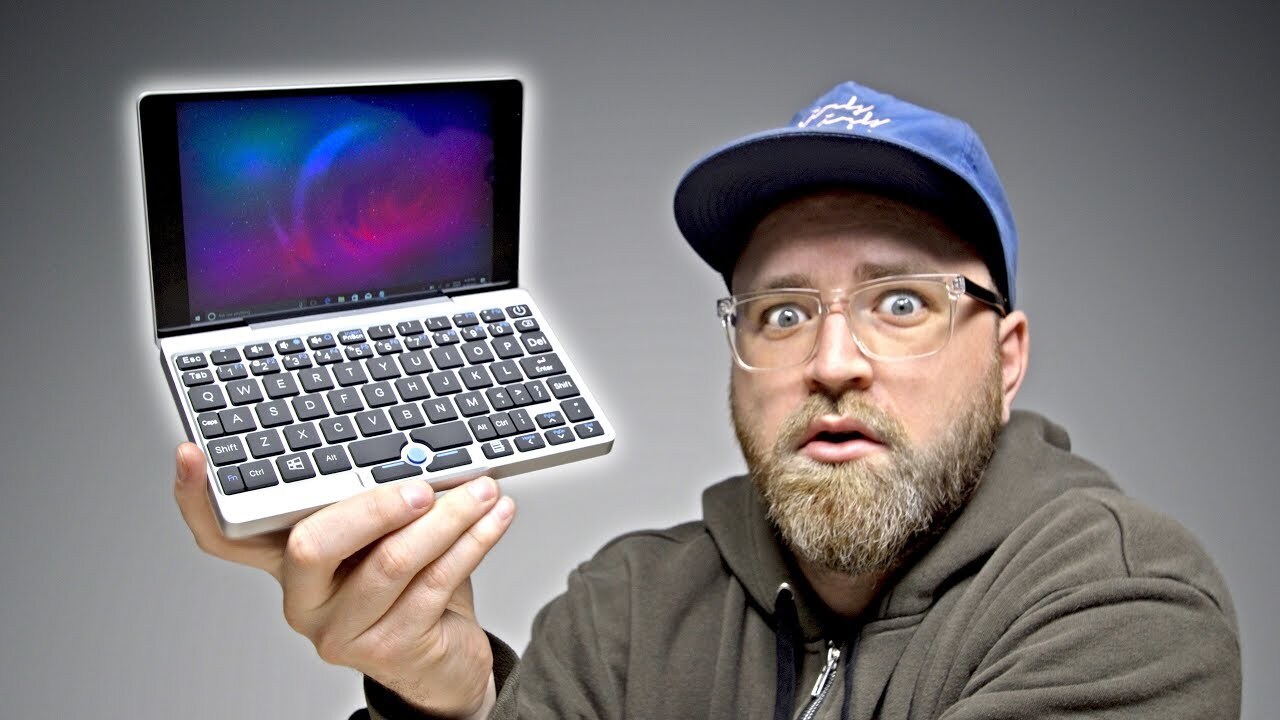
The GPD Pocket is the smallest laptop I've ever looked at. That said it runs a full Windows 10 installation. The keyboard (as expected) is cramped but the display is nice. It runs an Intel Atom processor so it isn't the most powerful thing in the world but you wouldn't be buying this laptop for processing power anyway. I see the GPD Pocket as a media consumption device primarily with light productivity capabilities. Either way, this is the first laptop I've ever put in my pocket.
FOLLOW ME IN THESE PLACES FOR UPDATES
Twitter - http://twitter.com/unboxtherapy
Facebook - http://facebook.com/lewis.hilsenteger
Instagram - http://instagram.com/unboxtherapy
Google Plus - http://bit.ly/1auEeak
Show More Show Less View Video Transcript
0:00
Today I'm going to show you what might be the world's smallest laptop
0:04
It's from a company called Gamepad Digital. As you can see on the side it says pocket
0:09
So they're trying to imply that you could fit this thing into your pocket. You'd have to have a rather large pocket and I don't know how comfortable that would be
0:16
Nonetheless this thing was incredibly popular. In fact it has raised I believe close to 3.5 million dollars on Indiegogo
0:24
So people are obviously interested in tiny laptops. So let's go ahead and jump inside the box and see what this thing is all about
0:31
So, this looks like the power brick, which you can already tell
0:35
It's about the size of some quick charge bricks for smartphones. And you can see here that you have a USB type C connector
0:43
Okay, cool. Also in here, a USB-C cable. Look at that! Look at that little guy! It's like a slightly bigger Nintendo DS XL
0:53
Whoa! Made out of aluminum, a solid aluminum brick there. Now the version I have I believe is running Windows, but they do sell a version with Linux as well
1:05
And the price is somewhere around 500 bucks, which sounds kind of expensive for something so tiny
1:11
but maybe that's the reason you want it. So far, first impressions here on build quality, very, it's almost MacBook-esque
1:19
Ohhh. That's kinda funny. Look at that. Look at this little guy
1:24
It also happens to have a touchscreen so you can reach up and immediately interface with it
1:28
Alright, so as mentioned, USB 3 standard headphone output, HDMI output of the Micro HDMI variety
1:37
and the USB type C connector which will also be used to charge the unit
1:41
Let's go ahead and boot this up. Alright, so it's loading up Windows right now. Windows 10. It's not the brightest screen I've ever seen
1:48
You can tell like with the white background you can kind of get a better sense for how bright it's gonna be
1:52
So the display is actually 1920 by 1200 and that's in a 7 inch form factor
1:58
Alright so here's some of the specs on this unit specifically. It has a quad core 1.6 gigahertz Intel Atom processor
2:06
8 gigs of RAM. 128 gigabytes of storage. This is Gorilla Glass 3 on the display
2:12
I mentioned before it has active cooling. The weight is under half a kilogram at .480
2:17
And they're claiming a 12 hour battery life with this lithium polymer battery that's inside
2:23
Alright, let's load up a video here and get a sense for how it sounds and what the video looks like
2:28
I load up an unbox therapy video Let just make sure I running it at a high resolution That a pretty nice looking display right there Now let go ahead and hear the speaker while we at it Seems to be muted right now Oh there we go This little guy will plug in to where your cord normally would
2:45
plug in and you will pair up to the adapter. Other ways to do that as well from various brands. So
2:50
here's an adapter. Turn it down a few notches. AirMod and they're focusing on the Bose products
2:55
So the QC25 and the QC15. I mean, the speaker works, but oh my goodness
3:02
It's quite tinny. And of course, you have the headphone jack. You've also got Bluetooth on here
3:06
So that said, though, I am impressed with the visual here. The actual video itself at 1080p, I mean, it's probably above my expectations for something so small
3:15
So here's the thing. You're probably thinking, okay, so it has a nice display
3:18
It's got good battery life. So it's a little, maybe it is. Maybe I can just watch videos on the go
3:24
But then why do I need to I mean my I already got a phone it has a huge display on it
3:28
I can watch videos on there But I think the difference here is that this form factor allows it to be propped up by default no special equipment
3:36
Just immediately in a form factor where you can enjoy it while you're eating lunch Whatever it is it should be on an airplane you have limited space pop this thing open and because of the hinge
3:44
You can get the exact right angle to enjoy your content now of course if that was all it was you wouldn't have this keyboard
3:50
You wouldn't have a full PC So I think what's happening here, maybe it's a multimedia focus for someone, but can they get a little bit of work done
3:58
I suppose that's possible, but with a keyboard this tiny, I'm not sure how that's gonna work out
4:03
So let me do a quick typing test here. Now one thing that's strange, I mean you do, your hands bump into each other
4:08
This little pointer thing, obviously nowhere near as effective as a trackpad
4:13
Now there's no room for a trackpad, how could they possibly have gotten a trackpad in there
4:17
Maybe you could carry around a tiny little mouse, that's possible. And then of course you have the aspect of the touch screen. I could reach up and touch it, but that seems so weird on such a small screen
4:27
Like look at this. My finger is bigger than any possible touch point. Like look at that. You have to be pretty precise
4:33
Alright, let's check out this pocketability real quick. It's going to my left pocket here. Regular pair of shorts
4:39
Oh my goodness, it's gone. It is truly pocketable. Now the question is, could I use this just kind of straight out of the pocket with my thumbs
4:47
That's something I was curious about. That backspace lines up pretty well
4:51
Let's say I wanted to type unbox therapy, UNBOX, I can still thumb type
4:57
So maybe the real move there is to just use touch and your thumbs and now it's a truly portable device
5:04
Wow I can reach everywhere in there Look at that They really surprised me on the fit and finish Plus it technically does fit in your pocket and I can say that I ever put a laptop in my pocket I don think I going to shift too many people away from a dedicated laptop as a whole
5:18
But hey, this might be useful to you. Plus, remember, the power brick is tiny too. It's like a smartphone power brick
5:24
That's your whole travel setup right there. Plus, let's be honest, your phone is probably already USB Type-C, so now it's one charger for both
5:31
There are sacrifices you're making here in exchange for mega portability. For something that they've said is pocketable
5:38
Full Windows 10, I suppose on it's own is kind of impressive
5:42
There are plenty of things you can do with Windows. I mean you can do almost anything with Windows
5:45
And that's kind of a step up on the other things that might fit in your pocket. Like a mobile device, a smart phone and so on
5:51
There are some things that you're still incapable of doing on those platforms. So as far as set of functions that you could fit in your pocket, this might represent it
5:59
That said, you might be sitting there thinking, okay, it's around 500 bucks
6:03
I mean, I could get a laptop for 500 bucks. And yes, I have to carry a backpack possibly or a laptop sleeve
6:09
But I'm going to type better. I'm going to get a bigger display that I can watch things on
6:13
I'm going to get better sound. So yes, it's for a very specific group of people who need ultimate portability
6:20
and possibly the versatility offered up by Windows. All right, so thank you very much for sticking around to the end of the video
6:27
Today we have a special segment. I don't know if this goes over well. We might continue this segment
6:33
It's a Q&A section where you guys can ask me questions about anything
6:37
I guess maybe related to a previous video which was recently uploaded or maybe related to nothing at all that I've ever done
6:45
And I don't know it's up to you you ask a question I answer it so I went out on Twitter last night and I said hey at the end of tomorrow's upload
6:52
I will be including some of your questions. I'll probably pick, I don't know, three
6:57
And then I'll answer them and maybe we'll do it all over again if it goes well. So here we go
7:01
Let me load up my Twitter here and see what some of those questions were. All right, here's one from Jigar Trivedi
7:08
What do you think your audience's age group is? Now, this one's actually easy to answer because I have ytics available to me
7:15
where I can check and see what the age group of viewers is
7:19
and the majority are between the ages of 18 and 30, somewhere in that range, and mostly male
7:26
In fact, I think the viewership is close to 95% male. So if you're not in that group, if you're one of the 5% of females watching
7:34
say hello in the comments down below. You part of a very special group the 5 Thank you Okay here another one RHL asks what was your first smartphone and this is kind of tough because I not really sure what constitutes a smartphone
7:49
But I did have a palm trio. I don't know if you remember that device. It had the keyboard on it
7:54
It was kind of like a blackberry the interface was similar But of course was a palm product had that antenna that stood up at the top now at the time
8:01
There are only there's a handful of applications none of which were really that great
8:05
But it did sort of feel like the future and then after that believe it or not I had an Android device before an iPhone
8:12
I had the very first Galaxy S. Maybe there was an iPhone in between there. Okay, here's a question from
8:18
C.S. Sprinkle or C.Sprinkle and the question is what is the most mind-blowing product you ever had on your channel
8:26
This is obviously tough because there's been so many I don't know maybe like
8:30
1500 videos or something like that it's really hard to pinpoint over the entire
8:34
period of the channel the most mind-blowing but there have been many and a couple come to mind immediately especially a fairly recent one which was
8:42
the DVLA Phantom speaker if you haven't seen that video you definitely need to
8:46
go and check it out it's a Bluetooth speaker with a very unusual design it's
8:49
about this big can sit on a table and can link up to others it's very expensive but it will blow you away if you sit this closer you're just like how
8:57
How is that sound coming out of that package? It is truly mind blowing
9:01
Then the other one that comes to mind is a little bit older. It was the unspillable cup
9:05
This is a cup, it's like a regular travel mug. It has some technology on the bottom that stops it from tipping over
9:11
You can slap the thing, alright, you can knock the thing. Of course, if you really want to knock it over, you can
9:16
But it's very difficult to do so. Certainly if it was accidental, it would likely stay standing up
9:22
So if you have a hot coffee in there, if you like to have a drink near your computer or something like this
9:26
You can't knock it over. At the time, I was amazed. You should go check out that video as well if you want to see me attempt to knock over an unspillable cup
9:33
I end up just slapping. Anyway, I don't want to spoil it. Go check that out. Alright, so there you go. A little trial run of the end of the video Q&A
9:41
Now, you guys can ask me whatever you want. You can ask me about this video, the last video, any video, any personal questions
9:49
Completely up to you. And you can leave them here in the comments of this video that you're watching right now
9:53
because I'm gonna come back to this video before filming the next one and answer some more questions at the end of the next video
10:00
That's a lot of words there, but I promise that I'll do it, and hopefully you guys enjoy this segment
10:05
If you do, leave a thumbs up down below just to let me know as well. And there you go, a little bit more dialogue back and forth
10:11
Hopefully I can give you guys some useful info in this segment of the video
#Computers & Electronics
#Laptops & Notebooks
#Consumer Electronics
#Gadgets & Portable Electronics