live_tv
Livestream Starting Soon
00
Hours
:
00
Minutes
:
00
Seconds
Up next in 10



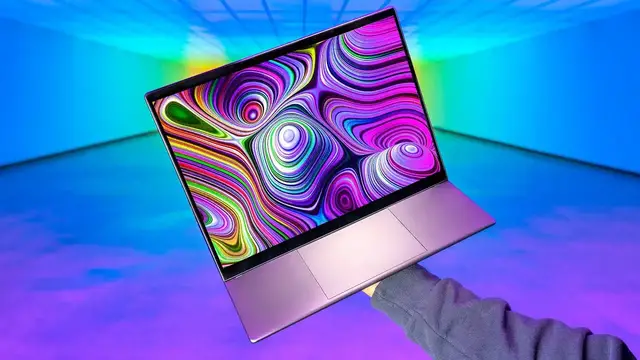
The HP Dragonfly Folio G3 is more than a laptop. Dragonfly Folio G3 is a versatile device that takes many forms. https://bit.ly/3Rmas2k Sponsored by HP.
Monaco Motors: https://www.monacomotorcars.com/
FOLLOW ME IN THESE PLACES FOR UPDATES
Twitter - http://twitter.com/unboxtherapy
Facebook - http://facebook.com/lewis.hilsenteger
Instagram - http://instagram.com/unboxtherapy
Show More Show Less View Video Transcript
0:00
So we recently checked out some new laptops from HP and today we've got something fresh in a
0:06
different category, elevated category. This one is going to flip around, turn into a tablet
0:12
have a pen input, have a leather-like finish. It's the HP Dragonfly Folio G3. Exquisitely
0:19
crafted and ultralight, three pounds, Intel i5 or i7 with a really cool little setup for housing
0:27
your pen box in a box there we go all right so what is cool about this device i think it's pretty
0:37
obvious straight away converting it is doing different things it's a laptop when you want it
0:41
to be it's a tablet when you want it to be it's a companion at the table when you're uh eating your
0:47
breakfast it's taking up a very small amount of space you have this leather like folio aspect to
0:53
So like when you're carrying it around, it kind of has that nice grippy texture and executive presence
1:00
Look at that. Look at the different modes, including this kind of flat drawing mode or inking mode when you're taking notes, maybe touching up a photo
1:12
Okay. Now you're going to notice right away, they did go with 3-2
1:20
and that's gonna give you more vertical workspace in a 13-inch laptop
1:24
And it also elevates your eyeline a little bit, slightly more ergonomically pleasing, comfortable
1:32
You wanna get that top edge of the display as close as possible to your eyeline
1:37
So you're just hunched over a little less, which is obviously targeted at extended hours of work
1:42
spreadsheets, webpages, all of the above. oh okay leather like texture on the outside there is something about that grip confidence
1:55
inspiring you walk around you can see me this thing is nice and understated you could just
2:00
imagine it fitting into any environment even when you're just driving around with it and you put it
2:04
on the passenger seat like it's a nice looking item little seam in the center a little bit of
2:10
stitching in a lighter color, metal on the bottom. And because we're packing Intel in here
2:17
we're getting a full Windows experience. I'm not going to open it up yet. Let's just look at the
2:21
other items in the package. A bit of an elevated unboxing experience as well. A very portable
2:28
power brick with the braided style cable. However, it terminates in USB type C, which is the most
2:35
convenient, obviously in the most universal, 65 watt capable. This little package houses your
2:41
paperwork. Whoa, the pen. It's also coming with a number of different tips, interchangeable tips
2:48
If you want to get a fresh one, you just pop one of those in. One thing about pen input in general
2:54
is where does that pen go? How do you make sure you have it with you when you want to reach up
3:00
and use it. Oftentimes these can be forgotten. Whoa. Yes. Okay. Let me explain. So this little
3:07
recessed section, the magnet in there is kind of suspended. And when the pen approaches, it pops
3:14
Oh, it's on the pen. So the recessed section has a strong magnet inside. And then the pen
3:19
has a portion that pops out. Look at that. And sits in there. So it's a little bit more than
3:25
just a magnet. It has some resistance to it. You have some confidence as you walk around like this
3:30
So now the pen is always with you, which is lovely. And you can just leave it there
3:37
You can go about life using your device. And by the way, if I had read that little diagram, I would have figured that out more quickly
3:43
You can leave it there. Everything is still accessible. And then you can just quickly get your pen and do your pen stuff
3:52
And then slap it back over there. Is it charging that way too
3:56
You know what it is. You know what it is. It's charging over there as well
3:59
which is good. So you really never need to worry about it or think about it
4:04
Ooh, look at the deck on that one. Blacked out, big track pad
4:09
You have the big HP fonts on the keyboard, which I've been a fan of on the last few models
4:15
This is a very portable and slim laptop, but somehow they fit a fairly substantial keyboard into here as well Let me do a quick brown fox
4:33
Get the focus, Mo. I do like this keyboard. For a thin laptop like this
4:41
and I know the construction materials are robust, but this thing is so solid, it has like a..
4:51
This is a lovely experience. It's also a pretty quiet keyboard, if that matters to you
4:57
This is laptop mode. You see, pick your angle, you get your work done
5:00
No big deal, but that's not really the magic. There's more to the story here. Let me just lean back like that
5:06
So there's a magnet down here that it slaps into. It's a strong, when it's in laptop mode
5:12
there's no confusion that it's in laptop mode. But anyway, that pops out
5:17
And this is a nice little angle. your note taking, your inking, photo touch-ups
5:23
Well, anything you might want to do with a pen. And then so is this. Look how natural that is
5:27
with the spot for the thumb in portrait on the leather. Then I'm really in folio land
5:33
Cool. 10 kilometers of glass versus plastic. Durability-wise, these nibs, these nubs
5:39
they should last for a little while. This is obviously a cool format
5:42
How about that one? If you have something in front of you, you're also working on. So if you have a reference here
5:47
and then you're working in front of it or you're eating a meal airplane tray table
5:51
where you're really limited for space, your display is now just closer to you
5:57
And the nice thing about this, with having the touch input and the pen input, you can still interact with the display
6:02
or just reach up and touch it. I don't think we're done yet though. This angle over here, which sits right
6:08
and the magnet just picks it up. Look at this. So you're just gonna kind of like reaching down
6:14
and it just clicks right into place. A nice little viewing angle
6:18
you still have access to your trackpad. You still have access to your touch input
6:23
It's just a tremendous amount of flexibility and different angles to get your work done
6:28
depending on the environment. There's some examples where somebody might be doing
6:31
a video conference on a couch. Somebody might be sitting at a cafe table
6:35
Somebody might be in the back of a cab. There's all these different scenarios
6:39
for all those different scenarios. But I actually don't think we're done quite yet, are we
6:43
There would be one more, which would be this. Tent. You could also do tent
6:49
I don't know why or when this would be important to do
6:54
but I guess if you had a really small amount of space
6:58
you could do this. A really narrow, I don't know, you might be in France or something
7:02
Like you're in France and you're in one of those really small coffee shops, which has like only a ledge
7:08
Do you know what I'm talking about? You only have a ledge and you're trying to do a quick video conference
7:13
You put your cup and then you put this. I have a vision in my mind of the place in which you're using this
7:19
That is tremendous flexibility. And look at that. I mean, it's just, it's kind of also satisfying as you just like
7:26
look at the mechanical aspect of this. Solid in all scenarios. All right, let's look around the outside
7:33
That's your magical connection point for your pen. We have a vent here also on the other side
7:39
an og audio jack for your headphones, two type C ports, one with an LED indicator
7:44
so that you know if you're charging. I think this is a SIM tray. It is a SIM tray
7:49
Windows 11 Pro, 12th generation Intel Core processor, i5 and i7 non-V Pro and V Pro
7:57
The device is starting at 3.09 pounds. So the display I have on this one, thank goodness
8:04
13.5 inch diagonal, 3K by 2K, that's 3,000 by 2,000 pixels, touch input
8:11
IPS, bright view, Corning Gorilla Glass 7, 400 nits of brightness. There's other display options if you don't want this resolution or the beauty of OLED
8:20
because there's something wrong with you. This display, I mean, I'm just looking at the spec, OLED displays in general
8:26
And then the pixels, I can't personally turn it down, so that would be my display choice
8:30
Up to 32 gigs of RAM, up to 2 terabytes PCIe NVMe M.2 SSD storage
8:37
Battery life acclaimed 13 and a half hours. Seven hours for the OLED panel
8:44
HP fast charge support over that 65 watt charge is gonna charge this thing up to 50 in 30 minutes The premium keyboard as HP calls it is apparently spill resistant which is nice in those cafes
8:59
that I was referencing earlier. No spill zone. Oh, and these USB-C connectors
9:04
are actually Thunderbolt 4 capable, which is lovely. HP Elite Series, MIL-standard, 810G durability standards
9:12
That's 19 different tests. dust water desert ocean dirt mud just cafe i stick to the cafe all right look how nice your laptop is
9:24
all right we are also protected by hp wolf security oh that is definitely the oled display
9:31
wow that's a lovely display i don't even want to touch it with my fingers right now i think i will
9:36
use the pen instead let me tell you the other benefit of the pen is that it keeps your fingers
9:41
off the display. So you can still get the benefits of a touch display
9:45
but without the fingerprints to go with it, which is good. Ooh, yeah
9:50
You know, one of the reasons I like to use this as a sample, it's a nice contrast essentially
9:55
And where OLED truly shines is in the darker regions as we've spoken about in the past
10:01
It's totally black in these sections over here. I realize this is a sort of like a business targeted laptop
10:08
but this particular display option is going to crush for media consumption
10:13
Watching your Netflix, watching your YouTube, watching your Lulater, your Criterion collection if you're Mo or Kirk
10:19
This is going to be a great place to sit and watch, especially when you consider the convertible aspects of this device
10:26
You can flip it like that. I can use my little pen. Maybe this is a more comfortable way to watch the film
10:32
I'm going here because now on the couch, I don't have the keyboard tray in my way as I'm trying to just appreciate the display
10:45
Obviously, Apple has been a part of that conversation. Where are you, speakers
10:51
Apple Gar coming in with some of our most different... Interesting content from across..
10:55
Part of this must have something to do with the fact... Yeah, you know what
11:00
Here's the thing, guys. This test, when I used to listen to the speakers on a lot of laptops
11:04
there was more variance in like a good sounding speaker and and and like a tinny one but they've
11:11
all tuned things up and taken it more seriously thank goodness maybe has something to do with
11:16
these tests and these videos that people do here on youtube that sound experience more than
11:21
sufficient obviously i mean you you heard it so oh look at this pen configurator cool pen tip
11:27
sensitivity i'm gonna leave it tilt for the artists you can program the buttons barrel button
11:33
top and bottom. On pen detach, open the menu. Look at this. On pen detach, we can launch OneNote
11:39
Microsoft whiteboard. Cool. We also have a radial menu option for nav. Indirect inking
11:46
which Kirk is very excited about. Moe is very excited about. They both told me about this
11:49
feature before I even got into the package here. They were like, you can use this as an actual
11:56
tablet, like an inking, an art tablet on a different display. Well, that's pretty sick
12:01
You can use it as a tablet for pen input on any computer
12:05
through this indirect inking feature. Slap this baby back onto the, to its docking location
12:11
We pull it out and Microsoft whiteboard pops up. Got it, got it, got it
12:17
And then just like that, oh baby. that's my cafe wow
12:39
this is mostly just for like ideas like you're supposed to just do like this you're supposed
12:50
to just be like yeah you should just be like Ideas lead to big ideas Big ideas lead to bigger ideas think about it what the hell is this how about this one how about this one Yeah
13:42
Bart Simpson. I'll take it. You crazy guy. Man, this would be such a doodle machine for me
13:52
Good lordy. Lordy. This is Mo after a long day right here
13:59
He goes, mmm. You wanna know something? This feels good
14:10
Drawing on this feels really good. And the contrast with the OLED and such
14:14
it's an experience that's infrequent for me. Feeling that level of kind of input, you know
14:22
Is there something intuitive and kind of like weirdly creative about it? I'm just sitting here goofing around
14:28
and then all of a sudden it's like your hand is just moving and you're kind of jotting things down
14:32
So when it comes to like ideation and brainstorming and stuff, because I know we're joking around and goof
14:37
I know we were goofing around. The whiteboard effect, it also applies here in the digital realm
14:43
Obviously quite cool. Can I have a bowl of cereal in front of this
14:47
All right, now the other thing to mention here, they had to consider what they were gonna do with the microphones
14:50
because you have all these different form factors that are supported. They found a way of putting the mics
14:55
on top of the bezel right here. one there and one there. Apparently these are gonna pick you up
14:59
up to three meters away. And for those of you that are not part of the metric system, that's pretty substantial
15:05
It's like around here. If you're in a room with a group of people
15:09
and they're all spread out all over the place or for whatever reason you wanna walk away from the device itself
15:14
because maybe you're doing a cooking show for all I know. Three meters back or, or, and, and, or 360 degrees
15:22
around the device. Eight megapixels. We just one up to the last test
15:26
take a video why don't we this is a video test of the webcam 8 megapixel capable webcam on the
15:35
dragonfly folio g3 on the oled display with a pen in my hand the audio that you are hearing is also
15:43
directly from the device and i'm staring right into it this is about oh i don't know 30 centimeters
15:51
away and this is about one meter away microphones on the top of the device 360 360 360 360 360 360
16:03
I'm now behind the device 360 I'm now behind the device and I'm gonna move back around to the front
16:11
of it and it should have heard me all the way around there uh yeah I don't think there's gonna
16:17
be any complaints when it comes to video conferencing the thing is legit it's also got the
16:21
auto framing, just like the other HP devices that we featured recently. So if you move around the
16:25
frame, find me, I go forward. Damn. What a cool combination of things. What a versatile device
16:37
that's really doing so much. It's truly a tablet. It's a note taker. It's a portrait mode device
16:43
It's obviously a landscape mode device. It's a three pound laptop with up to an Intel i7
16:48
up to two terabytes of storage it has thunderbolt 4 in my case here it has a 3k by 2k oled display
16:55
they've even found a way to pack decent audio into it nice dumpy weighted keyboard with big
17:01
key caps even though you have a 13.5 inch device and then also by going with the 3 to aspect ratio
17:06
you end up with something that for productivity gives you a little bit more vertical space
17:10
lastly the styling you have this nice leather folio style so that you can carry this around
17:16
and not really feel like you need to put anything else on it. It's comfortable enough
17:20
You just kind of, you know, you put it under the arm. You walk around and you get things done
17:26
You show up like this, you're getting things done. You have everything you need to get things done
17:29
There's no more excuses. Mo
#Computers & Electronics
#Computer Hardware
#Laptops & Notebooks
#Consumer Electronics