Up next in 10



Check out the LG CineBeam S Here: https://bit.ly/4nAdgtl
Get $100 off your preorder purchase using this code: UT100PJ (Until Oct 5th)
#miniprojector #4kprojector #shortthrowprojector #LGCineBeamS
Check out the LG xboom portanble speaker at 4:33 of the video.
Check out the New LG xboom lineup below...
LG xboom will.i.am : https://bit.ly/LGxboom_william_Unbox
LG xboom Grab : https://bit.ly/LG_xboom_Grab_UBT
LG xboom Bounce : https://bit.ly/LG_xboom_Bounce_UBT
Thanks to LG for partnering on this video.
FOLLOW ME IN THESE PLACES FOR UPDATES
Twitter - http://twitter.com/unboxtherapy
Instagram - http://instagram.com/unboxtherapy
TikTok - http://tiktok.com/@unboxtherapyofficial
Show More Show Less View Video Transcript
0:00
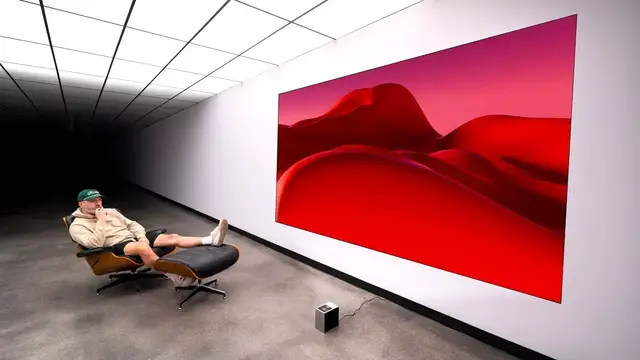
So this is the new LG Cinebeam S. This is an ultra short throw projector. It's 4k capable
0:07
And I don't know if you guys recall, but I've been looking at Cinebeam products for a while
0:11
including all those cool little portable projectors. But what's nice about a short throw
0:15
is we don't need like a lot of space to get a really big image. So this thing will project
0:19
up to 100 inches. So even if you're in a small environment, you can still experience a large
0:24
image and you're still getting it in a package that is supremely portable. Like look at this
0:29
little thing. Extremely modern and cube-like. You can see our short throw projection surface over here
0:35
We have a power button and a fan and a grill to allow for a lot of air to pass through
0:40
Here you can see our speaker unit. So we're gonna get audio from the device as well
0:44
You can see the quarter thread on the bottom if we wanna put it on a tripod mount. We've also got a couple of USB inputs and a full-size HDMI
0:51
So you can use the built-in streaming services or you can supply your own video signal game console
0:57
Comes with these little feet, little rubber corner protectors. USB-C power brick with an extension power cable
1:04
And here is your remote. We have dedicated buttons for Netflix, Disney Plus, Sling, Prime Video, and LG channels
1:11
A directional pad in the center, volume controls. It's a Slim style remote
1:15
And let's activate the battery. Okay, so we have the Cinebeam S set up now
1:19
And we have this beautiful white wall, which is kind of like an ideal scenario for it
1:23
Because it's so portable, I don't think many people are gonna use it projecting onto a projection screen obviously you could do that if you wanted to but i think this is
1:31
more of a kind of thing that you can move around the house take to different environments have a
1:34
party and because of that they put features in here in order to adjust to whatever the color of
1:39
the surfaces that it happens to be projecting on which is pretty cool you can set it up in a couple
1:43
different ways you can put it close to the wall in which case the image itself is obviously going
1:47
to appear to be a little bit sharper and maybe even brighter but smaller and then if you move
1:51
it to where we have it here this gives you the maximum screen size so this is about 40 centimeters
1:55
away from the wall. You can bring it to a minimum of eight centimeters. We could essentially do either
1:59
on this particular piece of furniture I could slide this over here slide it back and have essentially two different TV sizes just based on distance from the wall I think we should bring the lights down see what it looks like in sort of an optimal situation
2:11
and check out the interface. All right, so now we have our lighting down
2:15
to around 10% here. I guess this would be like a dimly lit room
2:19
You've got all the apps you'd expect to find. Netflix, Prime Video, Disney+, YouTube
2:24
It looks like they're installed by default, but if I click on the app button here
2:28
Apple TV, UFC is there. Whatever it is that's supported in LG's interface is going to be here on this projector
2:34
And if you own LG TVs, then the Cinebeam will be easy to operate
2:39
If you select the settings button on the remote, it'll have kind of a panel that slides out from the left-hand side
2:45
And this is like a quick access menu. Cinema, sports. There's even a game optimizer in order to reduce input lag
2:51
And then we have wall color adjustment, which will compensate for the wall color
2:55
which I think is kind of a cool option to have. Especially with these portable ones, you end up projecting them on walls that are not optimal
3:02
They show a wide variety of like vibrant walls. And I'm with you. I was like, oh, okay
3:06
It'll just be able to deal with gray. But gray or anything without tons of color pigment
3:10
isn't really changing the color very much. The vibrance, sure. The contrast, for sure
3:16
But like when you get into these reds and blues. And so yes, it has built-in speakers that you can use
3:20
but you can also send the audio out to another device, including other Bluetooth devices
3:25
So you can be completely portable, but still have bigger sound if you choose to
3:31
Man, it's just more fun watching a bigger image. It's just more fun
3:37
What a shot. Just leg. Big space shoe and leg. There's an installation wizard, which makes it easy to set up
3:46
These things have gotten so much better in that regard as far as basically just point, shoot, and you've got a beautiful image
3:53
So during the setup, you've also got options for screen scaling and shifting
3:58
If you happen to have obstructions on the wall, fireplace or other artwork, you can shift
4:03
your image around that obstruction so that you can leave it where it is and just sort of move the projection space around it I mean the image looks better when you get out of the interface and just get into a video It definitely looks even better
4:17
I don't know how it looks on your camera, but it looks good to me. So like I would say for this environment
4:22
as dimly lit as it is, we have a totally like usable projector
4:27
I will say the sound sounds small relative to the display size
4:32
but it's good that they gave you something. The other option there, like I said, is a Bluetooth speaker you carry with you
4:38
Now you have an entire cinema experience with the Cinebeam and some sound to go with it
4:43
But it's a lot better to put a speaker in there for obvious reasons. Sometimes you just need sound in a pinch
4:49
It's built in. Instead of having nothing at all and constantly needing to bring some sound solution
4:54
I like the fact that at least they've put something in there. I'm going to take it up a notch and kill the lights completely now
5:00
I want to see what that looks like. Oof. I mean, that's a whole different level
5:03
If you have darkness, if you're watching this at night, that punch is crazy
5:08
That is a lot of punch. Now we are ultra optimal. We're in a dark room
5:12
We're projecting onto a white surface. We've got the projector in the optimal spot about 40 centimeters away from the wall
5:19
This is your prime performance experience here, and it does look good
5:26
Yeah, so with these smart devices like this, I mean, most of the time for me, I'm just using the built-in apps
5:33
But if you're with other people and they want to show you something via AirPlay, like maybe their own content videos they shot, you can do that
5:38
So AirPlay is there as well. And then obviously the versatility of the HDMI port gives you the game console as well
5:43
You could possibly integrate this with some kind of desk setup. So like you can imagine my desk was there and I had a monitor, a computer monitor on it
5:50
Had this to the side. Like that's the whole thing, small spaces. Ultra short throw goes so well with small spaces
5:56
Just because you have a small space doesn't mean you can't have a big display. That's what you get here
6:00
boot up the PlayStation now and then, oh, it sees the input
6:05
and you know what I want to do? On this input, I want
6:09
to oh it knew right away Sick Got my little game interface FPS RPG RTS Low latency is on Sweet
6:21
Damn, dude. The color and the whatnot. Look how small the projector is, Mo
6:25
Come on, dude. You hear that music, Mo
6:35
It's the sound of victory. I have been sitting here thinking about this
6:41
Now, obviously, if you guys recall, I was playing with the original Cinebeam, and that was a little guy with beautiful industrial design
6:48
You got to go watch it because it's very cool the way they put the whole thing together, but it's a medium throw
6:52
And now I'm thinking that maybe the ultimate portable projector is a short throw or ultra short throw
6:57
and not a medium throw because it's more flexible. I can be right up against the wall
7:02
and I don't need to worry about the scale of the room or whether or not I have a good place to place something
7:07
at the right height or whatever. I just don't even need to think about that. There is obviously a difference when it comes to sound
7:12
because now the sound has gotten further away from you as well, but connect a Bluetooth speaker
7:16
and then you're going to get the real punch anyways. So it's kind of wild that you're getting that level of 4K
7:22
and that scale and that distance from the wall in something that tiny
7:30
It's one of the better things about 2025, honestly. there's something i just like about the aesthetic of like the projected image compared to a tv like
7:42
that sort of matte attribute to it and it's probably somewhat nostalgic just because i grew
7:47
up in movie theaters but everything feels special when it has that large scale matte appearance with
7:53
no glare no reflection it like somehow seems more significant that way like more of a presentation
7:59
than the TV, which was always where trashier things were. You know what I mean
#Computers & Electronics