live_tv
Livestream Starting Soon
00
Hours
:
00
Minutes
:
00
Seconds
Up next in 10



Microsoft Surface Go 2 at Amazon*: https://geni.us/surfacego2
Apple iPad 7 at Amazon*: https://geni.us/ipad102
Apple iPad Pro at Amazon*: https://geni.us/ipadpro2020
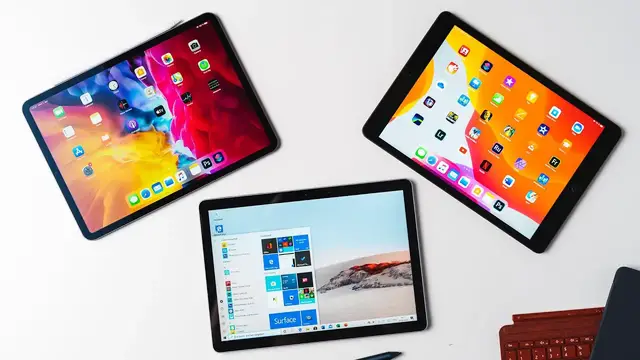
Depending on the configuration, the Microsoft Surface Go 2 competes with the Apple iPad 7 and with the Apple iPad Pro. Which of those three tablets is better for which tasks? That's what you'll learn in this comparison.
Do you prefer the Surface Go 2, iPad 7 or the iPad Pro?
Website: https://mynexttablet.com
Twitter: https://twitter.com/mynexttablet
What I use for my videos:
Camera 1*: https://geni.us/sonya7markiii
Camera 2*: https://geni.us/sonyal6400
Lens 1*: https://geni.us/sonyfe1635f4
Lens 2*: https://geni.us/tamronfe2875f28
Lens 3*: https://geni.us/sonyfe90
Lens 4*: https://geni.us/sonye1018f4
Microphone 1*: https://geni.us/rodentusbmic
Show More Show Less View Video Transcript
0:00
Microsoft and Apple are not competing in that many business fields these days, but they are
0:05
competing with their tablets. Microsoft just released the Surface Go 2, which depending on the configuration, competes
0:12
with the simple iPad 7 up to the iPad Pro. I'm Anjay from mynextablet.com and in this comparison you will learn which tablet is better
0:20
suited for who. Before we start, don't forget to subscribe to this channel
0:27
I'm reviewing almost every tablet that gets released, all from Microsoft, Apple, Samsung
0:32
Lenovo, Huawei and others. Let's start with the internal hardware. You can get the Microsoft Surface Go 2 with an Intel Pentium Gold 4425W processor or with
0:43
an Intel Core M3. You can choose between 4GB and 8GB of RAM as well as between a 64GB eMMC storage or a
0:53
128GB SSD. Besides the Apple iPad 7 sits an Apple A10 Fusion with 3GB of RAM and a 32GB or 128GB
1:04
internal storage. The iPad Pro features an Apple A12Z processor with 6GB of RAM and you can get between 128GB
1:14
and 1TB of storage. You can get LTE versions of all of them
1:18
Yes I know, if you're looking at Apple tablets you could also get the iPad Air, but that one
1:23
is over a year old already and will probably be updated soon
1:28
Microsoft is also offering a Surface Pro 7 which I compared to the iPad Pro already
1:34
so I won't mention it here anymore. Well, my Geekbench 5 benchmark comparison shows that the Surface Go 2 with the Intel
1:40
Pentium Gold is the weakest one of all. The CPU performance of the Core M3 version is on a similar level as the iPad 7 is and
1:48
the iPad Pro is much faster. To test the real performance, I rendered a 16 minute long 4K video on all 3 machines
1:56
in Adobe Premiere Rush. In this test, the iPad Pro is much faster than the iPad 7 and the highest end version
2:03
of the Surface Go 2 is much slower than the cheapest iPad
2:07
So if you want to edit videos with a 10-inch tablet, then you should stay away from Microsoft
2:12
Exactly this is what I experienced in my gaming test. Sure, you can play many and especially older games on the Surface Go 2
2:20
Most of them have been developed with the mouse and keyboard in mind though
2:25
For iPads, the selection of games that are optimized for touchscreens is much larger
2:30
And games like Fortnite don't run just a bit, but much faster on both iPads
2:35
They all support gamepads by the way. Alright, if you're interested in the Surface Go 2, you're probably not looking for a gaming tablet
2:42
And I can comfort you, especially the Core M3 version can handle all standard tasks very
2:48
well and surprisingly smoothly. I wrote a lot in Microsoft Word and served the web in Chrome and Edge
2:55
All of that works fine. Yes, even if you've got lots of tabs and Word open at the same time
3:00
I was also surprised by how well the Surface Pen works in Adobe Photoshop Sure if you working with demanding projects it can be a bit too much But remember this is full Photoshop and not the mobile version that available for the iPad
3:14
Still, I think both iPads are better suited for photographers, Lightroom runs better for
3:20
instance and if you really need all Photoshop features of the desktop version, you should
3:24
get a Surface Pro instead of a Go anyways. Real life performance of the Surface Go 2 is not better than on the iPad 7
3:32
That one is very fast for its price and better suited if you want to work while watching YouTube
3:36
for instance. The Surface Go 2 can't handle too intensive multitasking sometimes
3:43
So if you need as much performance as possible, both iPads are better for you
3:47
The Surface Go 2 is a great office tablet, but if you want to play games, edit photos
3:52
and videos, you're better off with Apple, even with the cheapest iPad
3:56
At least if you don't need windows. Let's get to the screens. The Microsoft Surface Go 2 has a 10.5 inch screen with a resolution of 1920x1280 pixels
4:07
With the iPad 7 we get a 10.2 inch screen with 2160x1620 pixels
4:13
The iPad Pro is 11 inches in size and has a resolution of 2388x1668 pixels
4:20
When comparing them directly, you can see that even though the screen of the Surface
4:24
Go 2 is quite bright, it's darker than the iPad 7. The iPad Pro has the brightest screen
4:31
All three are LCD displays with wide viewing angles and good color reproduction
4:35
While the Surface Go 2 does not have the brightest screen, it is fully laminated just as the
4:40
iPad Pro. On the iPad 7 on the other hand, you can see a small air gap below its touch screen that
4:46
can be annoying especially if you know of it and when you're using a stylus
4:51
Because of this air gap, you don't have the feeling of directly touching the screen with
4:55
the tip of the pen sometimes. The 3 pens have lots of things in common, all are pressure sensitive
5:01
That means you can draw a thicker line by pressing down harder. There are some small differences, but overall all of them are good
5:08
I have to say all 3 pens, because the ones for the iPad 7 and iPad Pro are not the same
5:14
While the iPad 7 is compatible with the first generation Apple Pencil, the iPad Pro works
5:18
with the second generation only. That's very disappointing, because with Microsoft, all their pens are interchangeable
5:25
Still, the Apple Pencil 1 and 2 are working mostly the same
5:29
You've got to charge the first one using the lightning port of the tablet, and the
5:32
Pencil 2 is charged wirelessly on top of the iPad Pro. You've got to replace the battery of the Microsoft Surface Pen from time to time, but
5:40
you can attach it magnetically to the side of the Surface Go too
5:44
The pens feel a bit different while writing. When using the Microsoft stylus, I've got more of a feeling of writing on real paper
5:51
because the tip gives in a bit and you can feel a bit of resistance
5:56
The pens from Apple are made of hard plastic so it's more slippery on the glass screen
6:01
But you can replace tips and get protectors which give you the feeling of writing on paper All three tablets support their pens on the software side very well Your hands get ignored on all of them when resting a palm on the screen while writing for instance Microsoft OneNote has much more features than Apple Notes app but OneNote works
6:20
great on an iPad so that's not a unique feature. The advantage of Apple continues to be the much bigger selection of apps that are optimized
6:27
for tablets. The advantage of Microsoft is that you can use old, traditional desktop apps like Adobe
6:33
Photoshop and Illustrator. I think the designs of Apple's iPad Pro and the Microsoft Surface Go 2 are fantastic
6:40
Both look modern and a premium feeling. While the last aspect goes for the iPad 7 too, that one looks much older due to its thick
6:47
black screen bezels. On the positive side, that makes it the only one of those three with the fingerprint scanner
6:53
You can unlock the Surface Go 2 and the iPad Pro with facial recognition though, which works
6:58
great on both. With over 8mm the Surface Go 2 is the thickest, but it also has a built-in kickstand
7:05
That's one of the highlights of the Surface lineup. On its side it features a USB-C port which you can use to connect external monitors and
7:11
other accessories. Below we get a magnetic Surface connect port which you can also use to charge it but also
7:17
to connect the dock. It also has a headphone jack. The iPad 7 features a headphone jack as well, but instead of USB-C we've got to live with
7:25
the old lightning port, that's a bummer. We do get a USB-C port on the iPad Pro however and you can connect monitors and external hard
7:33
drives as well. The Surface is the only one with a microSD card slot
7:38
All three tablets have a connector for official keyboards, which you've got to buy separately
7:42
in all cases. For the Surface Go 2, Microsoft sells a type cover that costs at least $99
7:48
The Apple ones cost at least twice as much. It's connected magnetically and is fantastic
7:54
Even though it's small due to the 10-inch screen, you can type on it quite comfortably
7:58
and fast. It offers the real key travel and has the built-in background light
8:02
The touchpad works fine too. An important differentiator towards the Apple keyboards is that the Type Cover has a magnetic
8:09
bar which allows you to use the keyboard at an angle. That's much more comfortable if you write a lot
8:14
Apple sells a smart keyboard folio for the iPad 7 which is much worse than the Type Cover
8:20
The back is not protected, just like with Microsoft, but unlike that keyboard
8:25
the keys don't have a proper travel here. There's no background light and no touchpad
8:30
So I think the only one that really can compete with Microsoft's Type Cover is the Apple
8:35
Magic Keyboard which you can get for the iPad Pro only. That one does have keys with a real travel, a background light and a touchpad
8:44
I think this keyboard works great and can transform the iPad Pro into a real computer
8:49
Sadly, it's quite heavy and the keyboard lies flat on the table
8:53
If you want to watch movies and listen to music you will get much better speakers on
8:57
the iPad Pro. That one has 4 in total with an excellent sound quality
9:01
While the iPad 7 has good speakers too, they're placed on just one side so you won't hear
9:07
any stereo separation. On the Surface Go 2 the speakers are separate from each other and are placed towards the front That great and they sound great for a cheap Windows device but Apple is better here The Microsoft Surface Go 2 is shipped with Windows 10 in S mode
9:22
That means that out of the box you can install apps from the Microsoft Store only
9:26
But don't worry, you can switch from S mode to standard Windows 10 Home in a couple of
9:30
seconds with just a couple of clicks. Both iPads are running the newest version of iPadOS
9:35
Well, there are lots of differences between the two operating systems. iOS 10 is an operating system that was developed for traditional desktop pieces originally and
9:45
got upgraded to work with tablets, touchcreens and pens later. iOS on the other hand is a mobile operating system first which got some traditional computer
9:53
features like real multitasking and mouse support later. By now it even features a real files manager and you can connect external storage like SSDs
10:02
That means that on the Surface Go 2 you can use pretty much every app that was developed
10:07
for Windows. So it's the better choice if you need a traditional desktop app
10:11
I think it can be a great second device for developers for instance, or if you need a program
10:16
that's available for windows only. There are lots of these. iPadOS is the better choice if you want to use your tablet as a tablet and navigate with
10:24
the touch screen most of the time. It supports much more apps that are optimized for touch
10:29
Really much much more. And among those are quite interesting apps these days like Adobe Photoshop and even alternatives
10:35
like Affinity Photo. Sure they don't offer all the features as their desktop counterparts do, but they do
10:41
support a lot. And keep in mind that Microsoft's Office apps work great on both iPads
10:46
But here again, they don't support every single feature of the desktop versions
10:51
Let's check out their batteries. When watching HD videos on YouTube at maximum brightness, the Surface Go 2 lasts 5.5 hours
10:58
the iPad 7 lasts 5 hours, and the iPad Pro lasts 6 hours
11:02
So when streaming videos, their battery lives are quite similar. Both iPads have longer standby times though
11:08
So which is the better tablet? The Microsoft Surface Go 2 is the better choice if you need Windows of course
11:14
Because you are a developer for instance and want to program a bit while traveling
11:18
Or because you need a Windows app for work. I think the Surface Go 2 is a fantastic choice for OneNote fans too
11:24
It seems to be made just for that. It's better suited for drawings and handwritten notes than the iPad 7 is because the screen
11:31
is not laminated on the iPad. Most iPads are the better choice if you mostly want to watch movies, surf the web and play games
11:39
Because of its bigger and better app selection, it's much better suited for these tasks
11:44
Especially the iPad Pro can be interesting for work too, for photographers and artists
11:49
for example. And if you don't need Windows for work, because the apps you need exist for iPadOS, then I
11:55
would get an iPad too. It is suited for productivity work these days too and is an excellent entertainment tablet
12:02
at the same time. And the Apple Pencil 2 works great for handwritten notes and drawings
12:06
Alright, that's my comparison of the Microsoft Surface Go 2 with the Apple iPad 7 and the
12:11
Apple iPad Pro. If you have any questions, please write them in the comments below
12:15
I'm Anjay from MyNextTablet.com. Thanks for watching and see you next time
#Computers & Electronics