Up next in 10



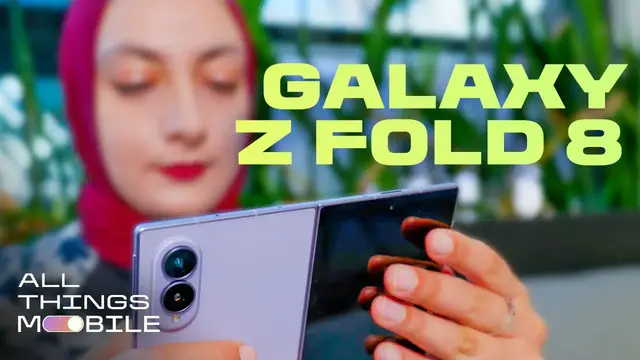
Samsung's passport-sized foldable is a standout for scrolling, reading and binge-watching, despite its steep price.
Show More Show Less View Video Transcript
0:00
This may be the future of foldables
0:02
And given how much I love this phone, I certainly hope so. The Samsung Galaxy Z Fold 8
0:07
is not just incredibly fun and adorable, but it's also surprisingly practical
0:11
which at first I didn't expect from such a compact design. But this is a phone that can adapt
0:16
to whatever you're watching or scrolling through in a way that most current foldables just don't
0:21
And now that I've been using the Z Fold 8 for a couple of weeks, I can safely say I do not want to put this phone down
0:26
Now this isn't an entirely new design, of course. The Z Fold 8 follows in the footsteps with other foldables like the Microsoft Surface Duo, RIP
0:33
the first Google Pixel Fold, and the Huawei Pura X Max. And if the rumors are to be trusted, it's possible Apple could release a similarly sized foldable iPhone in the fall
0:43
So with key players like Samsung and Apple releasing palm-sized gadgets, it's possible we'll see a lot more phones like this in the future
0:49
That doesn't mean the Z Fold 8 is perfect, and I mean that $1,900 price tag is just wild
0:55
but it might still be one of the best phones I've used this year. The Z Fold 8 is the lightest
1:00
fold yet. It weighs just 201 grams and I hardly feel it in my pocket. It's 9.7 millimeters when
1:06
closed and 4.5 millimeters thick when open, making it just slightly thicker than the Z Fold 8 Ultra
1:12
and you can see just how thin that is. It's about the size of a passport, so it feels nice and
1:17
compact and fits perfectly in my palm. Let's start with the 5.5 inch cover display, which despite its
1:22
size never really feels super cramped. This is what I stick to when I'm texting someone or quickly
1:27
checking an email or snapping a photo. Or what I like to do when I'm motivating myself to clean up
1:31
around my apartment, I'll prop it up into tent mode and just watch endless episodes of Downton
1:36
Abbey. But if I really want to watch something in a more immersive layout, that's where the 7.6
1:41
inch inside display comes in. This is when it starts to feel more like a tablet, especially
1:45
with that wider four to three aspect ratio. This is where you can also multitask with up to three
1:51
the apps, but it starts to feel a little crammed, so I tend to stick to just two
1:55
It can also literally feel like a bit of a stretch to type in landscape orientation even though I have pretty big hands but here where the experience feels the most optimal when I turn the Z Fold 8 to its side
2:06
This portrait orientation is the most natural feeling way to scroll through vertical platforms
2:10
like Instagram or TikTok. The formatting isn't weirdly cropped, and honestly, it feels like
2:16
using a larger slab phone that's still super thin and light, I can easily do this one-handed
2:21
It's also a lot easier to type this way because my fingers can easily reach the full keyboard
2:25
And this is also an ideal way to read documents or ebooks. It's easier to see text more clearly and tap through the pages
2:32
Now, the question you've likely been searching for, how obvious is the crease on the Z Fold 8
2:37
Well, I'm happy to report I hardly notice it at all. Yes, it's still there, but it really isn't particularly glaring or obvious
2:43
When I'm watching videos or scrolling, I don't even think about it. The Z Fold 8 has Samsung's new Flex Titanium display
2:50
which is thinner and more durable than previous Galaxy Fold displays. and it also helps to reduce that crease
2:56
To be honest, I hardly noticed the crease on last year's Z Fold 7, but it's even less obvious on this year's phone
3:02
I actually got a rare look at how Samsung tests the durability of its displays at its headquarters in Korea
3:06
That includes putting them in a torture chamber of sorts to see if the displays can handle up to half a million folds
3:12
And they also drop a heavy marble-sized ball on the screen over and over again to make sure it doesn't crack
3:16
One of the things I'm pretty thrilled about is the anti-reflective coating
3:20
on the Z Fold 8's cover and main displays. This is a huge help when you're watching on a larger screen that can catch more reflections
3:28
and a 3,000 nit peak brightness also makes it easy to look at the display outdoors
3:32
Now on the topic of durability, the Z Fold 8 still has just an IP48 rating
3:37
That means it can handle being under a meter and a half of water for 30 minutes, and it's protected against solid objects larger than one millimeter, but not dust or sand
3:46
So it's not as dustproof as, say, the Google Pixel 10 Pro Fold, which has an IP68 rating
3:52
but it matches the durability of most foldable phones. One of the big compromises of this thin and light phone is that there are still no built in magnets for Qi2 wireless charging Now I know a lot of you guys are going to give me a hard time about this and say just slap on a case it be so much easier But no I think if you are spending nearly
4:11
on a phone, you should be allowed to want built-in magnets so that this can match pretty much
4:15
every other premium phone on the market. Now, what about battery life? Has that improved over
4:19
last year's foldable? There are some minor improvements to the Z Fold 8's battery
4:23
which uses silicon carbon technology to bump the capacity to 4,800 mAh. I was able to use the phone
4:30
almost constantly for a little over 24 hours, thanks to some jet lag. That included streaming
4:35
on both the cover and main displays, scrolling through Instagram, texting, navigating, and
4:39
snapping photos. So this phone will safely get you through most days without needing to recharge
4:44
I definitely spent more time anxiously checking the battery levels on the Z Fold 7
4:48
which had a slightly smaller 4,400 mAh battery. The improvement to this year's phone
4:53
is incremental, but it's a step in the right direction. Now, this is probably one of the most
4:58
disappointing elements of the Z Fold 8, the cameras. There are only two on the back, a 50
5:03
megapixel wide and a 50 megapixel ultra wide. So there's no telephoto lens here. I take a lot of
5:10
pictures. So I like to have a phone with the best cameras. And I do wish Samsung was able to fit
5:15
all three into this design. But even without a telephoto lens, sensor cropping on 2x and 4x
5:21
shots usually does the trick. If you want the most pro-level shots, though, you'll probably want to
5:25
step up to the Z Fold 8 Ultra. But I'm quite pleased with the shots I took on this phone
5:30
and I didn't notice any glaring issues or deficiencies. The colors are rich, the images
5:35
aren't too saturated, and everything looks sharp. Even nighttime photos are pretty clear
5:40
so the cameras do pull their weight even if they're more scaled back. The Z Fold 8 is powered by a
5:45
Snapdragon 8 Elite Gen 5 chip, which keeps the phone running smoothly
5:50
I didn't experience any intense overheating or lagging. That chip also helps to power the handful of AI features on the Z Fold 8, like Now Nudge
5:58
This suggests apps to pull up based on what on your screen and then opens them in split mode so you don have to hop around So if someone texts you asking to grab dinner a suggestion to pull up your calendar will appear so you can then view it on one half of the screen while replying on the
6:12
other. As jaded as I am about AI, I actually like features like this that are intuitive and helpful
6:17
rather than annoying. It reminds me of the Magic Q feature on Google's Pixel phones, but like Magic
6:23
Q, Now Nudge doesn't work all the time, but when it does, it's pretty convenient. Maybe the most
6:28
fun new feature is My Fan Cam. You can go to a video in your gallery and choose one person to
6:34
track with AI so it looks like the camera is following them. You can also change the video's
6:39
aspect ratio and turn a horizontal clip into a vertical one for social media, for example
6:45
The downside is that video quality takes a hit as My Fan Cam zooms in on a subject
6:50
but it's nice to have that capability built into the gallery. Here's an AI feature I'm a little
6:55
more wary of. Photo Assist now lets you enter a text prompt to change a picture however you want
7:01
This capability launched on the S26 series, but it's now available on Samsung's Foldables 2
7:06
I think this could be good for removing something distracting from the background, but I'm not sure
7:10
how I feel about altering a scene so much that it creates an overly false reality
7:16
even if there's a little disclaimer in the bottom corner. So would I recommend the Galaxy Z Fold 8
7:20
I have legitimately been telling anyone who will listen how much I love using this phone
7:26
It's not perfect, and there is room for improvement, but for a fresh form factor, this really is a solid debut
7:33
If you prefer to have a phone that's better for multitasking and pro-grade photography, the Z Fold 8 Ultra might be a better fit
7:39
But if you're like a lot of us who just want something that can better adapt to whatever you're watching or scrolling through
7:44
the Z Fold 8 could be a good choice for you. and it's worth checking out carrier deals
7:49
and other discounts to see if you can get a good price. In the end, this phone really is just so satisfying to use
7:55
but I'd love to know what you think. Are you planning on buying the Z Fold 8 or are you not quite sold on the idea
8:00
Let me know in the comments and while you're at it, be sure to hit those like and subscribe buttons for more
8:04
Thanks for watching
Celebrities & Entertainment News