0:00
what's up YouTube it's Matt here again
0:01
from Filter grade and today I'm going to
0:03
be showing you a little tutorial on how
0:05
to set up back button focus on the Nikon
0:08
d750 um it's a super simple process but
0:11
it basically what it does is change your
0:14
autofocus mechanism from halfway
0:17
pressing the shutter release button to a
0:21
button on the back right here so that
0:23
it's a little bit just separated from
0:25
when you're actually ready to shoot with
0:27
the the shutter release button and then
0:30
this will be what you will start to use
0:32
for your back button um autofocus for me
0:35
it's a little bit easier it helps you
0:37
set up um if you're shooting portraits
0:40
you can kind of do a little bit better
0:42
of uh framing where you want your focus
0:45
point to actually be while still
0:46
shooting an autofocus and it's just a
0:48
little bit more um efficient in my
0:51
opinion than having to worry about like
0:53
when you accidentally press the shutter
0:55
release button so let's go ahead and get
0:57
into it I'll just show you a quick
0:58
little demo on how to set this up so
1:00
that you can get started and it's really
1:02
easy to switch back and forth so
1:04
regardless of of with whether you use it
1:07
or not all the time it's good to just
1:08
know how to do it so that when you're
1:10
ready to switch to it or when you're
1:11
ready to switch back to normal mode you
1:13
can kind of go ahead and do that so
1:15
let's go ahead and get into it all right
1:17
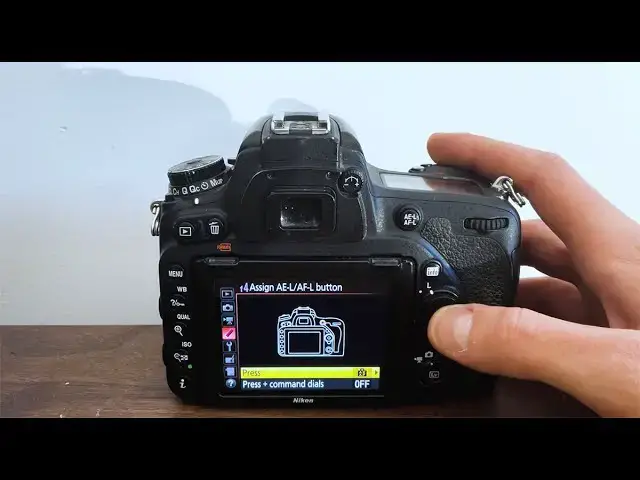
so to set up back button Focus what
1:19
you're going to do is make sure your
1:20
camera's on all the way and then from
1:22
there go ahead and click on the little I
1:24
for information on the bottom left once
1:27
you get here you're going to see all the
1:29
way at the bottom assign a e l AFL
1:32
button this is the autofocus button go
1:35
ahead and press that once you're in here
1:38
you press again to get into the menu and
1:42
then scroll down where it says AF
1:46
on and then you're going to go ahead and
1:48
go into your main menu once you get in
1:51
here now when you do your regular
1:54
halfway press on the shutter it's not
1:56
doing anything to the Focus system but
2:02
now if you click on the back button
2:06
here as you can see it's going to be
2:08
changing up a little bit and searching
2:12
new Focus Point regardless of where you
2:16
at okay so once you have the back button
2:19
Focus actually set up it's going to be a
2:22
lot easier and just a much different
2:25
mechanism I guess when you're shooting
2:27
with your camera once you go go ahead
2:30
and press on the LV button to see in
2:33
mode once you get here this is just
2:35
another quick helpful tip you can
2:37
continue using your back but button
2:39
Focus but if you actually press info you
2:42
can get much different layouts for while
2:44
you're shooting this one as you can see
2:46
is the rule of thirds with the grid the
2:48
grid lines over your frame this one is a
2:51
little bit of a this one helps
2:52
especially when you're shooting video to
2:54
make sure that everything is balanced
2:56
you can see at which angles you're
2:58
shooting and it just helps helps you to
3:00
like align the shot a little bit better
3:02
especially when it shows you the two
3:05
marks and if you want just the standard
3:08
information like your settings at the
3:10
bottom so that you can see when you're
3:12
changing your focus or when you're when
3:14
you're changing your aperture and your
3:15
shutter speed along with the iso as well
3:19
then this is helpful for that sometimes
3:21
though you just want to be able to see
3:22
what you're shooting so you can help get
3:24
rid of it by just pressing all these by
3:27
pressing on the info button
3:31
normally I like to have the Grid on
3:32
there just to help me with a little bit
3:34
of the the layout of the composition of
3:36
the image sometimes I will use this when
3:39
shooting for video although when I'm
3:41
using it for photo sometimes it almost
3:43
feels like it's getting in the way so I
3:46
end up just shooting with the single
3:48
point or the Grid on there so I hope
3:52
this was helpful if you have any
3:54
questions please feel free to leave a
3:55
comment below and we'll get back to you
3:57
as soon as we can but other than that
3:59
thanks so much for watching and have a