Up next in 10



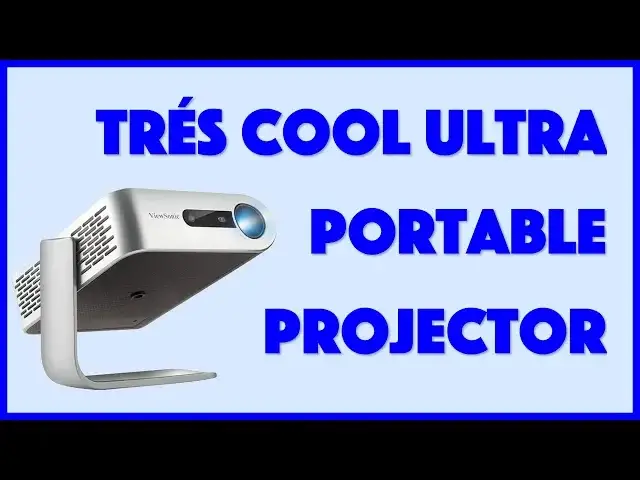
Imagine a completely self-contained projector system that can show 1080p HD video, has a built-in battery that can run 6 hours, built-in storage of 16GB and the ability to project content from HDMI, a USB flash drive, or a MicroSD card too. Oh, and did I mention built-in Harman Kardon speakers?? It's the Viewsonic M1 Portable Projector and there's lots to love about it.
Tech expert Dave Taylor of https://www.AskDaveTaylor.com/ put the Viewsonic M1 through its paces and found it a remarkable device. With two issues that you'll want to know about before you make a purchase decision...
Check it on Amazon: https://amzn.to/2JwKxHK
or on BestBuy: https://www.bestbuy.com/site/viewsonic-m1-wvga-dlp-portable-projector-silver/6225339.p?skuId=6225339
Show More Show Less View Video Transcript
0:00
A full-sized LED projector, the size of a paperback book
0:04
Let's check this out. Dave Taylor here, and I'm looking at this
0:15
This is the Vue Sonic M1 Ultra Portable LED projector. And check it out
0:21
All I have to do is open the stand, and it will actually power on
0:25
It'll go through a power-up cycle, and then it'll be ready to roll
0:29
So you're all going to see a really bright light in a moment or two. Actually, yeah, you've already got it there
0:33
So as you can see, super simple design, and the stand is built in
0:39
so you can adjust it to wherever you want it, and it actually automatically unscues
0:45
because it's watching what it's projecting, or maybe it's just doing it based on angle
0:50
Whatever it is, very cool. It just does the right thing. Now, on the back, you have the plus, minus, and back buttons
0:58
you can actually control the on-screen interface, power on and off. But really, you don't need it because when you close it up properly, it actually turns off
1:08
Very nice. On the side is a focusing dial, and then rather hidden on the bottom
1:13
If you pull this little tray out, it gives you access to a whole lot of interfaces
1:20
So now, let's go through the interface real quick. So from the left, you have a microSD card reader, and I have a micro-a-sd card reader
1:26
and I have a micro sd card in there. And then you have power
1:30
You have USBC for charging your devices, HDMI, audio out, perfect for headphones, and USB2
1:38
So lots and lots of options. What I'm going to demonstrate is I'm going to demonstrate
1:42
HTML off of my computer, and we're going to use local internal storage
1:47
This thing has 16 gigs of internal storage. How cool is that
1:51
And then we'll also look at something right off the microSD card. Before we do that, and you can see
1:56
have sort of jury rigged up a projection screen behind me. I don't normally have such a bare white background
2:04
but before we do that, let me tell you that this is also what's known as a short throw lens
2:09
So if you have this five feet from the wall, you're going to get the equivalent of a 60-inch TV screen view
2:16
If you have it seven feet, you get an 80-inch screen, and nine feet away gives you its maximum of 100 inches
2:23
That's a lot of screen. Now, of course, the further away it is, the less bright it is
2:28
It is a 250-lum lamp, but that's only 250 lumens. So you'll find out when I switch to the live demo, I'm going to have to drop some of these lights down
2:38
because it's just too bright in here for this to do a good job. Now, it is 1.7 pounds
2:43
It's super easy to work with. It is 5.8 by 5 by 1.6, and it's very portable
2:52
you can see it actually has a built-in battery and the battery can run up to six
2:57
hours depending on what you're doing certainly plenty enough for a movie oh and
3:02
it has built-in speakers it has a three-watt Harmon Cardin speaker system in
3:06
addition to that audio out so it really is self it works pretty slick now one of the issues of projectors is the life of a light bulb because once the bulb goes it can be really expensive
3:17
to replace. The 250 lumen lamp that's included with this Vue Sonic is rated up to 30,000
3:24
hours of use. Now, if you're going to have this on 24-7, that doesn't sound like a huge amount of
3:30
time. But if you're going to watch a movie or maybe you're at a hotel and you want to watch
3:35
your favorite TV show, or you're going to watch a video game. or play a video game, you can do that and 30,000 hours then turns out to be a really long time
3:43
Now, the maximum resolution of this is 1920 by 1080, but its native resolution is 854 by 480
3:52
It's a little confusing, but it can handle pushing out 1080p, but it doesn't have a really deep color gamut
4:00
so there's not like millions of different colors that can convey. You'll see that when we get to the video example
4:06
But you know what? It looks pretty nice. So, let's see. The internal storage is 16 gig
4:12
Like I said, microSD card. I have a 32 gig card in here
4:16
I only have one movie on it, but that's plenty of space for a bunch of movies. Enough talk
4:20
Oh, well, no, before we finish, let me tell you, it comes with the carrying case, handy
4:26
Comes with a remote control, super handy. This is really, really important
4:31
And it comes with this really clumsy charging setup, but we'll get back to that when we actually
4:36
get past the demo. So now I've talked enough. Let's switch it all around, turn off some lights
4:43
and I'll give you a quick demo of how this thing works. All right, so it's not pitch dark
4:48
otherwise you wouldn't be able to see me, but if it was pitch dark, this would be brighter
4:53
I will say that when I look at this screen, this looks really good just like this. And you can see
5:00
the row of input options. We have HDMI, USBC, which doesn't seem to be an input option
5:05
a USB reader, local storage, and microSD. There's wallpaper, settings, and information about the projector
5:13
Now, I have it hooked up via HDMI to my MacBook Pro, so let's go on to that
5:19
And again, all I have to do is use the remote to select that input. And now I am on SlingTV, and Sling TV is great
5:27
So we're going to use Sling TV to watch some soccer. Those of you that watch my videos, no, I'm a big soccer fan
5:32
We're going to watch England versus the Czech Republic. So let's watch live and see how that looks
5:38
And there we go. Now, again, you're not getting the full impression
5:42
There's sort of inherently problems with having screens and projectors and cameras, videotaping screens of projectors and stuff
5:51
But when I look at this, this looks absolutely gorgeous. This looks terrific
5:56
And notice, if I'm quiet, you'll hear the audio is coming out of the projector
6:03
Not much happening right now, but... Let's give it a second or two
6:10
It's still not much happening. Oh well, trust me, the audio is coming out of there
6:14
Now to go to a different input, all I have to do is push the home button
6:18
And I going to go ahead and turn this off on my computer because I don need to be streaming when we not doing it In fact I just close the computer We done with the computer demo Now remember I told you I had that micro SD card So let choose that
6:32
And you can see, I just move over, choose OK on the remote control
6:36
Oh, and by the way, here's a close-up of the remote control. You can see it has a decent number of functions
6:42
There is a design error in the way they implemented the remote control, but we'll talk about that in just a minute
6:47
Anyway, here I am, and now I'm looking at the microSD card that's in the device
6:53
So, this is portable, right? There's no wires plugging it in. In fact, just to avoid confusion, I'll pull the HDMI cord and move it out of the way
7:02
So this is completely self-contained, super cool. Now, let's see, I just happen to have a movie on here that's known as Jurassic World Fallen Kingdom
7:12
So let's choose that. And... Hopefully. There we go. How cool is that, right? So now I'm watching a movie projected and I can make it bigger by just moving the projector back
7:29
Right? If I do that, then it gets bigger. And it has sound, everything's built in, totally self-contained
7:39
And let's see, I assume I can move forward a bit if I want. Let's see if I can jump forward a little bit here
7:45
Okay, so here we are. We're into the movie. Well, somewhere. Once it actually starts playing again
7:53
oops, I think I'm in fast forward mode. That's why. Let's just choose okay
8:02
Well, oh, there we go. I'm pushing the wrong button. There we go
8:07
So now we've jumped around in the movie. We're watching the movie. You can hear it
8:12
If that's not loud enough, I can turn the volume up. Thank you, sure. Right
8:18
All well and good. I'm going to pause it because I don't actually have the rights to show you this movie
8:23
just as a demo, just a short demo. So now, let's go back home again
8:27
This was off the micro-SD card. Now let's go off of local storage
8:32
So again, now I don't even have an SD card. I just have this off the 16 gig of local storage
8:37
and you can see here's yet another movie. So now let's try this again
8:43
And this is. This one is polar from Netflix. And as you can see again, this is working perfectly fine
8:54
The audio comes through. Everything's doing really well. Now, I'm gonna pause it
9:00
Because one of the things that's really important here is that I can hook this up to my computer and use it as a second screen
9:08
Now, the downside is like I said, there's not millions and millions of colors
9:13
So if you're looking at something that has a second screen. a lot of nuances. I'm thinking like the sunset scenes in Mad Max, where there's just gorgeous colors
9:22
It's not going to be super, super great off of this projector, but this is also not a $5,000
9:28
projector So let me switch back on camera and let talk a little more about this device I think it actually pretty impressive It not super crazy bright but compared to a lot of the projectors I tested it is actually quite bright certainly bright enough that at night if you turn off your lights and just use the projector actually works surprisingly well
9:48
So I loaned this to my college-age daughter, and she actually watched an entire TV show just directly off of this
9:55
Super nice. Now, it doesn't have Wi-Fi, it doesn't have streaming, it doesn't automatically connect to your Netflix account, but there's some of the TV show
10:02
But there's so many different connectivity options, including downloading and storing it directly on the unit, that I feel like that's not really a huge issue
10:10
And you still have the ability to really get whatever media you want right onto here
10:16
And of course, if you're at a trade show or you're going to a meeting, preload your presentation, and you pull this out, no wires, plug it in
10:23
You know, you don't even, heck, you don't even plug it in. You pull this out, turn it on, point it at the wall, and boom, you're making a presentation
10:29
and right off the bat, they're going to be like, wow, that's pretty cool. I'm impressed
10:34
That's really a nice piece of technology. So I'm a big fan in the M1
10:38
Now, there are two things I want to say that I'm a little disappointed by that I think you should know
10:43
Number one is that the receiver for the remote control is on the front of the unit
10:50
Oops, let me turn that off again. So that means if I have it pointed like this and I'm using the remote control from here, it's not going to use it
10:59
It's not going to work. It's not going to see it. Now, I'd like to see Vue Sonic put a receiver on the back, too
11:04
or somehow figure out how to have this actually be a little bit more flexible
11:09
And the other thing is that there's no way around it. This is a clumsy power cord
11:14
especially when it all fits so neatly into this little carrying case, except for this
11:19
Now, I understand why they're doing this, because this is actually a pretty hefty amount of voltage it's pushing out
11:24
And when you have this plugged in, you can actually plug devices into the use
11:29
USBC, and you can charge them. So that's actually a pretty nice setup, but man, this is just not a very portable charger
11:38
and it's a little frustrating that's how it works, but that's how it works
11:42
So with those two caveats, the VueSonic M1 Ultra Portable LED projector, I'm a big fan
11:49
Now before I get to the price and tell you where you can find it at a discount, let me ask
11:54
if you can subscribe to my channel. Really appreciate when you do that. Cool
11:58
Now, Vue Sonic M1 Ultra Portable LED projector, 29999 at Amazon.com, but when I checked Best Buy.com
12:08
they had it for $30 off, making it $26999. Now, if you're going to use this as a TV or for when you're traveling or for business presentations
12:18
that is a no-brainer price. This is a pretty sweet piece of hardware
12:22
So, with that, I might just get back to one of those movies, which means I'll catch you
12:26
in my next video
#Online Video
#TV & Video Equipment
#Virtual Reality Devices
#Other