Up next in 10



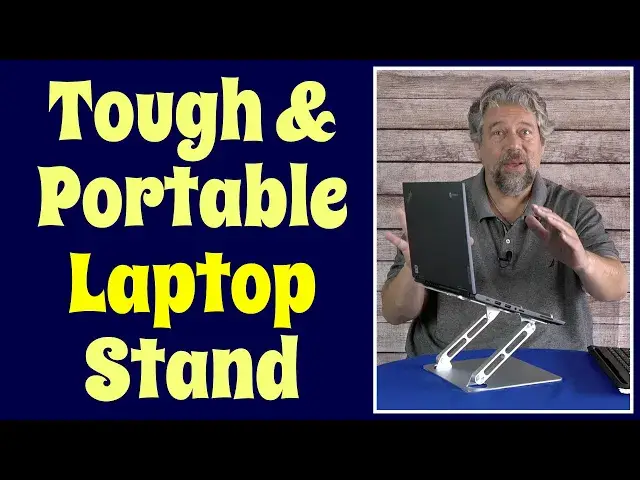
Let's be honest. Your workspace ergonomics probably stink, particularly if you're working from home or a coffee shop. The solution? The Tobefort Aluminum Laptop Stand. For less than you'd expect, this stand will let you get that laptop screen to an optimal height - even if your laptop is up to 17" or 12-13 pounds - and finally let you straighten your back. Good ergonomics leads to better work too, along with fewer headaches, backaches, and general grumpiness at the end of a shift.
Check it out at: http://amz.do/rYGA9Y
Check out Dave's Q&A Web site at: https://www.AskDaveTaylor.com/
#tobefort #laptop #stand #askdavetaylor
Show More Show Less View Video Transcript
0:00
It's time to update your workspace ergonomics with this laptop stand
0:04
Let's check it out. Dave Taylor here, and I'm checking out this
0:14
This is the Tobavort aluminum laptop stand, and it's pretty cool, actually
0:20
So the idea of these is that if you're using your laptop and it's just sitting on the work surface
0:25
like your table or something, then you're probably have your back at a weird
0:29
angle, you probably have poor ergonomics and that means that you're getting more fatigued
0:35
more headaches, more back aches. And it's just you're not doing your best work because you have
0:40
your body compensating for your bad posture. Enter laptop stands. Now, this is a really good
0:47
tough one because it's foldable. It's a little tough to open, but you just do a little muscle
0:53
and you can see here. So I can do this. And the idea is that you can then
0:59
put your laptop like this Chromebook and you can put it on the stand and now you can adjust
1:07
that screen height to where it actually should be. So now it's a very different experience
1:14
and my back is very different. Let me show you this from the side. So, you know, my experience
1:20
of having my back and how I'm sitting while I'm working is very different with this setup
1:25
than it would be if I just had this sitting on the table or worse on
1:29
my lap or even worse on my lap while I'm like lounging on the couch
1:34
That's comfortable for a few minutes, but if you tried to do a whole day of work that way
1:38
it would be pretty rough on your body. So the stand itself can handle laptops up to 17 inches and up to 13 pounds Now this is not a 13 pound laptop This is maybe a third of that weight maybe less
1:53
But this is a strong, tough, rugged, all-aluminum device. And it's interesting because the aluminum also ends up working as a bit of a heat sink
2:02
But even without that, you can see there are holes underneath. So your device isn't going to just sit there and get hot
2:09
It's going to keep it all nice and cool. And that's important. So let's see what else going to tell you. It has non-slip silicon pads. As you can see, hopefully, my laptop staying in place until I get to a pretty acute angle there. And not only that, but as you can see in this close-up, there are pads on the top and bottom, but there's also a big lip on the front. And then there are silicone pads in the lip. So not only does this keep your laptop in good shape, but it won't scratch it either. So you can position it
2:42
to an optimal setting and you can obviously lower it down as you desire
2:47
And I have to say when I have my laptop on a stand
2:50
I'm not generally a fan of using the keyboard in that sort of setup
2:55
So enter another keyboard. So this works perfectly and I can even store the other keyboard
3:01
underneath. So I have this where now I can even push it back a little further
3:07
So give myself even better workspace ergonomics and then I can have the keyboard here
3:12
and work like this. And this is a revolutionary way to work with your laptop
3:17
If you're used to just crouching and using it, something like this
3:21
especially now that we have hybrid work environments and you might be working from home
3:26
for days on end even though you have a corporate job this can really help you have a better work environment And you can see it just a really flexible setup And again I can put the keyboard here and now it all stored and ready to go Whenever I want to work I just bring the screen up
3:43
to whatever height and angle is optimal for me. And again, think about the angle of your spine
3:49
You want to try to sit as straight as possible. And raising the screen up helps your neck
3:55
Really important. And in fact, this actual laptop stand can go from about 1.7 inches if you have it at its lowest setting
4:06
That's just a little less than two inches here, all the way up to its maximum height
4:12
And I'm going to see if I can figure out how to do that. I guess if you really wanted it to be really high
4:18
you could do something like this. And that's a maximum height of 7.1 inches
4:23
And this is a pretty radical change. So if I have my laptop like this and I open the screen
4:29
you literally won't even be able to see me, because my screen's that high
4:33
Now, the other important factor with these sort of devices is that it's also very portable
4:38
So when you do fold it down, and you can see they are pretty tight hinges
4:43
which is good, because if you put a 10-pound laptop on here
4:47
like a gamer PC or something, you don't want it slowly sinking
4:51
So that's why they have it so tight. So when fully fold it up
4:55
it's pretty easy to deal with. And in fact, it has a convenient handle here
4:59
and it's 9.5 by 8.5 by 2.2 inches. So that includes this here. And it's about two pounds
5:08
Aluminums, a nice light metal. So it's easy to work with. There are smaller, more compact units on the market
5:15
But this gives you a lot of stability and silicon feet on the bottom too
5:19
So once you put it down on a surface it not going to slide around anywhere even if you have your laptop at a funny angle So really not much else to talk about It a simple elegant machine solution to a legitimate problem and I have it too
5:33
So I try to use these when I can just to improve my posture and give me less fatigue when I'm working with my computer
5:42
You definitely want to look at something like that too. So only thing left to talk about here is the price
5:47
But before I get to the price, let me ask if you can... subscribe to my channel a click or a tap on that subscribe button and we're connected now also leave a
5:56
comment tell me what else you wish i would have talked about or shown with this particular unit what is
6:02
this unit you may ask this is the tobefort aluminum laptop stand and it's 2399 but there's various
6:11
discounts and coupons that'll take it down to about 20 bucks at amazon.com and that's a no-brainer investment
6:18
That's like the cost of a burger, fries, and a soda, and you get something like this
6:23
and this will change the way you work, especially if you're doing work out of home
6:28
whether you're a student or whether you're in college, or whether you're just in a hybrid
6:33
work situation or, you know, moonlighting or something. Getting your whole workspace set up can make a world of difference into how engaged and
6:42
energized you are with work. So that's my recommendation. You definitely want to check this out
6:48
and I'll catch you in my next video
#Computer Hardware
#Laptops & Notebooks