Up next in 10



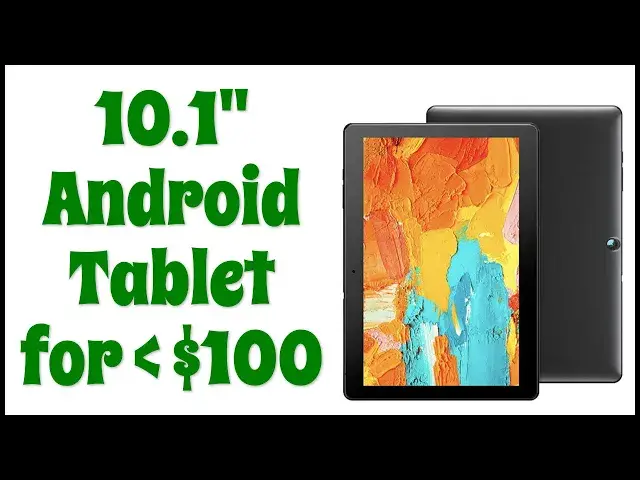
A 10.1" Android tablet with front-facing Zoom-friendly camera, 5hrs battery life, and dual speakers, all for under $100? Tech expert Dave Taylor checks out the Voger PriorPad X100 Budget Android Tablet and finds that there are a lot of trade-offs with this unit, but that it could be great for the kids or as a second screen. What's most lacking, though? Watch and learn in this candid demo and review...
Check the PriorPad X100 at https://amzn.to/3zkTTfD
Check out Dave Taylor's Tech Q&A at https://www.AskDaveTaylor.com/
#android #tablet #androidgo
Show More Show Less View Video Transcript
0:00
A 10-inch Android tablet at a budget price
0:03
Let's check it out. Dave Taylor here, and I'm looking at this
0:14
This is the Vogueur PriorPad X-100 Android tablet. And you can see it's got a 10.1-inch screen
0:22
It's running Android. It has really a lot of the functionality that you're looking for in a tablet at a really
0:29
budget price. Now, I'm going to give you the specs and then I'm going to give you some demos
0:33
But before I go anywhere down that road, let me ask if you could subscribe to my channel
0:38
just a click or a tap on that red button. Awesome. Great. Now, this features the 10.1 inch screen
0:45
running at a relatively low resolution of 1280 by 800. So to keep that in mind
0:52
HD is 1920 by 1080. So this is less than HD, but it is a pretty nice
0:59
screen, as you can see. It features a quad core 1.6 gigahertz CPU, 2 gigabytes of RAM, 32 gig of storage, a 2 megapixel front
1:10
camera, an 8 megapixel rear camera, and there's even support for a microSD card. You can slip it in
1:17
right here on the top. Now give you up to another 128 gig of storage. And battery life, it's okay
1:25
It's a 500 miller amp hour battery, which gives you about 4
1:29
five hours of use. So if you're hoping this is going to be something you can watch all those
1:34
downloaded Netflix movies between New York and Tokyo, you're going to need to recharge it
1:41
There's no way that's going to work. So supports 2.4 gigahertz and 5 gigahertz Wi-Fi networks
1:48
And it does have Android 10, but it's interesting because it's running Android Go. You probably
1:53
never heard of that. That's a lightweight version of Android designed for budget and entry-level
1:58
phones and tablets. So in my experience, I didn't really notice much in the way of difference
2:04
but I guess it is not exactly a full featured Android. Might or might not matter to you
2:11
Let me finally give you some dimensions and then we jump into actually some hands So 9 inches by 6 inches by 0 inches thick and it 16 ounces It nice It lightweight It easy for you to hold like this if you want to read a book or watch a movie That works just fine Now in the box is the tablet and it comes with as far as I can tell a screen protector already pre and then it has the charger It has a charging cable And then also in the box is
2:45
a user manual, which is helpful, and a couple of cards. Let's see. One is for membership and extended
2:53
warranty, and the other one is just a thank you and a 15% discount if you want to buy a
3:00
sand disk microSD cards so you can get some more storage. So that's really nice of them to offer all that
3:07
But of course, it's kind of all about the tablet. So I will say it's not super fast. The
3:15
screen is not super vivid and the pictures and such are not super vivid either. So let's
3:22
start out. Let me show you just a little bit of video footage and then a couple of photos
3:27
As you can see the video is okay but it's a little washed out. That washed out is much more
3:36
obvious in this selfie that I took. Though this photo of the Snapdragon is reasonably vibrant
3:43
So for the next demo, what I'm going to do is I'm going to actually turn on screen recording
3:49
which you can do by doing a double pull down and then turning on screen record
3:56
And now I'm recording my screen. So what I'm going to do is I'm going to switch to this being full screen
4:02
So you can see, though you'll be able to hear me talking. And before we do that, let's just go straight to Spotify
4:09
So you can hear, there are two speakers on the back, but I can play some music and you can hear a little bit about what it sounds like
4:19
So there's no bass at all. There's barely mid-range. It's a very treble-heavy sort of sound
4:27
But the redeeming feature is that it does have a headphone jack on the top
4:33
In fact, let me show you. Here a close of everything on the top All the controls are on the top of the screen in horizontal mode and that is the micro USB for charging the microSD slot for external memory
4:49
the 3.5 millimeter audio jack, volume up down and power, very standard on any Android device
4:56
and that's all you get. Now, there is a front-facing camera, sort of off-center on the front of the display, and on the back there is a camera
5:06
that is absolutely front and center. Not front and center. There is a camera that is absolutely centered on the back
5:14
Now, let's get to that screen capture. I do a lot of reading on my tablets
5:19
So let's go into the Kindle app. And here, I'm actually in the middle of reading
5:24
a new book about blockchain from my colleague, Shelly Palmer, but I can go into my library
5:32
I can look at other books. There's a lot I can do. And of course, I can turn the device and then rotate my content, and then this will be much more of the sort of orientation I expect for a book
5:47
But for this demo, I think it's a lot easier to have everything horizontal
5:51
So that's what I'm going to do. I can do the same thing with Hoopla, which is a program my library subscribes to
5:57
So I can actually get library books in digital form, and it also wants to be in the other orientation
6:03
understandably, but that's great because I can actually get books from the library without actually
6:11
ever having a physical product in front of me. Now, Google Go is interesting. It's a sort of starting
6:17
point for using the web, but it actually gives you a little bit different home screen. And remember
6:23
Google Go is part of Android Go, which is part of this sort of lighter weight version of Android
6:29
Again, this device keeps just switching back and forth between portrait and landscape
6:35
I guess you just get used to it. And then we can try going into video, but I have a feeling that it's going to turn off the recording
6:44
So I'm going to operate on the assumption that it has turned off the recording
6:48
And you can see here that I in HBO Max and I can swipe up and it into entirely functional if a little slow So all in all there lots to like about this I mean it is a budget device It is low cost
7:09
It doesn't have that bright, vivid screen that you might wish you had
7:13
And it doesn't have full HD resolution with its 1280 by 800
7:18
But if you're looking for a tablet for your child or for someone as a second screen
7:25
or you just want to have something where you can. it up and put on some sports or something this could be a really good choice you know
7:33
you can use it with zoom and it does have that front facing camera it's a little bit
7:39
if I may say so zoomed in so you're gonna find that you'll have to push it back a
7:44
little ways so that you're not just like really tight on your face but all in all
7:49
in all there's a lot of functionality here and I think it's really cool that these
7:53
sort of devices have become commodities and then have become incredibly inexpensive. So really all this left to talk about then is the price. But again
8:03
I'm going to ask if you could subscribe to my channel, leave me a comment, tell me what you
8:07
appreciate that I did or showed what you wish I would have showed. Give me a thumbs up if you
8:13
found this to be of value. And so we get to the price. Let me turn this around. This is the
8:20
Voger PriorPad X100 Android tablet, and it is 1099, but on Amazon just now, I saw it actually for 9349 at Amazon.com
8:34
$93 for a 10-inch Android tablet that is entirely functional. This could be a game changer for a younger person in your household
8:43
or for you if you just want to have another screen and another option. Could it do with better battery life and a better screen
8:50
Yeah, but then your price is going to go up. So those are the tradeoffs. Anyway, with that, I'm going to go back to HBO Max
8:56
because there's something I want to watch. So I'll have to catch you in my next video
#Computer Hardware
#Laptops & Notebooks
#Gadgets & Portable Electronics