Up next in 10



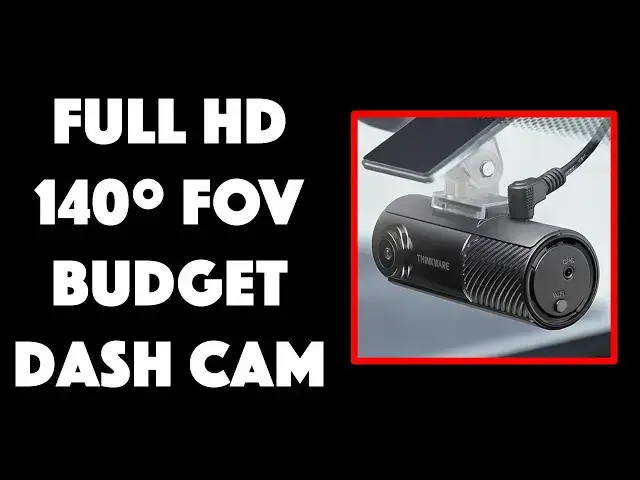
You don't have to live in a dangerous traffic corridor to want a reliable video record of your driving, sometimes it's fun to share a beautiful stretch of road. Got into a fender-bender? Your insurance company or law enforcement might find that dashcam footage quite helpful too. Enter the surprisingly affordable, full 1080p HD Thinkware F70 Pro Wi-Fi Dash Cam. Driving and tech expert Dave Taylor puts it through its paces with extensive demos in this informative video. It might just be your next car purchase!
@thinkwaredashcam
Check it out at: https://amzn.to/3Q2q4KL
Visit Dave's Q&A Web site at: https://www.AskDaveTaylor.com/
#thinkware #dashcam #f70pro #dashcamvideos #f70 #thinkwaref70 #askdavetaylor
Show More Show Less View Video Transcript
0:00
It's small, but it's still an HD dash cam
0:03
Let's check it out. Dave Taylor here, and I'm checking out this
0:13
This is the Thinkware F70 Pro Wi-Fi dash cam. So this thing has both Bluetooth and Wi-Fi
0:22
which makes it super easy to connect to your phone and to actually access it and adjust its settings
0:29
and you can even preview the live video stream from your smartphone
0:34
Now, it is very much a compact design. As you can see, it's 3.2 inches long
0:40
by 1.3 inch around. It weighs 1 tenth of a pound. It's really light
0:46
And it comes with, of course, a mounting unit and it's basically just a sticky surface
0:52
and a little pivot, and you put this on your windshield and then you slide this on when you want to use it
1:02
and you are good to go. And, of course, it does need to be wired
1:07
so there is a 12-volt power adapter and a super long cord
1:13
and then it just plugs right into the dash cam. Why is this cord so long
1:18
Because you can actually plug it into the back of your car
1:22
A lot of vehicles have a 12-volt plug in the front and one all the way in the back
1:28
and so the benefit of plugging it into the very back is you probably never use that power outlet
1:34
and then it comes with an install tool and even some adhesive little clips
1:39
so you can do a really nice, neat wire install because you will need it to be wired for power
1:45
but you can have that run along the passenger side of the roof of your car
1:50
and then it just comes down just behind your rearview mirror, and then this is just sitting there on your windshield
1:56
ready to go. Now, it is pretty slick. It has a 140-degree field of view
2:02
and it's full HD, so it's 1920 by 1080p at 30 frames per second
2:08
I got a ton of demos. We'll get there in just a second, and it actually runs with a 2.1 megapixel CMOS sensor
2:15
and it has super night vision, so there's an enhanced mode that it automatically enables that lets you work at night
2:25
or lets it record and give you good quality at night, so there are more specs
2:30
but honestly, let's just jump into some demos. This first demo is just me
2:35
driving through a small town here in Colorado, and you can see it's crystal clear
2:41
Now, I have sped up the video 2x just so that it's not quite so boring
2:47
Driving when you're watching the video is kind of boring. Now, here we are going through the mountains
2:53
and this time I'm going to do 4x, so it just zips right along
2:57
but it's a beautiful springtime here in the Colorado Rockies. And then one more example also at 4x
3:07
and this is driving through the beautiful mountain town of Estes Park
3:15
Now, let's get into some night vision, and this first one actually recorded some audio
3:20
directly off its built-in microphone. There are a lot of buildings here that did not exist
3:25
5 or 10 years ago. We are a thriving little city, and what you're hearing an example of
3:32
is the audio pickup for the Thinkware unit, and it does a really good job
3:38
It is entirely capable of picking up the entire conversation inside the vehicle while you're driving
3:44
and of course it's still continuing to record the video segment too
3:50
And here's some more night view. And you can see it's done a really nice job
4:04
It really gives you really good video. Now, how did I get that video onto my computer
4:10
Well, it actually records onto a microSD card, and Thinkware includes a 32GB card already in the unit
4:20
which is plenty enough storage, but if you really want to record a lot
4:25
you can put up to a 128GB card into it, and honestly, 128GB microSD cards are, I don't know, 15 bucks
4:33
They're really, really cheap now. It's really quite amazing. Now, one slight thing I found confusing
4:39
is that in the app, and I'll show you the app in a second, but in the app you can enable a GPS mode
4:45
that says it's getting the data from your phone, but as far as I can tell from viewing the recording
4:51
you actually need to plug in their external GPS device for it to record properly and work
4:58
Now, my suspicion is that might be a coming soon feature and that there will just be a firmware update
5:05
and suddenly you will be able to use your phone without obviously putting those pieces in place
5:11
but on the side there is a button that lets you do manual recording
5:15
if you're just sitting there or something, and maybe you're an Uber and someone wants to get in the car
5:20
and you haven't started the vehicle yet, you can just push this button
5:24
and it'll start recording the video in front of you, but it'll record the audio inside the vehicle
5:30
and then on the other side there's a Wi-Fi button that you push for that initial synchronization via Bluetooth
5:36
so it says Wi-Fi, but it's really Wi-Fi and Bluetooth, and those are really all the buttons on the unit
5:43
There's not much you have to do because everything's in the app
5:47
So let me show you the app, and I'm just going to zip through it pretty quickly
5:52
You can see you connect via Wi-Fi from the app to the actual dash cam
5:58
and then you can go into a live view, but you can also get to all of the different settings
6:05
and you can even remotely copy video segments if you just pulled over and you're like
6:11
wow, I really want to save that thing that just happened. Some amazing car drove past me
6:16
or someone tried to cut me off and flip me off and I really want to go talk to the cops
6:21
and I want to make sure I have the footage. Hopefully the former, not the latter
6:25
but either way, all of that is accessible via the app. And then here's that GPS feature
6:32
and it suggests that it's using the GPS data from my phone
6:37
but when I reviewed the footage, it didn't actually have any GPS information stored
6:42
So again, my guess is that's a coming soon feature. So I found working with that app pretty darn easy
6:51
In fact, that demo that I recorded was me while I was at a stoplight
6:56
so that's how comfortable I was that I could still track everything going on
7:00
and be able to go forward when the light turned green, but I was still able to go and quickly go through
7:05
some of the settings and make sure everything was correctly configured. So, let's see
7:10
I've told you pretty much everything. You know it has a built-in microphone
7:14
The operating temperature for this is 14 degrees to 140 degrees. So if you are in the high desert
7:23
and it is the hottest day of the year, you might want to pull this out of your
7:27
you know, sort of front windshield area and it is easy. Even with this mounted, you can
7:34
and I have done, just slide it off and just stick it in the, you know
7:38
sort of maybe behind your gear shift or something, and then when you get back in the car
7:42
all you have to do is slide it back on the mount, which is just sitting on the windshield
7:46
and you're good to go. Now, I found the adhesive worked really well on my Mazda
7:52
and if you need a second one, it does include an additional adhesive
7:57
So, there's a bunch of stuff included in the box, and there's really a lot to like here
8:02
This is definitely, if you're looking for an affordable dash cam that's at 1080p HD
8:09
this is definitely one to check out. So, we should talk about the price
8:13
but before we get to the price, you know what's coming. I'm going to ask you to subscribe to my channel
8:18
Click on that subscribe button, and don't forget to click on that bell icon for notifications
8:23
and if this was of value, and I certainly hope it was, give me a thumbs up
8:27
If it wasn't of value, leave a comment and tell me what you wish I would have shown
8:32
or would have demonstrated. Cool. Now, this... Let's hold it this way
8:38
This is the Thinkware F70 Pro Wi-Fi dash cam, and it is $99.99
8:45
currently discounted down to a remarkable $79.99 at Amazon.com. For $80, this is a no-brainer addition to your vehicle
8:55
so that you have recording footage of interesting things that happen to your vehicle
9:01
and it also has various parking modes so it can give you some video footage
9:06
if someone bumps your car or something, even while you're not in the vehicle
9:10
as long as you have it on a hot 12-volt plug. If your 12-volt plug turns off when your car turns off
9:16
then that won't work so well. There's no on-board battery, but generally speaking, this is a great addition
9:24
and my daughter recently rear-ended someone, and I wish she would have had this dash cam
9:28
because we would have been able to review the footage to see exactly what happened
9:32
but we didn't, so there it goes. Anyway, that's everything I got
9:37
I'm going to go put this back in my car, so I'll catch you, I hope, in my next video. ♪♪♪ ♪♪♪ ♪♪��
#Computers & Electronics
#Consumer Electronics
#Camera & Photo Equipment
#Car Electronics