Up next in 10



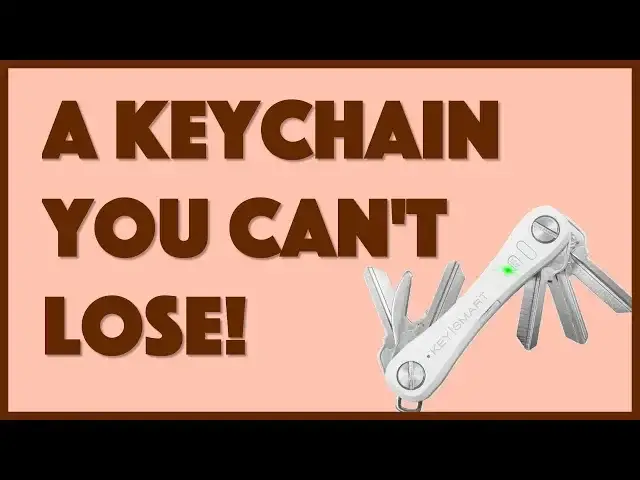
Ever lose your keys? I'm sure you have, and it might have been in the last few days. Frustrating! But with the KeySmart Pro powered by TILE you'll never lose 'em again, whether you forget them at work, drop them on a run or have your partner "forget" where they put 'em.
Tech expert Dave Taylor of https://www.AskDaveTaylor.com/ adds his keys to the KeySmart Pro and gave it a whirl for a week or two. And found it a pretty slick solution to a common problem. Except for one annoyance with the TILE service, however...
Check it at https://www.GetKeySmart.com/
Show More Show Less View Video Transcript
0:00
Never lose your keys again? Let's have a closer look
0:10
Dave Taylor here and I'm looking at this. This is the KeySmart Pro and it's pretty cool. It is
0:15
actually a keychain, well, key holder maybe is a better or more accurate term. And not only does
0:22
it hold up to 10 keys, but you also get things like a bottle opener. But that's not all because
0:29
it also has a handy built-in flashlight. So obviously right now doesn't seem very valuable
0:37
At night it's actually a nice bright tiny little LED. Pretty handy. But really what makes this cool
0:43
is that it has built-in tile Bluetooth tracking. So that means that you literally can't lose this
0:50
As long as eventually someone goes by with a Bluetooth device, it'll actually track its
0:55
location. But more importantly, your phone will know because you're probably going to carry both
1:00
at the same time. So it will remember the last place you had this. So if I leave this late night
1:06
at the bar or if I leave this at the office or something, I can then just go onto the tile app
1:12
and I can go and look on the map and it'll show me where it is. Now if you've lost it in your
1:17
house, it doesn't have that level of granularity, but it's got another trick up its sleeve. So
1:22
turns out, let me go ahead and launch the app, and this is the tile app. Like tile's a completely
1:28
separate company. So then keysmart, the company that makes the key holder, they're just utilizing
1:33
that tech. They just have it secretly embedded in this thing rather than having it be a little square
1:39
that you actually have on your keychain. So this is actually a whole lot more smooth. So what we're
1:44
going to do is I'm going to actually from the phone, I'm going to force this to ring. So let's
1:49
see if that works. And so you can hear that. Let's make it nice and loud. So there's lots going on
1:59
and you can see here when I'm ready, I can just tap on done and it's done. But what's kind of fun
2:04
is you can do that in reverse too. So if you have this but you can't find your phone, you can push
2:11
the tile button and it's supposed to. Let's see. Maybe I'm in the wrong place
2:25
There we go. Took a little bit of pushing. That's a sort of recessed button. But here's what's kind
2:31
of fun is that it actually will make your phone make noise even if your phone's on silent or mute
2:37
Now that by itself makes this really valuable. My teen daughter would really benefit from this
2:43
because she's constantly losing her phone and then she's like I can't find it because it's on mute so
2:48
I can't even call myself. So this would solve that problem. But tile actually has some other features
2:54
So let me show you that you know the key of course is the sort of find feature which you know there's
3:00
the ringing and stuff but it's really about the map. And so for that you go to the location history
3:05
and here you can see my location. Now here's the only thing I will say that's super annoying about
3:10
this and this is a tile issue not a KeySmart Pro issue is that tile constantly pushes really
3:17
aggressively for you to upgrade to premium. So it shows you get 30 day history of where you are
3:23
or of where your key has been and then oh you have to pay for the upgrade. You know all the different
3:28
features is I feel like half the time whenever I try to go and do something it's like oh you have
3:32
to pay for an upgrade and this is like I don't want to pay for an upgrade I just want a keychain
3:37
So that's the only thing I will say. It also obviously has a battery in it and so it needs to
3:43
be recharged. There's a teeny tiny little micro USB plug on the side comes with a micro USB cable
3:50
in case you don't already have 20 of them in a drawer. But you do need to charge it every 45 days or so
3:57
and I believe the app will warn you if that's the case if it's getting really low. But if you just
4:01
set a reminder to plug it in on like the night of the first of every month you'll be totally good
4:06
and then you'll never actually get down to that last 10 or 20 percent of battery and I'm pretty
4:13
good about not losing stuff but I understand that a lot of people aren't that way and I certainly
4:18
have friends that go through their panic of oh my gosh where are my keys where are my keys this would
4:25
solve the problem and it would not only solve the problem but it also makes everything nice and neat
4:30
and although I appear to have lost it in my build process there is also a way you can actually have
4:37
like a key fob for if you have your car for example so that's part of this it's kind of a
4:45
tricky deal to take it apart layer the keys and then there are spacers in there too and the reason
4:51
that this one key is so loose is because I have apparently one too few spacers on that side so
4:58
that's a little tedious but that's a once in you know once at I don't know in in a few months deal
5:04
so however often you add or change keys on your keychain that's how often you'd have to do this
5:09
but once you get it right it is actually a pretty cool piece of technology and I really like
5:14
that tile is built in because I don't like the separate little tile fobs I want small and compact
5:21
and this definitely accomplishes that now before we talk about the price let me just go ahead and
5:26
say if you can subscribe to my channel I really appreciate that cool now if you do and you leave
5:33
a comment leave a comment telling me your funniest key lost story I want to hear them so share the
5:39
funniest time you lost keys whatever as a comment okay so the keysmart pro it is fairly spendy at
5:46
$49.99 you can get it at getkeysmart.com they have lots of other little gigas and you can put
5:53
different things in here and they have different ways that can connect to another keychain as
5:59
needed so lots of stuff to check out on their website it is a little spendy but on the other
6:05
hand how much would you pay when you're in the middle of flailing and panicking that you can't
6:10
find your keys yet again and there is a deadline and you need to go right now and you can't find
6:15
your keys so possibly that price might be entirely reasonable for someone that actually really needs
6:21
this product so I think it's actually a pretty cool product I want to play with it a little more
6:27
to get all the spacers just so but I like it and I think you should check it out that's all I got
6:32
so I will catch you in my next video so
#Computers & Electronics
#Shopping
#Locks & Locksmiths