Up next in 10



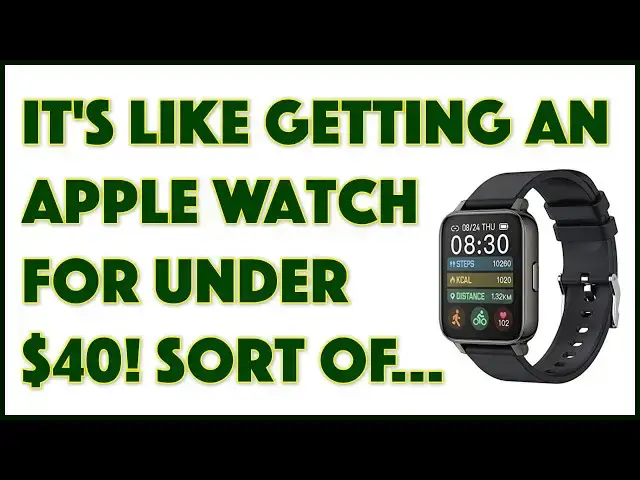
Envious of your friends with fancy Apple Watches or Samsung Gear smartwatches? Rogbid has an alternative, the Rowatch 2 smartwatch, and it's under $40! Tech expert Dave Taylor of https://www.AskDaveTaylor.com/ runs through its features and talks about its limitations and whether it would be a good choice for you or not. Includes demonstrations of both on-watch functionality and paired smartphone app features too.
Show More Show Less View Video Transcript
0:00
You won't believe the price of this smartwatch
0:02
Let's check it out. Dave Taylor here, and I'm checking out this
0:13
This is the Rogbid Row Watch 2 Smartwatch. And yeah, it looks a whole lot like an Apple watch
0:21
In fact, it's very similar in design, so similar that the screens within 1 millimeter of the 44 millimeter
0:30
larger Apple Watch size. This is actually a 1.7 inch touchscreen and it's interesting
0:35
The resolution's only 240 by 280 but it's a pretty crisp looking screen. It actually works really well
0:43
It's IP 68 waterproof includes a fitness tracker and it's really interesting what sports they track
0:50
It tracks walking, running, swimming, cycling, basketball, football, and then there's two odd ones, badminton and skipping
1:00
Now, I don't do a lot of badminton and I don't do a lot of skipping, but if I did, my watch could track that. How handy is that
1:07
It also tracks your heart rate and it has an oxygen monitor. How accurate they are might be another story, but it actually has at least some data
1:16
Sleep tracker, it has a sedentary and water drinking reminder you can set
1:21
So if you're the kind of person that just sits at your computer or your video game system and just zones out and has hours and hours and hours
1:30
pass. This can remind you to get up, get a glass of water, move around a little bit, maybe focus
1:35
your eyes on something at a different distance, right? All of that can be done. You can also set
1:40
alarms, so if this is for grandma or something, it can remind her to take her meds or something. Pretty
1:45
handy. Now, some of the other features it includes are a remote button for the camera on your
1:52
paired smartphone, and it has a weather display so it can show you the weather, and it has a remote
1:59
music controller. So again, on your paired device, if you're listening to music, you could just go to
2:04
the controller on your watch to pause or to go to the next track or even just to see what track
2:09
you're listening to. Now, it is a notification watch. It is not actually a watch that lets you
2:17
interact. So you can't answer phone calls. You can't respond to text messages on this watch
2:23
But honestly, when I look at people and how they use like their Apple Watch or their Samsung
2:28
Galaxy gear or something, that most of them actually use it for notifications and then go to their device anyway
2:35
So maybe that not such a big deal It connects via low power Bluetooth and it has a pretty solid battery life So one of the things that really frustrating about the Apple Watch is that its battery life about 20 25 hours which means every single day you have to charge it This they say it a five days of full use per charge
2:55
I found it's a little shorter than that, but even three or four days is pretty darn nice
2:59
And then if you don't touch it and it just sits, it can actually be on standby up to 30 days
3:05
So I will tell you that I had it sitting untouched for a week or so, and the battery was still
3:12
like 82%. So that was pretty impressive. Now, I know I've talked about it a lot, but you want to see it. So here's what I'm going to do is I'm going to close up on the watch. But before we do that, let me show you some of the interaction you get through the app. So the app, actually, let me just get my recording started. So the app is called Hero Band 3, which is interesting. So it's not actually from the same company. I think it's just a company they work with
3:42
And as you can see, it shows you the watch. It gives you access to a lot of watch faces
3:48
Here's some of the ones. These are the ones I have installed. But if I go to discover more dials, check out all the watch faces you can download
3:57
So the actual watch face that I have right now, that's sort of that Santa Fe, New Mexican style image, that is one that I downloaded
4:07
And it was super easy. So really nice feature. It gives you lots of settings
4:12
You can see notifications. You can turn on and off notifications. If you get a lot of stuff on Twitter, you can turn that off
4:19
Pretty handy. Set alarms, access your remote shutter and give it permissions to do that
4:26
You can check for upgrades. You can also go and get your health status
4:30
And you can see, I haven't worn it very much and I haven't moved around very much yet today
4:34
So I'm at a pretty embarrassing 264 steps. I'll break at least a thousand
4:40
by lunge, if not five or 10,000. And then finally, there's also some profile. You can set your
4:47
height and weight and you can set your goal for a number of steps per day. All of that. Really handy
4:53
Really the sort of home screen of it, though, is the middle one that shows you the watch face
5:00
Now, great. Let's switch and let's look at the watch itself. To do that, I need to spin the camera around
5:07
to point at it and we'll see how that goes. First thing to notice is that there's a button on the side
5:13
It's not a crown. It doesn't give you a dial. It doesn't give you that sophisticated interaction you'd have on an Apple watch
5:19
But it's functional. I can change watch faces on the ones that are already preloaded by just pushing and holding
5:27
And then it can step through and you can see what my options are And this one let see there well I think I just pick this again I actually like this one and then I going to go and swipe upward and that gives me
5:44
my steps and fitness swipe up again I can see sleep I can see my heart rate obviously I do not
5:52
have my heart rate right now because it's literally sitting on a table which is curious
5:59
But we can go back to the screen. If I go in the other direction, then I can see settings
6:06
And there are some interesting ones. So I can go and push the button again to wake it up
6:11
I can do flashlight, which just gives you a bright screen. I'm not sure when that's useful, but I suppose that can be beneficial
6:19
And then this button will give me weather and it will update the weather
6:23
Tell me how it's looking outside. That's a pretty nice day. and I find that it's easier just to push the button to move back and around
6:31
So 91% battery, Bluetooth is connected. I can go to settings and there's a lot of settings
6:39
So you can see there's a lot of things you can do from the settings screen
6:45
I can push again. I can go in the other direction and here's some notifications that have come in
6:50
Text message, Facebook, some general notifications off of my phone. And of course I can zoom in on one
7:00
And I guess that's from the ESPN app. And as you can see, it's a little confusing to figure out what direction to move things in
7:09
but now I'm back to the date and time and whatever screen that I want
7:14
There's a lot to like about this simple little watch. Now, let's flip it over and see what's on the other side
7:20
So the sensors for things like your heart rate are in the center
7:24
center. But this is what's important to look at on the back. These are the charging tabs
7:29
and it comes with a very special charging cable, and it works with magnets. So you just get it
7:36
close, and now it's ready to charge, and you plug the other end into whatever charging device
7:42
you want, which is good and bad. It's good because this lets it be waterproof, but it's bad
7:49
because if you ever lose this cable or it gets damaged, you're kind of out of luck
7:54
because this is not something you're going to find off the shelf at somewhere like Best Buy or even probably at Amazon.com
8:02
So that's a design limitation worth knowing about. Maybe that's the nature of these things
8:08
to have some sort of a magnetic charge, but you do want to know that
8:12
Now, also while we're at the back, notice that it a standard watchband with a quick release so you can take the band off you can switch it for another one It a pretty neat little watch I mean it really not a true one competitor with
8:26
something like the Apple Watch, but it's at a fraction of the price. So it might be a little less
8:32
accurate with its pedometer. Its health rate, you know, heart rate, oxygen monitor, all of those
8:38
might be a little bit more questionable in terms of their true accuracy. But it gives you a chance to
8:44
join the world of smart watches and try it out and get those notifications and say, oh, look
8:50
someone just sent me an email message, right? All of that can happen. You could turn on and
8:55
off your haptic feedback, all of that at such a low price that if you lose this or break it
9:01
you're not even going to care. It's okay, because you'll just get another one, right? And you're
9:05
wondering, well, okay, how much is it? So let's talk about the price. But before we get to the
9:10
price, give me some feedback on this video. I really appreciate it. Give me a thumb
9:14
up if you like it, leave a comment if you use a smart watch and what kind you use or whether
9:19
you think that it should only be Samsung and Apple and everything else should be eliminated
9:23
Why? Give me some justification. And of course, don't forget to subscribe. I really
9:29
appreciate when people subscribe to my channel. All right. Now this, I suppose I'll take it off
9:35
and show you. And by the way, it's sort of a typical rubber band on it and it does have an easy
9:42
release so you can change watch bands if you want. That's a pretty easy thing to do with modern
9:47
smart watches. And I changed the face even. So super easy to do that. This is the Rogbid Row Watch 2
9:56
Smartwatch and it's 3699 at Amazon.com. 3699. That is so cheap that there are watch bands for the
10:06
Apple Watch that cost more than this. And this comes with the actual watch. So definitely one worth
10:12
checking out, this could be really great for a tween or teenager that just wants those notifications
10:18
but doesn't really need to wear a multi-hundred dollar device on their wrist. And it might be fun
10:24
for you to have if you're like going to a tough mutter or you're in an environment where things
10:28
are really banged up a lot because having this go south is a whole lot less sad than having your
10:34
brand new Apple watch at $400 going bad. So definitely one to check out. I'm going to put that back
10:41
on my wrist and I need to go for a walk. So I'll catch you in my next video
#Product Reviews & Price Comparisons
#Gadgets & Portable Electronics
#Other