Up next in 10



Kindle 2019 at Amazon: https://geni.us/akindle2019
Kindle Paperwhite at Amazon: https://geni.us/apaperwhite
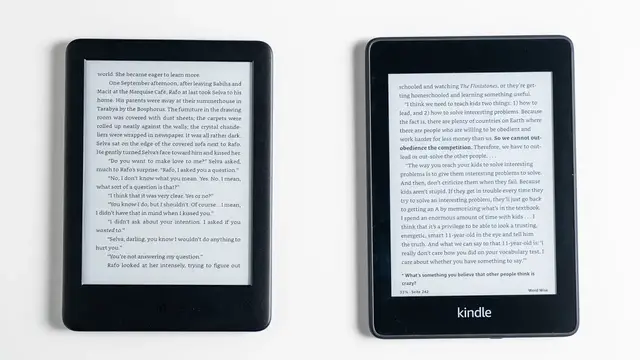
Should you get the Amazon Kindle 2019 or the Kindle Paperwhite? In my review and comparison you learn which ebook reader is the better one and if it's worth it to spend more on the Paperwhite. I review and compare their screens, battery life, and other features. While the Paperwhite is waterproof only, both have frontlights now and both support Audible audiobooks. However, you'll have to use Bluetooth headphones or speakers.
Which one do you prefer? The Amazon Kindle 2019 or the Kindle Paperwhite?
My website: https://mynexttablet.com
Twitter: https://twitter.com/mynexttablet
What I use for my videos:
Camera: https://amzn.to/2nXWyZd
Lens 1: https://amzn.to/2wh2tMF
Lens 2: https://amzn.to/2whLU3k
Lens 3: https://amzn.to/2BA936X
Microphone: https://amzn.to/2MKETSD
Light 1: https://amzn.to/2o2Q37f
Light 2: https://amzn.to/2wirIOK
Show More Show Less View Video Transcript
0:00
I've been using an Amazon Kindle since 2011 and have been very happy with this platform
0:09
For reading long books I prefer readers with e-ink displays over small tablets
0:14
It's much more comfortable for your eyes. Well now in 2019 it was time for me to get a new one and I got both the new Amazon Kindle
0:22
2019 and the Kindle Paperwhite that got a refresh in 2018. How good are they and is it worth it to spend $40 extra on the Paperwhite
0:33
I'm Anjay for MyNextTablet.com and this is my Amazon Kindle and Kindle Paperwhite review and comparison
0:50
A couple of words about pricing. first. The new standard Amazon Kindle with 4GB storage starts at around $90
0:59
If you want to get the Kindle paperwhite you will have to pay around $130 for the 8GB
1:04
version and around $160 for 32GB. As usual let's start with the design and build quality first
1:13
At first sight they look very similar because I've gotten the black versions of both
1:17
Once you pick them up though you immediately feel that the normal Kindle has a much cheaper
1:21
feeling plastic body than the Paperwhite does. It seems to be the same material Amazon uses for their FIAT tablets
1:29
The Paperwhite on the other hand has a smoother, more rubberized plastic, which feels much higher end
1:35
It's interesting to note that the normal Kindle is a little bit smaller overall, even
1:40
though their screen size is identical. I'm not sure why that is
1:45
Maybe it has something to do with the waterproofing of the Paperwhite
1:49
It has an IPX8 rating, which means you can use it in up to 2 meters of deep water
1:55
Now I wouldn go swimming with it but it should be fine for reading in the bathtub or so To make it waterproof it seems like Amazon put a protective layer above the screen which is missing on the normal Kindle That plastic layer has another advantage It much
2:10
easier to clean the screen. I noticed on my 2011 Kindle that without this layer, a lot of dust and
2:16
dirt can accumulate in the corners of the screen. And the Kindle 2019 has a similar design. There
2:23
shouldn't be an issue on the Paperwhite. Unlike older ebook readers, both don't have physical buttons to turn pages anymore, they've
2:31
got touchscreens for that. However there's obviously a power button on the bottom and both feature a micro usb
2:37
port for charging. Yes, usbc would be nicer, but well they're cheap
2:42
The kindle is a little bit lighter with 174 grams compared to 182 grams of the Paperwhite
2:50
Both the Amazon Kindle 2019 and the Kindle Paperwhite feature a 6 inch e-ink display that's
2:58
glare free. E-ink screens kind of mimic real ink on real paper
3:02
The image does not refresh constantly as is the case with other kinds of screens
3:07
Instead it only refreshes when you turn the page. Because of that these kinds of displays are much easier on your eyes and it is much more
3:15
comfortable to read for long periods of time. To me it feels just like reading a paper book
3:20
While the screen size and technology of both readers are identical, that's not the case
3:25
for other aspects. A major difference are the resolutions. While the Kindle Paperwhite has a pixel density of 300 ppi, the normal Kindle has a resolution
3:35
of 167 ppi only. And especially when you compare them side by side, text looks much sharper on the Paperwhite
3:43
It looks as sharp as the quality printed book does. The lower resolution of the standard kindle is not too bad as long as you don't hold
3:50
it super close to your eyes. For most I think it will be fine, but still you certainly can see a difference here
3:58
In the past only the paperwhite had front lights that illuminate the screen, but now
4:03
the standard kindle has them too Without them you must actively shine a light on them just like with a real book And you can use them that way You don have to turn on the front lights at all
4:14
As I said, both have front lights now. The paper white has 5 LEDs and the Kindle 4 LEDs
4:21
That means the paper white is a little bit brighter. With that being said, in real life the differences are very minor
4:27
Because these are E-ink displays, you only need the lights in a dark environment
4:32
and both are bright enough for that. If you're outside, there's enough light hitting the screen anyways, and you don't even need the front lights then
4:39
Now, the slow refresh time of earring displays means that the software can seem a bit sluggish if you compare to a fast smartphone or so
4:48
but that's just the technology of the screen itself. Amazon's interface is very simple, so you don't have to scroll through tons of menus anyways
4:56
A browser is built in too, but yeah, it's not really usable
5:00
I prefer a phone or tablet for that. These ebook readers are mostly meant for reading books
5:06
Unlike with tablets, there's not much internal hardware to compare. We don't even know which processor sits inside and since it's an ebook reader, you can't
5:15
play games or so anyways. The storage options are different though. While you can get the normal Kindle with 4GB only, you can choose between 8GB and 32GB
5:24
for the Kindle paper-wide. However both can hold thousands of books, because they're mostly text anyways
5:31
And you've got free cloud storage for your kindle books for free. So for most I'd say just get the cheaper option
5:37
Now if you want to listen to audiobooks, storage can be an issue of course
5:41
You can listen to audible audiobooks with both readers using bluetooth speakers or headphones
5:46
and audiobooks can have several hundred megabytes in size. I like to listen to audiobooks too, but I prefer my phone for that
5:54
But it's possible with these kindles and it does work but you need bluetooth speakers
5:58
or headphones. There's another hardware difference. You can get the Kindle with WiFi only while you can choose to get the paperwhite with
6:06
just WiFi or WiFi plus free cellular connectivity That varies by market though Let check out their battery life According to Amazon the normal Kindle will last you up to 4 weeks while the paperwhite
6:20
can last up to 6 weeks. For both, Amazon tested it with reading for half an hour per day, with wireless off and
6:27
the front light set to 13, which is medium. My results are a bit different, but I didn't bother with switching off Wi-Fi and the brightness
6:35
was set to maximum on both. And under these conditions with about an hour of reading per day
6:40
both lasted me around a week. If you don't need the front lights because you're reading outside on the balcony
6:46
or at the beach they will easily last several weeks. Basically battery life is not really an issue on both
6:52
just connect them to a charger once a week or so and you will probably never run out of battery
6:58
Well that's the end of my Amazon Kindle and Amazon Kindle paper wide review and comparison
7:03
I think both are excellent ebook readers and good values for their price
7:08
But overall, the Kindle Paperwhite is obviously the better one out of the two
7:12
It has a high resolution screen, more storage and it is waterproof
7:17
If you read a lot, I think it will be worth it for most to invest a bit more to get the Paperwhite
7:22
But if you want to save some money or if it's your first ebook reader, the normal Kindle
7:26
is a good choice too. I used the predecessor for years and it's totally fine
7:31
Alright, that's my Amazon Kindle and Kindle Paperwhite review and comparison. If you have any questions, please feel free to write me down below and check out mynexttablet.com
7:41
If you want to choose a tablet instead of an e-book reader for reading books, we've got the best list there for the best tablets to read books with
7:50
I'm Angel. Thanks for watching and see you next time. Thank you
#E-Books
#Product Reviews & Price Comparisons