Up next in 10



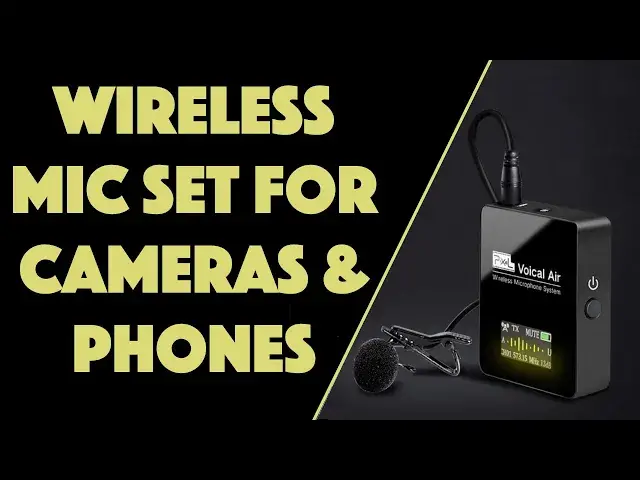
Whether you work with an iPhone, Android tablet DSLR or video camera, you'll want to learn more about the Pixel Voical Air Wireless Microphone System to free yourself from those pesky wired mics. Tech expert Dave Taylor of https://www.AskDaveTaylor.com/ tested out the Voical Air Wireless Mic with both a video camera and an iPhone 11 Pro, and found it worked well in both scenarios. It features a range of 70 meters and up to 6 hours of battery life too.
Learn more at Amazon: https://amzn.to/3kqcJdE
Show More Show Less View Video Transcript
0:00
A wireless microphone setup with a receiver and transmitter this tiny
0:04
Let's check it out. Dave Taylor here, and you're listening to me using this
0:17
Well, this is the transmitter. The receiver is actually hooked up to my camera
0:22
This is the pixel Voical Air Wireless microphone system. And it's pretty cool
0:28
As you can see, it's. really small. The transmitter and receiver are about the size of a box of matches
0:35
If you remember what that size is. And their super light comes with a lot of controls
0:40
but most importantly it comes with all the wires and cables you need to use it with a camera
0:46
a video camera, a DSLR camera, or even a smartphone. So here I have my Apple iPhone on a tripod
0:55
and I use the correct cable. There's different cables. So I use the cable label
0:59
labeled phone cable. And then I had to also use, because it's an iPhone, I had to use a
1:05
3.5 millimeter to lightning connector. So putting those two together, and here's a really important
1:11
thing to know, is that on the phone cable, there is one with two rings, one plug, and then
1:18
there's one plug with three rings. You want the three ring plug going into your device
1:24
So, in the case of an iPhone, that's the end that you plug into the lightning adapter
1:30
If you're using something like a pixel or a Samsung that has an audio jack
1:35
then you luckily don't need the adapter, but you still want to make sure you get the correct end
1:40
If you do it the opposite way, you will not get audio and you will be very cranky
1:46
So that leads to the question of, well, what does it sound like with the audio on the iPhone when I'm using it wirelessly
1:53
And let's go ahead and just cut to an example. So here I am on my front porch, and my phone, which is acting as the video camera, is, I don't know, I'd say about 25 feet away
2:04
I'm using the wireless microphone setup, and I'm talking at a very normal volume
2:07
So on my purse, I have the transmitter and the little Lavalier mic, and then on the phone I have plugged in the receiver, and that's all sitting on a tripod
2:17
So 25 feet away, and I'd say the audio clarity is pretty clean
2:22
But what do you think? All right so I unhooked the microphone and I using my standard microphone now so I can show you all the pieces So one of the things that you need to get the hang off with the pixel Voical Air is which one the transmitter and which one the receiver
2:39
And it's so subtle that by looking at it, you can almost not even tell
2:44
The way to be able to differentiate is on the top. The receiver has a headphone jack because you can use that to monitor your audio signal
2:53
and the transmitter has a built-in microphone if you don't want to actually use the clip-on
3:00
Lavalier microphone that's included. So that's about it. They really should have some differentiator
3:06
on the front that says transmitter and receiver, but not super hard. So let me give you a quick
3:11
tour of all the different plugs and ports and everything. So this is the transmitter, and I know
3:18
it's the transmitter because it has the microphone connection on the top. And then
3:23
then it has the wire you plug in for your lavalier mic and then on the left side is USBC for charging
3:31
on the right side is power and on the bottom is the settings which basically let you pick what
3:39
frequency you want to work with and then up and down volume up volume down gain up gain down
3:44
you know it lets you adjust because you don't want to have too high a gain because then you get
3:50
clipping but if you have it too low then you can't hear it so So that's where the receiver is handy having a little headphone jack
3:58
So you can get it all set up the way you want before you separate the two units at whatever distance you prefer
4:05
Now, on the receiver, you have a, I don't know what the graphic is, but that's where you plug in the cable that you then plug into your recording device
4:16
And then there is an audio headphone jack that you can just use as a monitor
4:21
I use that with earbuds to get things set up. correctly. Again, on the left side is USBC for charging. On the right side is power. And on the
4:30
bottom, in exactly the same configuration, are settings and positive and negative to get volume and gain
4:36
up and down. So you adjust the two to get it just so. And then you're ready to roll. So that's
4:42
really it. Now, it comes with this really nice carrying case that includes everything. And when I say
4:48
everything, I mean everything. So we have the Lavalier microphone with a little
4:53
the nice long cable that goes obviously to the transmitter And that all the audio source needs Then for the receiver you have to choose between your camera cable and your phone cable
5:06
The camera cable is a little easier to work with. That one has the same double ring 3.5
5:12
millimeter plug on each end. So there's no worries about having that go wrong. But on the phone
5:18
cable, there's two rings on one plug, three rings on the other. The only reason I'm bringing it up a second
5:24
time is it took me a while to figure that out because their instructions don't tell you that
5:29
and that's a little frustrating but now you know so once you actually are armed with that information
5:35
it's super easy to plug the correct end into your phone and then the other end into the receiver
5:41
and you know which one's the receiver because you're right it has the headphone jack graphic on it
5:47
so there's that now what else does it come with well if you are going to use it with the DSLR
5:54
Then there's actually a hot shoe, or they called cold shoe adapter
5:59
So you can actually hook this up to your camera. And then the receiver, you can just slide this
6:05
So let's see, I guess it will slide onto the receiver. Yeah
6:09
So it slides on just like that. That's really handy because you don't want this thing just dangling or hanging down
6:15
You want it actually working nice and neat and organized so that it's a little more professional
6:20
a little less likely to have any issues with crackling or anything on the cables
6:24
So it includes that. And in addition to all those other cables, it also includes two, and you won't be surprised, USBC charging cables
6:33
So you want to charge these up because obviously they are powered by their own internal 600 mill amp hour battery, which gives them up to six hours of usage, which is a lot, actually
6:46
And charged via USBC, the range is up to 70 meters, which is over 200 feet
6:52
You saw, I was about 25 feet away on the recording I made, and I'm already a very small element of the overall composition
7:01
So, 200 feet away is sort of an interesting number because I don't know what you would do with something that far away
7:06
You really couldn't see anybody unless you had, I guess, a really great zoom lens, maybe for a camera
7:12
But it's a lot more range than realistically you're going to be using, and that's great
7:16
Now, let me tell you also, it supports 36 different UHF frequencies
7:22
from 570 to 606 megahertz You just push settings and then plus or minus to step through Make sure obviously both of them end up on the same frequency and you good to go
7:35
Why would you do that? Because you might be monitoring and hearing noise from other electrical devices or maybe
7:40
other wireless microphones. So being able to modify that and fine tune to get the best frequency is really important
7:49
And that's pretty much it. It's a really nice setup. You know, I wish the documentation was a little clearer on the way to orient this cable properly
8:00
and how to differentiate from the receiver and the transmitter. But honestly, after a tiny bit of experimentation, you'll get the hang of it, and you'll be really pleased at how well it works
8:10
And I actually have to say this is going to be something that's going to stay in my mobile camera kit because it's so useful
8:17
And I love the battery life and the size. I mean, seriously, it doesn't get much smaller than this
8:23
It's really cool. Now, the only thing let's talk about is the price
8:27
but before we get to the price, I'm going to ask if you can subscribe to my channel. Really appreciate when you do that
8:32
So go ahead and click or tap on that subscribe link. Okay, now, this whole setup with all the cables, carrying case, everything, swanky box
8:43
Not sure you'll keep that, but nice looking box, right? All of this is the pixel Voical Air wireless microphone
8:50
system and it's $11999 at Amazon.com, but there's a $20 off coupon what I most recently checked
8:58
which drops it down to under $100, which is a pretty scream and deal, even if you're only
9:03
going to use it with your smartphone. But the fact that it's so flexible to also work with
9:08
DSLRs and video cameras and everything is a pretty nice deal. They've done a really good job
9:14
I really appreciate having this carrying case to keep it all neat and organized, and most importantly
9:19
to not end up getting into the field and finding out that, oh, the cable you really needed
9:24
that's still on your desk. What a drag. So really nice option, really worth checking out
9:29
if you want to have wireless microphone and the freedom that gives you. That's all I got
9:34
So I'll catch you in my next video
#Audio Equipment
#Camera & Photo Equipment
#Gadgets & Portable Electronics
#Virtual Reality Devices