Up next in 10



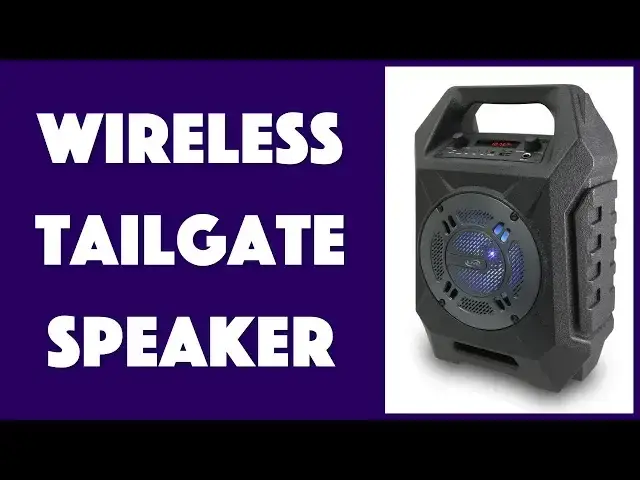
Ever wish you could bring along better, louder music to your next tailgater? Or have tunes for all tastes at the community picnic? Heck, there's poolside this summer too. All of these needs are easily met by the tough iLive Electronics ISB408B Wireless Tailgate Speaker. With MicroSD Card, USB, AUX, Bluetooth and built-in FM radio, if you can't find some good tunes, it's because you're just not trying!
Tech expert Dave Taylor of https://www.AskDaveTaylor.com/ tries out and demonstrates the various features of the iLive Wireless Tailgate Speaker and finds it s good for what it is, but has some limitations you want to know about before you make a purchase decision...
Check it on Amazon: https://amzn.to/2W87JOL
Show More Show Less View Video Transcript
0:00
Is this enough to power up your next tailgate? Let's check it out
0:11
Dave Taylor here and I'm sitting on my tailgate with this, the iLive Electronics ISB408B wireless tailgate speaker
0:21
So, tailgate for the tailgate. Now, let's give it a shot. First off, I'm just going to go ahead and go to FM radio. How about that? It actually works with FM
0:29
So, here we go. I would say, it gets pretty loud. I have to be really careful in this
0:39
I'm sorry, I'm going to have very short audio snippets because I don't have the rights to this music
0:44
and I don't want to get in trouble with YouTube or Facebook. So, we're just going to be chill here
0:48
So, that's FM. Now, it actually works with a lot of different input sources
0:53
Let's start with this. This is a micro SD, right? Like you'd have for your phone
0:59
So, I'm going to put it in and see what we get. So, it automatically switched to this source and now it's playing that music. That's cool
1:09
Now, let's try another one. This time, we're going to go Bluetooth
1:13
So, for Bluetooth, I'm actually going to just use my phone. Let's see
1:18
So, I already paired it and that was super easy. So, let's pick a song here that will sound good
1:24
Let's try this one. That would do better than that. So, there's another music source and it's just streaming wirelessly from my phone
1:43
Let's go one more here because I want to demonstrate. Actually, we're going to do two more
1:48
So, another one is you can do AUX in. So, I'm going to just plug that into the AUX in
1:54
It automatically identifies it and now we can actually do Spotify. I'm going to go ahead and put that down just to make this a little easier
2:01
So, we're going to go here. Let's see. This is pretty loud. I'm going to have to unlock the phone
2:09
If we can get that to work. There we go. That's really mellow, isn't it? Let's see if we can find something a little better
2:20
So, this is just streaming straight off of Spotify. It is actually one of those old school phones that has an AUX jack
2:28
So, that's nice. I'm going to pause that. Again, I don't have the rights to any of this music, so I know someone's going to leave in the comments
2:36
Dude, longer samples. Got you covered. So, for the longer sample, I have something where I do have the rights and that is on a USB stick
2:45
And again, what I'm demonstrating is all the different ways you can actually put music on here
2:50
So, now let's listen to this and I hope you can see it has a bit of a light show
2:58
And this is maximum loudness. So, it gets decently loud. Let's go ahead and pause that
3:06
So, you have pause play and as you can see in this close-up, there's a bunch of buttons and a bunch of controls
3:12
It takes a little bit of figuring out exactly how it all interacts. The biggest thing that I found was that it automatically chooses sources based on what kind of input you're giving it
3:22
But I wanted to actually choose the source manually. You don't have to do any of that
3:27
The only thing you need to do is if you want to go to radio, so then you just push the source button once and it should go to radio, hopefully
3:36
Let's see. Well, maybe twice. So, there's our radio. That doesn't sound very good, so I'm going to turn it off
3:47
So, now let me tell you a little bit about this speaker. I'm going to pop this back out again
3:52
So, this is number one. Really light. It is way lighter than you think
3:58
You look at this and you think, oh, this is going to be like 5 or 10 pounds. This is just a couple of pounds. It's really easy, very portable
4:05
It looks tough and rugged, but it's not weatherproof, so beware if you have this get wet
4:10
It is not going to be happy, particularly since there are inputs right here on the very top surface
4:16
So, even a light drizzle is going to hit this. Maybe if you cover this, it's a little more rugged, but that's certainly not part of how it's designed
4:23
Now, it is a 60-foot Bluetooth range, which is nice, so you can have it in your car and protected, even if the weather turns a little inclement
4:31
It has a 5 1⁄4-inch woofer, so you get some pretty nice sound there
4:35
The FM radio automatically figures out all the presets when it just scans through when you go into that mode, and then you can just step through presets super easily
4:45
As we have demonstrated, it has AUX in, it has USB in, it has micro SD support
4:51
It also supports actually plugging in a microphone, and then it has a separate microphone volume
4:56
So, if you want to do tailgate karaoke, this thing's got you covered
5:01
Now, one of the biggest issues that I have with this, though, is it does have the light show
5:06
So, we'll turn it on and we'll get that started, and I know it's daytime, so it's a little hard to see that, but you can't turn the light show off
5:14
I don't know why they did that. I don't know why there's not another switch that just says turn off light show, but it's always on all the time
5:21
If that's something you can live with, then you've got a good speaker
5:25
If that's something that's going to bother you, you need to know that. I already told you it's not waterproof
5:30
It has a decent battery life, three hours, not massive, but if you get to the game more than three hours ahead, then you can always charge it via the micro USB connection
5:40
And it comes with a micro USB cable, but not a wall charger
5:45
So, a lot of cars actually have USB plugs, including mine, so it's not too hard to find somewhere where you can plug it in and then you could run this for days, man
5:54
Probably annoy everyone else in the parking lot, but there you go
5:58
So, this is actually, it's pretty good. It's good for what it is, you know
6:03
There's not a big, rich, powerful sound. It gets loud. It has bass
6:08
There's not much in the way of mid-range, is what I find. So, if you're someone who's a real audiophile, this might not be your best office speaker
6:16
Obviously, it is not designed to be an office speaker, but if you're looking for something to rock your next tailgate and you don't know what kind of music you're going to use
6:24
and you might have friends that show up with music in different sources or different formats, this thing can handle pretty much anything you toss at it, and that makes it pretty cool
6:34
So, now, before I tell you the price, let me go ahead and ask if you can click on that subscribe button
6:39
Really appreciate when you subscribe and tell me, when you are tailgating, whether it's a picnic at the park or whether it's actually at a sports stadium
6:47
what kind of source do you use for your music or do you just not even listen to music
6:51
So, that would be a great thing to leave in the comments. With that, the price
6:56
So, iLive Electronics ISB408B Wireless Tailgate Speaker will cost you $49.99 at Amazon.com
7:06
And shop around online, you might find it even cheaper than that. So, you know, for $49, if you're looking for a big, loud outdoor speaker, this might be an interesting choice
7:15
And if you're the kind of person that likes disco lights, this has disco lights
7:20
So, with that, I'm going to go back to my music, which means I'll catch you in my next video
#Audio Equipment