Up next in 10



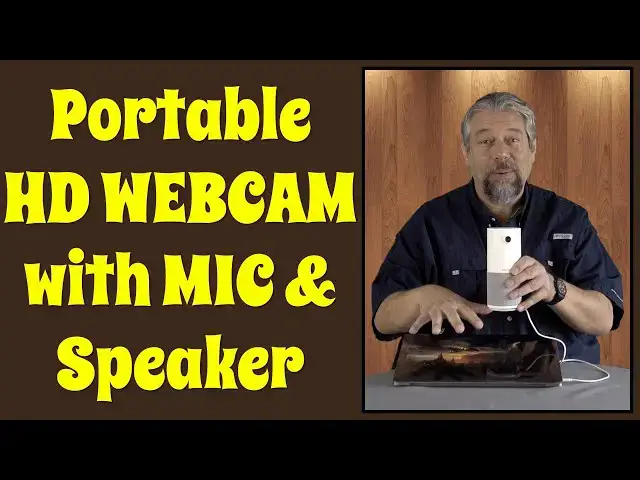
Tired of the fuzzy webcam on your computer or tablet? Upgrade to the Nuroum C10 Portable Conference Webcam instead. With its full 1080p HD resolution, array of 4 microphones, built-in USB-C connectivity and more, it's a great solution for small businesses, traveling sales, even family happy hour chats. Tech expert Dave Taylor offers up all the details - and a demo too!
Check it on Amazon at: https://amzn.to/3vlV4um
Check out Dave's Q&A Web site at https://www.AskDaveTaylor.com/
#nuroum #webcam #webconference #camera #video #hd
Show More Show Less View Video Transcript
0:00
This is a game changer for web conferencing. Let's check it out
0:11
Dave Taylor here and I'm checking out this. This is the Neuron C10 portable conference webcam and it's pretty cool
0:19
Now, it's actually the little brother of this. This is their C20 unit. I've reviewed it before and it's really cool
0:27
But, all of a sudden this looks really big compared to this little guy. Not only that, but this has a wire you got to deal with
0:35
Whereas this, the wire is actually neatly coiled into the bottom. What a great design
0:41
Now, let me get rid of this. It's kind of hard to have that tall guy around when there's just this little one
0:46
So, this basically does everything the big one does with a couple of tiny little differences, but in a much smaller size
0:54
This is just the size of like a can of Arizona iced tea or something. And it's light and portable and self-contained
1:01
And as you can see the wire, it's USB-C, but they've done such a good job
1:07
Not only does it have a USB-C wire secretly coiled in the bottom, but there's also a USB-3 adapter
1:17
So, if you actually need to plug it into a different kind of computer port, they've got that covered too
1:22
And it fits in the bottom, so it's going to be there when you need it
1:26
Now, what does this thing do? Well, it's a webcam, so that's a camera, but it's also a speaker
1:34
And there's also four microphones on the top. In fact, let me show you the top
1:39
It offers four buttons on the top. You can turn off the microphone, you can turn off the camera, and there's volume up and down
1:46
The unit itself gives you 1080p, which is 1920 by 1080 resolution at 30 frames per second
1:53
which is probably a lot better than your existing webcam. It gives you a 90 degree field of view, so that's also going to be wider
2:01
If you're used to the webcam on your computer, it's fairly narrow
2:05
This is going to give you more expansive view. I'll show you that in just a second
2:10
The larger one, the C20, gives you 110 degree field of view, so that's a little wider yet
2:16
I actually don't like it being super wide, because I have this background behind me
2:22
but if it's a really wide field of view, then suddenly you realize it's a background and I'm sitting in my office
2:28
So, trade-offs there. The microphones work with what they call an AI noise canceling system
2:35
It is four element mic array, and that gives you a 360 degree coverage
2:40
So you can put this at one end of your conference table, and regardless of where people are sitting
2:46
they'll be able to come across well through the microphones. This obviously works great for families, if you're connecting with friends
2:54
if you're gaming and you want to have a video connection, all of that's going to work fine
2:59
Now, the box is still here for a reason. I'll show you that in a second
3:03
So, USB plug and play. You just plug this thing in and it shows up on your computer as another audio input
3:11
as another audio output, as a video input. Everything you'd want, right
3:15
And I'll show you all that in just a second. In fact, let's just jump to that demo
3:20
I'm in Zoom, as you can see, and I'm going to open Preferences and go to Video
3:26
and you'll see, here I am on the webcam from my computer
3:32
And if you notice that little blue right on the top there, that's because I have a green screen behind me
3:38
and I have Zoom giving me a virtual background. In a moment, you'll see that change dramatically because I don't know that the NeurOm will do the same
3:48
So, I'm going to plug it in, and now the unit ring lights up
3:54
And in a moment or two, I should have... Okay, so now I have two camera options
4:00
So, I'm going to choose the NeurOm, and here's why I kept that box on the table
4:06
So, it works really well. It's a bit low. So, when I put it on the box, then I get a better result
4:14
And now you can see that green screen is a little weird, actually
4:18
But let's just double check. The audio should be coming from... Let's see. So, we're still getting the audio from and to the Mac
4:28
So, we'll switch all of that around. So, now I'm actually in the audio from the NeurOm, and if I go back to the video
4:36
you can see there might be a slight sync issue here because of how I'm recording it
4:41
But hopefully, you can also see there's a wider expanse here. And of course, I can now move the camera further back
4:49
which I certainly can't do as easily if I want to actually demo something on my computer
4:54
In fact, now you can see my computer. So, this is like I have my office, and I have this beautiful, lush, green, jungly view out my window
5:04
Except it's not a window. It's actually a green screen. But importantly, you can see the camera is doing a really nice job
5:11
And what makes this really great is that you can then switch back and forth
5:16
In fact, we can do this in a Zoom meeting. If I just go ahead and start a new meeting, then here I am on my computer's webcam
5:25
And at any point, I can just say, let's just switch to the other camera
5:30
And now here I am on the other camera. So, all of that's pretty slick
5:36
Now, let me jump back on the actual camera and tell you a little bit more about this unit
5:41
So, oh, it's a little hard to keep track of what camera I'm supposed to be looking at
5:46
So, looking at this camera. So, there's my demo. I really like this thing. It's really cool
5:52
The audio out, the audio in. It's just a nice self-contained unit that will just dramatically up your game with any web conferencing
6:01
And notice the ring on the top is blue. If I mute it, then it turns red
6:07
So, it gives you that feedback. And it's orange if I turn off the camera
6:13
You know, it gives you that really nice feedback. And it's just a very simple, well-designed unit
6:20
Now, let me go ahead and close this up. And, well, even just like put the box down
6:26
Because there's really nothing else in the box. It's just this unit. Because everything's contained on the bottom, which is really handy
6:33
Now, I want to tell you, you don't need a power adapter
6:37
You can see this is fully powered and fully enabled by my computer, which has USB-C connections
6:44
If it didn't, there is that adapter at the bottom. So, it works with Mac, Windows, Linux, some Android devices
6:52
It works with Chrome OS. You can use it with Zoom and Skype and Slack and BlueJeans
6:58
And, basically, it's a video input. And it's an audio input. And it's an audio output
7:04
So, you could even use this for music if you wanted to. Though, the audio is really tuned for voice
7:10
So, it's not going to really sound like a great musical speaker. Nor is it intended to
7:15
So, in terms of dimensions, it's 7.2 inches tall by 3 inches across at the base
7:22
And it's just under a pound at 0.8 pounds. So, it is quite easily carried
7:29
It's something that you can just sort of unplug when you're ready. And just wrap and coil the wire at the bottom
7:37
I found that slightly concerning over time because I don't know how well the base of the wire is connected to the unit
7:49
But, as long as you're not pulling really hard, it does wind up and it fits very neatly and very easily
7:55
And that's everything. It's a really great little unit if you want to up your game with web conferencing
8:02
Especially if you conference and you have multiple people. Instead of everyone crowding around a computer laptop or something, this is a clearly superior solution
8:11
And it is highly portable. It's small. It's light. It's easy to toss into a computer bag or a suitcase
8:18
You could use this when you're at trade shows. So many options and possibilities
8:22
Really, really slick piece of design. So, what we need to talk about is we need to talk about the price
8:28
But, before we get to the price, I'm going to ask if you could subscribe to my channel if you haven't already
8:33
So, it's a click or a tap on that subscribe button and I really appreciate you subscribing. Cool
8:39
This is the Neuroam CX Portable Conference Webcam and it's $129.99 at Amazon.com
8:48
Except, when I recorded this video, they had a $30 off discount which makes this a pretty solid price for you
8:56
So, it's definitely worth checking out at Amazon.com. This is a keeper
9:01
This is one I'm going to use and, in fact, I already have used for some web conferences and for Zoom meetings
9:06
I really like having it a little further away from my computer
9:10
There's just an energy about that angle of shot that's really cool
9:14
And other people really seem to appreciate it too because we're sort of so used to this ubiquitous webcam from like 16 inches away
9:23
Just looking up your nose and stuff. This is a very different idea
9:27
However, do keep the box or something because it's a little low and you're going to need to have that a little bit higher to get the best results
9:34
So, definitely worth checking out. That's all I got. I hope to catch you in my next video. Music
#Camera & Photo Equipment
#Voice & Video Chat
#Teleconferencing