live_tv
Livestream Starting Soon
00
Hours
:
00
Minutes
:
00
Seconds
Up next in 10



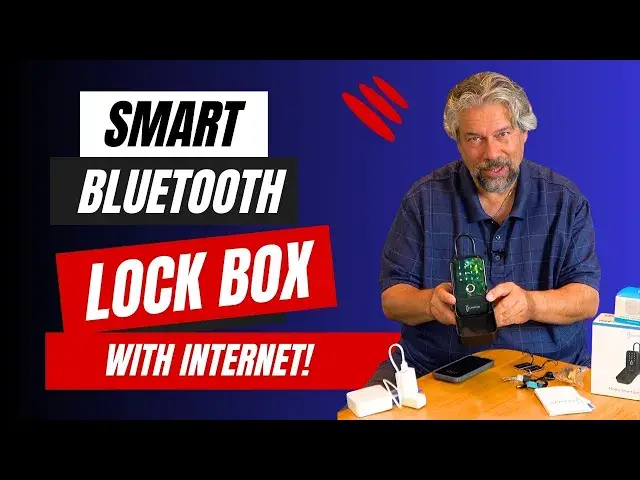
Imagine a lock box that you can unlock with a numeric code, a fingerprint, a security card, or an app. And that app can connect via Bluetooth or, with the optional wi-fi gateway, via Internet from a dozen, hundred, even a thousand miles away. That's the Linkstyle Matrix II smart lock box and it's demonstrated and reviewed by tech expert Dave Taylor in this review. He also shares some challenges with setup and a few quirks worth knowing too.
Check it out on Amazon at: https://amzn.to/460roVf
Visit Dave's Q&A Web site at: https://www.AskDaveTaylor.com/
#linkstyle #lockbox #matrixii #realtor #realestate #askdavetaylor
Show More Show Less View Video Transcript
0:00
A digital lockbox with a ton of smarts
0:02
Let's check this out. Dave Taylor here, and I'm checking out this
0:13
Let me open the front for you. This is the link-style matrix-2 smart key lockbox, and it is a pretty interesting device
0:24
It has a lot of ways you can unlock it, one of which is with my..
0:29
fingerprint and then you can see there's a space back here this is a secure space
0:35
that you could put car keys or credit cards or ID or whatever you need where do
0:41
you commonly see these realtors use these a lot let me go ahead and lock it
0:46
again so now it's locked again so you see these on like door handles of doors
0:52
when your house is up for sale but there's a lot of other uses for this too
0:57
and you can affix this to anything In fact, let me unlock it again
1:02
And one of the other ways you can unlock it is one of these little smart cards
1:06
So let's see. One of these three cards I programmed, this is the one
1:15
So one of the other things you can do is you can actually take this part off
1:21
And it actually comes with a mounting kit. So if you wanted to, you could actually mount this on the wall next to, for example
1:29
example, a shed that had stuff you wanted to share, maybe an ATV or maybe some tools or something
1:38
And then you can give the access code to the people that you care about and then they can get to it as desired
1:44
Let me go ahead and lock it again. And then why do they have this little thing on the front
1:50
Well, obviously for weather protection. So this gives it IP65 weather protection, which is great
1:57
It is fairly heavy, but what I want to do is I want to show you some of the features
2:03
I'll show you how you program custom codes, setup keys, all that sort of stuff
2:09
And then I'll tell you about what I like and don't like about it, because it is a little bit of a sort of tricky device to get to work just so
2:18
But I'll tell you, it's Bluetooth enabled. So by default, there is an app, and let me just show you some of that
2:26
so there's an app called link style and with the app you actually pair it with the lockbox and so i can go
2:36
into the app and i can unlock the device for example now this is bluetooth so it's only going to be
2:45
within a range of five or ten feet maximum and you're thinking well not super useful but that's why
2:52
they've got you covered because they also have this hub or gateway. And that's what I have plugged in here. And if this is within Bluetooth range
3:03
you then have internet access to your device. So this could be by your front door. This could be
3:10
plugged in just inside your house where it's safe and no one can see it. And then you could be
3:16
a hundred miles away and you can access this. Now, most importantly, that means you can also do
3:23
things if you have like an Airbnb you can actually put a new code in and then you can send it to
3:31
your guest and then it automatically times out when the guest has left so you can do that and then
3:38
you can put the house key in here super easy to work with now while I have this recording let go ahead and you can see here there temporary code there member management accessories management
3:52
So let's set a temporary code. So one of the things I'm not super thrilled with is it requires at least an eight-digit code
4:00
I would like it to be able to support any code at all and then just warn you, oh, a two-digit code is not very secure
4:08
but let you decide what you want to do. It doesn't do that
4:12
And you also can't do something like 1, 2, 3, 4, 5, 6, 7, 8, 9
4:15
because it will say you can't use sequential digits. So 1, 357, 1, 357
4:24
Okay. And then we're going to give this code name odds. All right
4:31
Let's see. Anything else we need to do? We need to select an expiration time. We will set this to be 12, 13
4:38
24 and that should do it okay so now let's try to unlock it so put your hand on it to get that to come up and then
4:50
one three five seven one three five seven check and it worked so that just gave us a new code and that
5:04
code is really helpful because now I can use that. And then when someone's like at the point
5:11
when it's like, I don't want you to have that code anymore, I can just go in and delete it if I
5:16
don't want to wait for it to just time out. Or I could set it up as a one time code. Now, I have
5:22
my own account set up. So I have me. And so here I have a fingerprint already entered. And here's
5:29
where I can enter another fingerprint. Or I can just use my thumb
5:34
which is what I scanned. And so you can see it did that. Now interestingly it is very
5:40
orientation sensitive. So if I do it from the other side, it doesn't recognize my thumb
5:47
print because it says when I scanned your thumb the original time it was from this
5:53
orientation, not this orientation. So I can't recognize that it's the same finger
5:58
That's fine. Excuse me. This is also where you can program in your keys. So let's see
6:04
if I have the right key. So if I wanted to add this key to be functional and how
6:11
might I use this? This might be something I just put on a key chain and maybe this is
6:15
down at the boat house on the dock and this is along the same key chain as the
6:21
boat keys and then I can say well that worked let's try this one. So let's go
6:30
ahead and add this key. So all I have to do is it's a card so I say
6:34
add and then it's going to let's see do this and now you can see in the app okay and now I have two
6:48
cards registered so this one should unlock it now so that's pretty cool now one of the
6:56
issues with these devices is the question of well what happens if I have the battery die and so
7:04
So let me actually stop this recording. We might come back to it in a minute
7:08
but I'm going to stop the recording. And if the battery is totally dead and you do this
7:13
and you don't get it to wake up or anything, then the backup, there's two backup options
7:19
There USBC on the bottom and you can feed it power and that will be enough for it to be able to operate in a crisis Or as a second backup it has these really funky looking keys
7:34
So you won't get into a situation that I got into with another lock box
7:38
where it just stopped opening and I had to tear it apart to get the key from the inside
7:44
And that was it. I had to throw it away. That was not well designed. But this gives me the ability to use the key
7:52
Let me just show you. So it's unlocked and I can use the key and now it's locked
7:58
So this is your absolute fail safe. I really think that's really great
8:05
Now one other thing, let's go back to the app for just a moment because everything I've
8:11
showed you has been on the assumption that I'm within Bluetooth range
8:16
But I can use this because this is also in the app and you can see that
8:21
I've called it Wi-Fi Gateway. out with a Chinese name, but you can fix that
8:27
And so through the Wi-Fi gateway, I can then access the lockbox
8:32
And now this is the connection that's Bluetooth, and this connection is actually going through
8:38
my Wi-Fi system and coming back to here. But I can still access it
8:44
So I can do exactly that when I'm in the office and someone standing at the dock on their
8:50
cell phone saying, how am I supposed to get to your boat? The code you gave me does not seem to be working
8:56
All right. Well, here's plan B. But of course, at that point, I can say, oh, forgot to set the code
9:01
Give me a minute. Okay, your code's all set. You can use it as you want now. So that's everything
9:07
I'm going to turn off the recording for a second time. And so now, feature-wise
9:14
So remote access via Wi-Fi, this is a separate purchase. It's not very expensive, but it is a separate purchase
9:21
You will need this if you want Wi-Fi. access to this device, but if you want to just have access to it with Bluetooth, which, for example
9:29
a realtor might do that because they might just be standing right next to it and say
9:34
boop, boop, here's a code. Now it's set. Now, when other realtors come to this house, they'll
9:40
use that code and this thing will work just fine. I don't need notifications on my phone
9:45
when another realtor uses it. So that's entirely functional and it'll work for a lot of cases
9:51
actually. You have passwords. I showed you numeric passwords, eight to ten digits. You have these
9:59
smart keys. You have the physical key. You have fingerprints or thumbprints that you set up in
10:07
advance. It's IP65 water and weatherproof. And it requires four AAA batteries. And it will actually
10:14
tell you when the batteries are low because it came with batteries. I put them in and it immediately said
10:20
batteries low please replace so I replaced them and that's what we've been using here so easy
10:26
enough and the company says that it's about 7,000 unlocks on a set of four batteries is pretty darn good
10:34
so not much else I can tell you I think this demo hopefully showed you all the cool features
10:40
I use these lockboxes quite a bit so here's something you might not know about me but I write about
10:45
cars so auto companies are constantly dropping cars off for me And what I have is I use a lockbox to have them put the keys securely on the side of my house so that when I come home, the car is still in the driveway and someone hasn't just taken it
11:04
So having a lockbox that gives me all of these features and capabilities is great It really really helpful But of course if you have an Airbnb if you a realtor you know there a lot of cases where something like this can be really handy And if you want to
11:21
have this on it, so you can put it on a door or something, it's as easy as just clipping it on
11:27
And now it's ready to go. I will lock it again because my fingers from the correct direction
11:33
And now I can just hang this on a door. So dimensions, 5.5 inches
11:38
by 3.1 inches by 2.1 inches. And it is two pounds. It is pretty heavy
11:45
There's a lot going on here. There's a lot of electronics. And there's obviously all of the physical security of the device too
11:52
This would be utterly useless if it was just plastic. And someone just took a knife and said, cut, here we go
11:57
I got everything inside. This is not that. This is a zinc alloy
12:01
It should be nice and strong for your application. So the base unit, get the Wi-Fi, get it
12:08
If you want to be able to access it remotely, simple, straightforward, smart solution
12:14
Now, I will also say I did have some challenges getting it all working correctly
12:19
because for reasons I couldn't explain, even though I was going through the Wi-Fi Gateway
12:26
it was complaining it couldn't see it via Bluetooth. What I did was I deleted the device from the app and then I reconnected the device to the app
12:34
And then everything just worked perfectly. So if you have any hiccups, then it might be worth going back and doing it again at second time and seeing if that solves things for you
12:45
To me, it was like, part of the setup of these sort of devices is that you got to fiddle around a little bit to get it all working correctly
12:53
So that wasn't a big deal to me. Getting the Wi-Fi network up and everything was super straightforward
12:59
So the app could do with a couple of changes. I'm unclear why the icon for this device looks like a door
13:06
handle but I expect that there's going to be an update and then boom it's going to just
13:12
magically be the right icon that's not a big deal I know what it is I can also give
13:17
it my own name and that will help me too so that's everything this is definitely one you
13:22
should check out if you're someone that needs or could use a lockbox now before we
13:28
talk about the price of all of this I'm going to ask you to subscribe to my channel
13:32
click or tap on that subscribe button hit the bell icon for notifications
13:36
And if this was a value, and I hope it was, give me a thumbs up. Excellent
13:40
Now, this base unit, just wake it up. This is the link-style Matrix 2 smart key lockbox, and it is $99-99, currently minus a $10 coupon at Amazon.com
13:56
If you want to add the Wi-Fi Hub, then the Wi-Fi Hub adds about $30 to the product, making it $1,000
14:06
29 I think for both of these. Again, this I think is really helpful, but not necessary for every single use case
14:15
So think about whether you really need to be able to access this remotely or not
14:20
And of course, whether there's a power outlet close enough to where you're going to deploy this
14:25
that it's going to be able to see it. And these need to be pretty close together
14:29
So that's everything. I hope this was a value. And I will hope to catch you in my next video
#Computers & Electronics
#Home Improvement
#Real Estate
#Real Estate Services
#Locks & Locksmiths
#Home Alarm & Security Systems
#Real Estate Agencies