Up next in 10



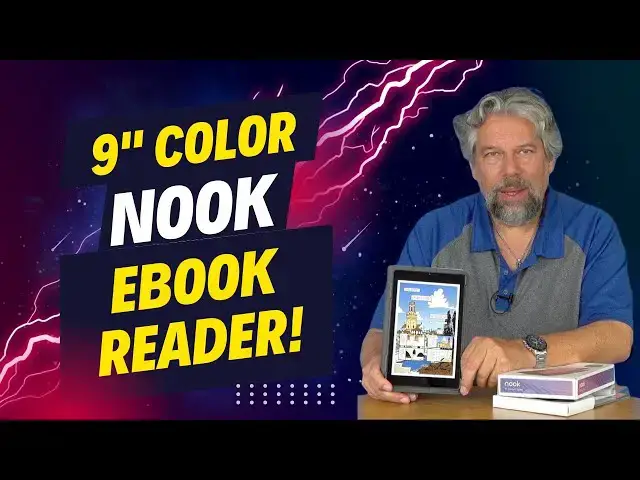
If you've been reading ebooks on a tiny 6" black & white screen, you're about to have an eye-opening experience with the big, bright 9" full-color display on the Barnes & Noble Nook 9-Inch Tablet. Ebook fan and tech expert Dave Taylor checks out the newest in the Nook family and talks about why you should buy it through BN.COM rather than just pick up the Lenovo Tab M9. Why? Because B&N adds some unique software that makes the experience quite a bit better. Don't forget, it's also an Android 13 tablet so you can watch Netflix, enjoy the latest YouTube videos, play all your favorite Android games, and much more. Includes detailed hands-on demo with a graphic novel, audiobook, and traditional ebook on screen.
Check it out at:
https://www.bn.com/w/nook-9-lenovo-tablet-barnes-noble/1144699877
Visit Dave's Q&A Web site at: https://www.AskDaveTaylor.com/
#nook #bnnook #ebook #ebookreader #colorebook #lenovo #askdavetaylor
Show More Show Less View Video Transcript
0:00
A color ebook reader? Let's check it out
0:10
Dave Taylor here and I'm checking out this. Well, let me open it up for you. This is the Barnes & Noble Nook 9-inch tablet
0:19
Now, secretly, it's actually the Lenovo Tab M9, but Barnes & Noble have added a couple of cool things
0:27
that make this what you really want to get. you really want a great color ebook reader. Now, let me tell you, 64 gig of storage, and it also
0:36
supports a microSD card so you can add another 64 gig if you want. Why you'd need 128 gig of storage
0:43
is a little beyond me, but maybe you want to put a bunch of movies on your device, right? It's
0:47
color. It's a nine-inch screen. It's quite a fun experience to actually be watching movies or
0:53
something. So I can just show you that if we go, let's see, where should we go
0:59
So let's go into the nook and I'm going to go into the nook and what I'm going to do is I'm going to give you a close up so you can see some of the features, but let's just get here and go back to the sort of table of contents view
1:12
Whoops, what's going on here? Not now. So there we go. So now you can see it's a big bright screen and if you put it sideways, then it gives you that really the aspect ratio of a movie or a TV show
1:28
So has a 13-hour battery life. The 9-inch display is 1340 by 800 pixels
1:35
So it is sort of kind of a not quite HD resolution
1:40
And one of the cool things is it has specific reading modes that you can pull out color
1:46
You can go into gray scale or chromatic or immersive. And if you go to immersive reading, it actually plays ambient sound in the background too
1:55
Now, because it's an Android tablet running. Android 13, you can plug in your headphones or have earbuds via Bluetooth, so you have some
2:06
options here too. It also has cameras. So it has a front facing camera and that front
2:11
facing camera is two megapixels. And then the rear facing camera, and let me actually show you
2:18
what that looks like. So the rear facing camera there is an eight megapixel camera. So this is pretty
2:26
much the same specs as your phone probably has. And it's just a device, just a tablet. Pretty easy to work with
2:34
Now, you can see from here, this is an Arctic gray metal exterior. It is kind of square. If you're
2:41
used to that more rounded sort of experience with the iPad, this is a little more square than that
2:48
I guess they just jammed a lot more circuitry in there, whatever. But what's really cool is that because
2:54
it's color, it does a great job with things like graphic novels. So let's switch around
3:01
and I'll let you see the screen and I'll walk you through a couple of basic features
3:06
All right so Android 13 So we can go to the Google Play Store and see tons of different content I can buy TV series
3:17
I can actually go and watch Netflix or something. I can get a different browser
3:22
Lots and lots I can do here. But I really want to go into the Barnes & Noble Nook app
3:27
And as you can see, I'm a pretty big reader. So what we have here is a graphic novel, an audiobook, and a regular
3:36
book. So let's start with Jack Reacher. Who doesn't like the Lee Child series? Really great stuff. This is a
3:43
straight ahead book. Now if I tap at the top, you can see I can do things, and this is what makes
3:50
e-books so marvelous. So I can say, let's make that type a little bit bigger. This just makes it
3:57
work so much easier for me. It's easier for me to read it. I can do that. And now it's reformatted
4:03
Whoops, I'm going too close to the edge there. It's reformatted the entire book
4:09
So once it's on the page, I can go to the next page
4:13
I can read it all, and it's in big type, and it's really super friendly
4:18
especially if you have some vision issues. But let's check out the graphic novel, too
4:24
So this is Romeo and Juliet as a graphic novel. And look at how beautiful these pages look
4:30
And by the way, look at that cool animation. But this is such an enjoyable experience for a graphic novel
4:39
This is 99% the same as having the physical book, but of course I can have 300 of them
4:46
or I can actually just carry around the ones that I like the most
4:51
And if we go back, let's just check one more thing out. Let's do an audiobook, and you're thinking an audiobook
4:59
and the answer is, listen. of those people watching the film over the years, no one could work out which
5:04
whether he had meant to send himself plummeting from the edge. So I won't go any further into this
5:08
This is actually pretty darn good stuff. But suffice to say, it has built-in speakers that sound really good
5:16
and I can use the 3.5 millimeter jack if I want to plug in some headphones
5:22
It has Bluetooth. If I have wireless headphones, super easy to work with
5:27
And then if I want to go to the store, I can just go to e-books, for example
5:32
And for those of you that have never experienced the Nook store
5:36
it's not entirely dissimilar to the way Amazon does it. They just have a really nice presentation
5:43
So if I might say, ooh, the Hobbit, sweet, and they have it on sale
5:48
a buck 99, that's a no-brainer. I'm going to get that. And now literally a minute later, it'll be ready for me to read
5:55
And if that's not a revolution in reading for you, those of you that have physical books
6:01
It's pretty sweet. So there's all of that. It can do videos, obviously
6:07
It can just really do a ton of different things. And you can also log into your actual Android account
6:13
and have access to all of this other stuff. Now the secret sauce that Barnes Noble only adds to its own Nook devices is this This is the Nook Hub I talk about it again but suffice to say with this installed I then can buy books directly in the Nook app or the Nook bookstore
6:37
And that is an absolutely huge difference. If I just have a generic Android tablet, then I can certainly get the Nook app, but I can't
6:47
buy anything here. I have to go through many more hoops. So being able to just tap that button
6:52
and get the Hobbit, I mean, no-brainer. That is absolutely something I'm going to do. So let me jump
6:58
back on camera. One of the things I did to make this more useful is I actually went and bought the
7:03
Nook, two-way cover stand. And that gives me this ability to have it work like this, and I can
7:09
just sit and watch a movie or a TV show. Obviously, this is super helpful on a plane flight
7:15
or really any environment you're in where you want to be hands off, but you want to still be able to use it
7:21
And of course, it flips closed. And then once it's closed, there's this strap on the back that gives you either for your hand
7:29
But what I like to do is I actually like to just put it over the cover to make sure it stays closed
7:34
even if it's in my backpack or it's in my computer bag or it's in my suitcase or something
7:39
So you can choose either way or you can just ignore that. And then you have this nice tablet with a nice case
7:47
So we saw audiobooks, you heard, I'm sorry, you saw graphic novels, you heard audiobooks
7:54
This actually has Dolby Atmos. It seems like a little overkill for a tablet, but it is actually a nicely tuned audio experience, which is nice
8:04
Technology-wise, Bluetooth 5.1, there's a 3.5 millimeter audio jack for earbuds. Super easy
8:11
USBC for charging and everything. And one of the other things that it has, which is really cool, is it's locked, right
8:18
Watch, I'm not going to do anything other than look at it. And we will
8:25
All right. I had to do it twice. It didn't recognize my face. I had to do it the second time
8:30
I will say facial recognition is not 100%, but you can set it up for facial recognition
8:36
So you pick it up and you immediately can just start reading and go right back to whatever
8:41
your ebook is. Now, in terms of the Barnes and Noble experience, I will tell you, they have
8:46
four and a half million ebooks in the Barnes and Noble Nook store, and two million of them
8:52
are less than $4.99. So you can really feed your reading habit with this, and because it's
8:59
Android, you can also access things like Libby and Hoopla, so you have access to public library
9:04
content, too. Dimensions wise, the tablet is 8.5 inches by 5.4. 4 inches by 3 tenths of an inch thick and it's 12 ounces
9:15
Obviously with the case, it adds a smidge of thickness and it's a little bit bigger
9:20
but the whole thing is really easy. It's not the lightest device in the world because it is a 9 inch screen
9:26
That a pretty big screen compared to a lot of ebook readers but that screen makes this a multi really versatile tablet So you want to do your email real quick You want to watch some YouTube videos All of that is easily done And then just
9:43
switch to your book, switch it into grayscale or chromatic mode so that you don't have all the
9:48
colors. It already has a screen that's designed to minimize blue light. So you can do your reading
9:55
late at night and not stay up all night because you had too much blue light. So
9:59
All of that's built in. So we need to talk about the price, but before we get to the price
10:04
I'm going to ask you to subscribe to my channel, a click or a tap on that subscribe button
10:09
hit the bell icon for notifications, and if this was a value, and I hope it was
10:14
give me a thumbs up. Really appreciate that. Cool. Now, this tablet is the Barnes & Noble Nook 9-inch tablet
10:23
and it is 14999 at bn.com. Now, I will point. out that you can also buy this as the Lenovo tab M9 at Amazon and other places, but that same
10:37
price only gets you 32 gig and much more importantly, it doesn't get you all of the Barnes
10:42
and Noble app software because by buying it through Barnes & Noble, because it's branded as a
10:49
Nook, it actually has the ability for you to buy e-books within the Nook software. If you just
10:56
get the Barnes and Noble Nook software on a generic Android tablet, then you won't be able to do that
11:03
And you'll have to use Google Play for your ebook purchases. So by itself, I think that makes this way better to get from Barnes & Noble
11:12
But the fact that it also gives you more storage, that's a win-win, right
11:16
Now, the cover, I should point out that the cover also includes in the container
11:21
I haven't put it on, but it also includes this screen protector
11:25
I'm going to pull it all the way out. So that comes for free, and the cover has five different colors
11:31
You can pick it up from bn.com, also $299. So for about $170, this is a really nice setup
11:41
This gives you a tablet that gives you all the functionality of Android 13
11:45
and all of the millions of apps you can get and all of the web pages
11:50
It's great for things like graphic novels and audiobooks, and it's a really nice
11:55
solid ebook reader and there's lots to like here. So definitely if you're into ebooks and you're a
12:02
reader like I am, even if you're just a graphics novel reader, imagine, you know, you buy a half
12:07
dozen graphic novels and you've paid the same as you would for this device. And you could have
12:13
a hundred of your favorite graphic novels on here and still have space for your favorite movies too
12:19
That's pretty sweet. That's all I got. I hope to catch you in my next video
#E-Books
#Computer Hardware
#Laptops & Notebooks
#Gadgets & Portable Electronics