Up next in 10



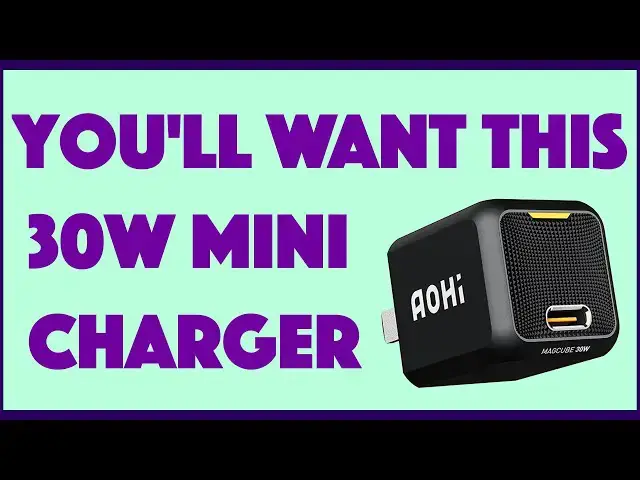
The AOHI MagCube 30W Mini Wall Charger has the same functionality as your big wall charger, but at a fraction of the size. Imagine, it's about a 1x1x1 cube that puts out enough power to charge a MacBook Air or Nintendo Switch, not to mention how quickly it can charge up phones like the Google Pixel 5 or Apple iPhone. Tech expert Dave Taylor of https://www.AskDaveTaylor.com/ puts the AOHI MagCube 30W charger through a bunch of different tests and finds that it does a great job with even devices like a MacBook Pro, everything except one class of product...
You'll want to just get one. And you can do just that at https://amzn.to/3z1IMrV
#charger #iphone #laptop
Show More Show Less View Video Transcript
0:00
It's the world's smallest 30 watt charger. Let's check it out
0:10
Dave Taylor here and I'm again talking about power and charging. It's an endless conversation because we all have devices and they all need to be charged
0:20
Now, in the good old days, maybe they weren't such good old days, but this was a 5 watt charger and it was about a 1 inch cube
0:29
and it put out relatively little power so everything took a long time to charge, right
0:34
Whatever. We have come a long way in technology and this is so cool
0:41
This is the Ohai MagCube 30 watt. This is a 30 watt charger in the exact same form factor
0:50
Better yet, it's USB-C. It's not even USB 3.0. So, this is such a sweet little device
0:58
Now, the secret is that it's actually gallium nitride. So, it's a very different technology for generating power
1:06
That also ends up with a smaller heat signature and more efficient generation of that power
1:12
So, pretty sweet. It charges three times faster than a traditional charger would
1:18
In fact, it works with three different current levels. So, there's a light at the top. I'll show you this in just a second
1:25
And it will give you yellow if it's a fast charge, green if it's a trickle charge
1:31
which you don't really want to see too often, and blue, a standard charge
1:36
Now, blue is what you're going to see with a lot of devices, but some devices are smart enough to work with what are known as power charging protocols
1:45
So, this supports PD3, QC3, PPS, and BC1.2. All these different standards so that your devices can get the maximum and fastest possible charge from this device
2:00
Now, it also has overcurrent, overvoltage, overheating, overcharging, and short circuit protection
2:08
All in this tiny little device. This is, in fact, 1.1 by 1.1 by 1.3 inches and 1.5 ounces
2:18
Look at this baby. This is so cool. Now, I didn't want to just show you this. I wanted to show you it charging
2:26
So, I'm going to plug it in. Then I got two different ways to charge
2:30
So, first off, I guess I should have put this at a different angle, but right now we're seeing green
2:35
Maybe if I do it this way, you'll see the green. And I'll give you some close-ups so you can see the different colors too
2:42
But first off, what I'm going to do is I'm going to charge my iPhone 12 Pro
2:48
Now, that needs a special USB-C to lightning connector because Apple, as is often the case, is still doing its own thing
2:57
So, it still uses lightning. So, I plug in my phone and this is turned to blue
3:03
Now, that's a tiny bit disappointing because blue means just getting a standard charge
3:09
Now, it charges at a decent rate. It gets a 58% charge in an hour, but that's nothing to write home about
3:16
It's just that it's a really nice small charger, right? But every other device I tried actually did a better job
3:23
So, let's give up on the iPhone. So it goes. And instead, I'm going to check out my Pixel 5
3:31
This is a Google Pixel 5 and it is USB-C. So, I have a USB-C to USB-C cable
3:39
I will plug this into the charger. And this time, this is now giving us that yellow charge
3:47
So, this is a fast charge. And the Pixel, you ready for this
3:52
It got a 90% charge in an hour. That is a fast charge
3:57
That's really sweet. But I figured, all right, well, since I'm doing this and since I have USB-C, let's try charging a Nintendo Switch
4:06
So, I plugged in the Switch and I was very curious. Is it going to do a standard charge or is it going to do a fast charge
4:13
And as you can see, the Switch is smart enough to do a fast charge with the MagCube 30 watt
4:20
So, this got a 56% charge in one hour using this teeny tiny little charger
4:28
And then I thought, all right, well, now let's just go for broke
4:32
I'm going to try to charge my MacBook Pro. Now, the MacBook Pro says that it wants a minimum of 60 watts to charge
4:40
And I thought, hmm, I've tried 30 watts before and it sort of just stays even
4:45
It doesn't charge up or down. But if you close the computer and you turn it off and you let it just charge and not be in use, then you should get some good results
4:56
So, same cable, same charger, everything the same, plugged in my MacBook Pro
5:03
You can see here that it does say that it's charging. And in fact, it got a 32% charge in an hour off of a 30 watt charger
5:14
Now, I'm sure Apple would be saying, not really what we recommend
5:20
But in a pinch, in an emergency, look at how small this is compared to the size of your average MacBook charger, right
5:29
Now, 30 watt chargers work perfectly with the MacBook Air. So, with that, you're going to get a much better charge
5:35
But even your MacBook Pro can charge off this MagCube 30 watt
5:42
This is a delightful little device that everyone should just pick one up and get it and put it in your computer bag, your backpack, put it in your desk for emergency purposes
5:53
Leave this in your glove compartment in your car. You're going to, at some point, need to charge something and not have the right charger
6:00
This will take care of it. As long as you have your own cable. It is obviously, like all of these, a BYOC, bring your own cable
6:09
But that's really everything I've got to say about this. It's a delightful little device
6:14
It's beautifully engineered. I really like the appearance of the front with that little, almost like automotive grill, very futuristic of them
6:23
So, the only thing left to talk about is the price. But before we get to the price, I'm going to ask, if you don't mind, go ahead and click or tap on that subscribe button and subscribe to my channel
6:33
Really appreciate when you do that. And give me some feedback. I tried charging a lot of different devices, but I could have charged more
6:40
What would you have been interested in having me try to charge with this 30 watt mini charger
6:46
So, let me know. Give me a thumbs up if you thought this was fun and interesting
6:51
And that means we need to talk about the price. So, this is the Aohai MagCube 30 watt
6:59
And it's $29.98 at Amazon.com. It literally just was released in the last couple of days
7:06
And I already obviously have one. I'm going to get a couple more, because I'm going to just give these to each of my kids
7:12
Because they could put this in their purse, their backpack, whatever. And then always have a really solid charging option, even though it's tiny, the size of those original little one-inch cubes that really don't charge much at all
7:26
So, definitely one worth checking out. I got to get back to getting that switch fully charged, so I can get back to my game
7:33
So, let me just plug this in. And did you notice, by the way, when I plugged in the MacBook Pro, it also went yellow
7:40
So, everything does the fast charge, except my iPhone. So, that's kind of a typical experience for Apple owners
7:48
So, it goes. But otherwise, all good. This is charging. That's all I got
7:54
So, I'll hope to catch you in my next video. ♪♪��
#Consumer Electronics
#Product Reviews & Price Comparisons