Up next in 10

Vue.js 3 vue-scroll-progress Example to Build Animated Scrolling Progress Bar in Browser Using TS
Jan 9, 2025

Get the full source code of application here:
https://gist.github.com/gauti123456/2bae57fe9e6a96c24631aac9756b9f95
Show More Show Less View Video Transcript
0:00
uh hello guys welcome to this video so
0:03
in this video I will show you a vuejs
0:06
library or package which allows you to
0:08
build this awesome looking scrolling
0:10
progress bar so as you scroll down the
0:12
page you will see this progress bar
0:14
appearing this is really useful for
0:16
Pages or blog post you can let your
0:19
users see this progress bar as they are
0:21
reading your blog post just telling them
0:24
how much they have read your blog post
0:27
this is really useful in those
0:28
situations you can just see this uh it
0:31
is something like uh YouTube also has
0:34
this progress bar whenever they're
0:35
loading the video so they use this
0:37
progress bar so I will show you how to
0:39
integrate this package so first of all
0:42
uh you need to go to npmjs.com just
0:45
search for this package which is uh view
0:48
scroll progress so if you go to the
0:51
search tab just search for this Pro uh
0:54
package view scroll progress and this is
0:57
actually the package I've already
0:59
installed it so this is actually the
1:01
command and almost it is 53 weekly
1:04
downloads a
1:05
pretty popular
1:08
package so now to initialize this first
1:12
of all you need to register this go to
1:13
your main.ts file this is your
1:16
typescript configuration file so here
1:19
first of all you need to import this so
1:21
we simply write the import statement
1:23
import view scroll progress and it will
1:27
be coming from this package which is
1:29
View
1:31
scroll progress so it is 1 kilobytes of
1:34
size so once you require this package we
1:37
now need to register it so we simply
1:39
write ab. use and after that we say view
1:42
scroll progress so simply these two
1:45
lines configuration lines so once you
1:47
configure this plugin close this file
1:49
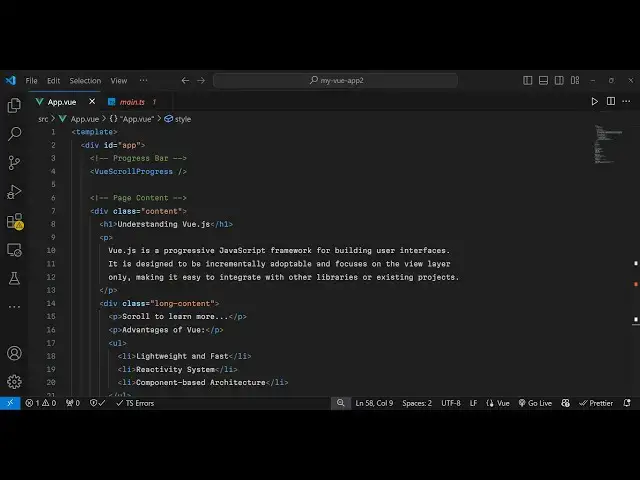
now move to your app. view file so right
1:53
here we will first of all inside your
1:57
template we will have actually Define
2:01
actually the progress part so inside the
2:05
div we will just give it an ID Here app
2:08
so wherever you need to place your
2:09
progress bar so at the starting here I
2:11
will just place it this view scroll
2:16
progress opening and closing tag so this
2:19
is your component so we register it now
2:22
we will Define the content of the
2:23
website so this content can be anything
2:26
so I will just have this uh nice little
2:31
content here
2:35
so this is my content a Content class
2:39
inside this long content so I will just
2:43
style it simply uh inside the style
2:46
here
2:48
so this class I will just give it a
2:51
height so that I can scroll this so I've
2:56
just given an height of 2,000
2:58
pixel so so if you refresh your browser
3:01
now uh you will
3:03
see uh let me just refresh and now you
3:06
can see as I'm scrolling
3:09
downwards I am seeing this progress bar
3:12
appearing the screen progress bar and as
3:15
I'm scrolling down you will see that it
3:18
is telling me how much I scrolled so it
3:21
is telling me in terms of progress bar
3:24
how much the page is remaining so it it
3:28
is halfway how much Pages remaining so
3:31
it is actually telling you that so in
3:34
this way you can have this scrolling
3:36
progress bar appearing the configuration
3:38
is very simple I showed you first of all
3:41
you require it and simply place it so
3:43
this is actually the component and if
3:46
you go to their documentation uh I think
3:48
you can
3:50
pass
3:51
or inside your Styles here
3:55
uh if you want to style this progress
3:58
bar uh
4:02
so you can edit the CSS of that progress
4:05
bar
4:07
so the background color if you
4:12
refresh and if you go to their
4:14
documentation uh they do offer this you
4:18
just need to put this slash important if
4:21
you want to change the background color
4:24
so what happens let's suppose I want to
4:27
change the background color to
4:31
this pink color so I want to change it
4:34
so I will just place this important
4:37
flag so now the progress bar color will
4:40
get
4:42
changed
4:44
so like
4:49
this again here also you just need to
4:52
put important at the and now it will
4:55
override those tiles
5:02
so this is actually the package guys so
5:04
you can do
5:19
this I have given all the source code in
5:22
the description so if you need this
5:23
source code you can go to the
5:25
description of this video to get all the
5:27
source code regarding this complete
5:29
examples
5:31
so so thank you very much guys for
5:33
watching this video and do check out my
5:36
website as well free mediat tools.com uh
5:39
which contains the thousands of tools
5:41
regarding audio video n MH and I will be
5:44
seeing you guys in the next video
#Programming
#Software