live_tv
Livestream Starting Soon
00
Hours
:
00
Minutes
:
00
Seconds
Up next in 10

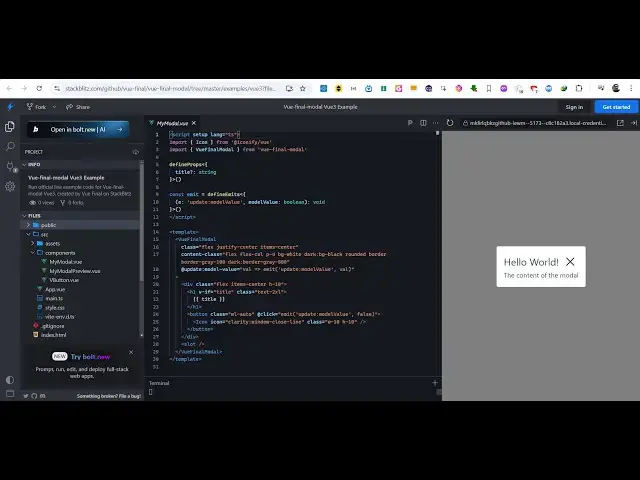
Vue.js 3 vue-final-modal Example to Show Overlay Alert Dialogs in Browser Using TypeScript
Jan 9, 2025

Get the full source code of application here:
https://stackblitz.com/github/vue-final/vue-final-modal/tree/master/examples/vue3?file=src%2Fcomponents%2FMyModal.vue
Show More Show Less View Video Transcript
0:00
uh hello guys welcome to this video and
0:03
in this video I will show you a package
0:05
inside view3 view final model which used
0:09
to display model windows so we have a
0:12
nice little example when I click the
0:14
button we see this hello world model
0:16
window appearing so in the similar way
0:19
uh you can show more model windows so if
0:23
you just search for this module View
0:25
final
0:27
model they do have their own website as
0:29
well it's specifically built for
0:32
view3 and click on get started and
0:38
uh you will see all the instructions to
0:41
get started it's used for showing popup
0:47
windows
0:50
so I have this working example on stack
0:53
pls.com I have given the link in the
0:55
description of this video of this full
0:57
example so when you click it
1:00
this hello world window appears so what
1:02
we are doing right here uh first of all
1:05
main.ts we come to this file and we are
1:08
registering this plug-in by importing it
1:11
we are also importing the CSS file as
1:15
well and then we are using
1:19
this the use function and registering
1:21
this plugin first of all so you need to
1:23
do this first of all inside your project
1:26
go to your main.ts file and register the
1:29
plugin
1:30
now
1:32
uh we are requiring the model container
1:36
the model
1:37
preview so model container actually is
1:40
the place where you will show the model
1:42
content which is this
1:44
one and inside this we have this model
1:49
preview and here we can change the text
1:52
here let's suppose this
1:55
is a simple alert window
2:01
so you will see now it will
2:04
change you can change everything this
2:06
content as
2:09
well so customize it it takes the title
2:12
and the default one and then we bind
2:14
this open model function bind an on
2:18
click that's all so use model is coming
2:21
from
2:22
this package View final
2:26
model this is a simple hook which
2:28
contains the component and the
2:30
attributes and the
2:32
slots it's a very simple model window
2:36
package in VJs 3 and uh I've given the
2:39
full working example you can check the
2:41
description link so thank you very much
2:42
for watching this video and do check out
2:45
my website as well uh free mediat
2:48
tools.com uh which contains thousands of
2:51
tools regarding audio video and MH and I
2:54
will be seeing you guys in the next
2:56
video
#Programming